Hello and thanks for using Quick Flickr Widget. Here’s some information which might be interesting, and please please please read before you ask, okay?
Description
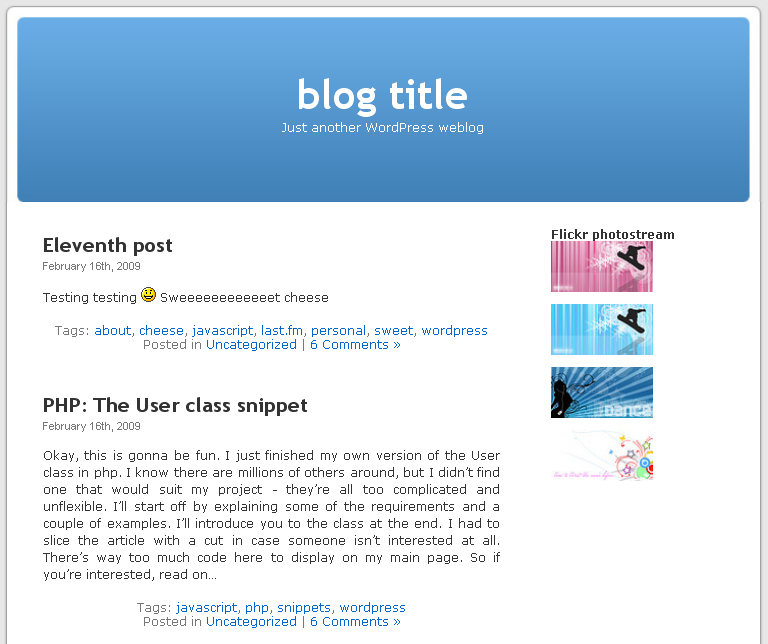
The Quick Flickr Widget for WordPress is capable of displaying up to ten photos using your Flickr screen name or any public Flickr RSS feed. Here are the main features:
- Easy to setup and configure
- Up to 10 Flickr photos in your sidebar or any other widgetized area
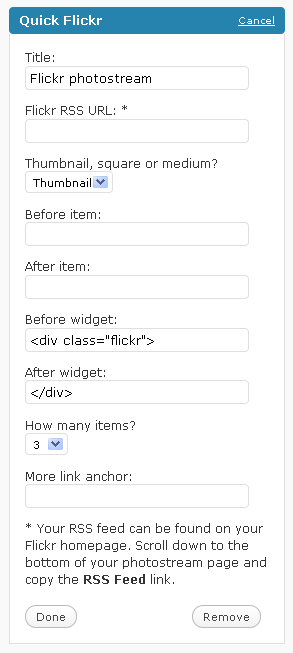
- Fully customizable widget (editable before.widget, after.widget, before.item, after.item, etc.)
- You can pick the photos display size: thumbnail, square, small or medium
- You can choose the _blank target to the flickr links
- Images are displayed with the Flickr photo description in ALT and TITLE attributes
- Ability to show titles next to your images
- Very easy to customize CSS
- Supports Thickbox!!
Screenshots

Download, changelog and other notes
 Download link, changelog and other notes. Officially hosted in the WordPress.org Plugin Directory: Quick Flickr Widget. I also like when people with WordPress.org accounts vote it up ;) thanks!
Please supply any feedback to the comments section of this page. Pingbacks and trackbacks are appreciated too. Thanks for all your contribution.
Before you ask
Please don’t just say that it doesn’t work, okay? That doesn’t help at all. I need to know which version of the plugin you’re using, and don’t just say latest, because I update very often – I need a number. I’d also like to know which version of WordPress you’re using and the output in the widget (there should probably be some error message). And if you’re a genius you can also tell me what version of php and apache you’re using and whether safe_mode is switched on or off on your server. Thanks.
Looks amazing! You can also try to add the ability to add more than one flickr widget to the sidebar. Best of luck, mate!
Nice. Thanks Chris!
Hi, thanks for a great plugin!
My request: possibility to show title under picture and description when mouse hovers over.
Thanks Mats. Noted down your request. Stay tuned!
I can't get my photos to show up on my website! I put the rss url in the box:
feed://api.flickr.com/services/feeds/photos_public.gne?id=36347316@N02&lang=en-us&format=rss_200
but it says:
"Your Quick Flickr widget requires configuration!"
Hey try using http instead of feed, I think that may be the problem. I'll try to solve this in the next release. Thanks!
hi.. i've tried with the rss url and http url and it still says; “Your Quick Flickr widget requires configuration!”
…
What version of WordPress are you using? I guess I'll need to make some debugging available 'cause I really can't say anything ATM :( Please wait for the next version.
I am using the latest version of wordpress and version 1.1 of your plugin.
Hey I just tested this address a few mins ago worked fine on 1.1 and wp 2.7: http://api.flickr.com/services/feeds/photos_publi…
feed:// tho said that configuration is required. I'm not sure the RSS class in wordpress can handle redirection. I'll look thru it before the next release to find out more. Thanks for your feedback Andrew. Please let me know if you get anywhere else.
Mine works but it shows text links instead of images. Any ideas?
You using 1.1?
I loaded the widget and the RSS.
got the pictures on the widget.
Could you make some suggestions for the before and after code?
Is there a simple way to get a margin and control how many across.
As an amature I can only make educated guesses about the code after playing with my Expressions software.
Are we still in PHP or CSS or are we back to html?
Hey, thanks for using my plugin. The before and after widget code is probably going to be some div with an id="flickr" or something like that. The before and after items code could be div class="item". That way you can style your photos in CSS like this: #flickr .item { … }. Or you can use an unordered list, it's up to you. Try out to see what suits you best.
The margin could be done with CSS.
I upgraded to the newest version and now I cannot figure it anymore, I try to put my login username, also my e-mail into the "Flickr username" box but it does not work. I do not know what to put in here. My flickr: http://www.flickr.com/photos/tungnguyen/ . Please help me. Thank you!
Hey thanks a lot for your feedback. The username input field is for your flickr username, in your case it's tungnguyen. Works for me, I just tried it out on my local box. Did version 1.1 work fine before the upgrade to 1.2? Also, is your server running PHP5 or an earlier version? Thank you!
The previous version worked well. I tried to enter "tungnguyen" but it's another Flickr username, not me (you can check at http://www.flickr.com/photos/14406115@N04). I changed my screen name to "Tung Nguyen Thanh" and put it into the box but nothing happened. I do not know why. Anyone have the same error like me? Or the username cannot contain any space?
Hey. Thanks once again. Yeah, I think I've found the problem. The plugin converts your Flickr screen name into a Flickr ID. The Flickr API converted "Tung Nguyen Thanh" into your ID just fine, so there's a little bug in my plugin – yup, no spaces. I'll fix that in 15 minutes and release it as 1.2.1. If you don't want to wait change your screen name to something without spaces as a temporary solution. Thanks once again.
I updated the version 1.2.1 and it worked like a charm now. You changed the box to "Flickr Screen Name" also make the things is more clearer. Good job. Thank you very much!
You're welcome Tung. Glad it worked.
Works great, thank you
Glad you liked it.
[…] Quick Flickr Widget […]
Can you draw photos from a specific Set in your Flickr or just your photostream?
No, it's just the photostream. Anyways, if you think it's a good idea then I can consider it as a feature request for future enhancements.
Of course!
I have a pro account which I dump everything into, but I'd like to have a "Website" set that I can dump stuff into.
Maybe later you could make a Flickr carousel viewer.
People could put different stuff into different Sets display pictures related to the content you're viewing.
For instance, if I had a site about Rocks, Plants, and Planets. I could put pictures of rocks in one set, pictures of plants in another set, and pictures of planets in another. When people were surfing around a certain part of my site, a large header image at top would display a random picture from the corresponding Flickr Set.
Take it one step further and draw pictures from the Photostream by tags. That would be interesting.
Anyway, great work! Thanks for this plugin.
Yup, sounds like a great idea. Thanks for your contribution, I'll definitely consider that.
I'm getting this
Flickr API call failed! (findByUsername returned: )
I put in my user name
Hey Aaron, thanks for your contribution. What username are you using? Remember it's your Flickr screen name that you should input, not Yahoo ID.
[…] Quick Flickr Widget […]
I put in my flicker username which is diemelproductions
Strange. http://api.flickr.com/services/rest/?method=flick… says user not found. Remember that http://www.flickr.com/photos/diemelproductions is NOT your screen name, that's your username.
yea it's strange, I had it working the other day and upgraded to the newest version and now it doesn't work.
I've tried my rss which is
http://api.flickr.com/services/feeds/photos_publi… with no luck
I've tried my last username "diemelproductions" no luck
I've changed my username to "diepro" with no luck
I've tried my stream url "http://www.flickr.com/photos/diemelproductions/"
no luck
It was working for the last couple weeks and I deactivated it, uninstalled, then re-installed and now it doesn't work. Very strange
Aaron, please read the latest changelog. The new version doesn't work the way the old one used to, I've changed the method. You have to use your screen name, not username. It's in the account settings of your Flickr profile. Read Tung's comments above, he had a similar problem.
I think in this case, you should try enter "DIEPRO" and see if you have the result or not.
Hey man, thanks for helping me out here! Yeah, the Flickr API converted "DIEPRO" to 36314103@N04 which seems to be Aaron's Flickr NSID, so I think it should work.
[…] Quick Flickr Widget […]
[…] before, this plugin is a widget that can display up to 10 of your latest Flickr photos… …..read more Download Plugin! Plugin Owner: Konstantin Kovshenin Homepage: Visit Plugin’s Website […]
Hi there, same problem here. I used my screen name – doublechecked it in the Flickr Account steeings, but the widget keeps telling me:
"Something went wrong with the Flickr feed! Please check your configuration and make sure that the Flickr screen name exists. "
I don't know what's wrong here. :) I even tried to copy the Screenname from the Account settings and paste it into the widget settings but it didn't work.
Maybe you could tell, what's wrong?
As a small sidenote :) I liked the old settings – where I could use a feed – better :) It enabled me to embed any particular set and not just the photostream. :)
Apart from that: Great Widget, I really like it :)
Hi Mischa. Thanks for your feedback. Not sure about your screen name problem and I won't be able to figure it out unless you provide me with the screen name you're trying to use. Anyways, check out the new version (1.2.2) you can use either screen name or flickr rss address to feed your photos. Thanks for the tip, hope it works for you!
Cheers.
It is becoming better every released version. Thank you so much! Keep up the good work.
Thanks Tung. I will! As long as I get feedback and ideas from people like you ;) Can't do it on my own y'know..
The screenname is Greenstreet. Maybe it helps to find the bug :)
hi
whith this
http://api.flickr.com/services/feeds/photos_publi…
i get this
"Something went wrong with the Flickr feed! Please check your configuration and make sure that the Flickr username exists. Function json_decode does not exists. Please report this."
does anybody help me?
regards
Hey Andrea. It seems that you've got php4 installed on your hosting account therefore no json_decode function. I'll try to write a php4 compilant version next update, so stay tuned. Thanks.
Almost the same here. I just updated to 1.2.2 and entered the rss-feed: http://api.flickr.com/services/feeds/photoset.gne…
on my blog it returns:
Something went wrong with the Flickr feed! Please check your configuration and make sure that the Flickr username exists.
keep up the good work. :)
Mischa, please upgrade to 1.2.3. Your feed address should work just fine now. And please let me know, okay? Thanks.
Hi Konstantin,
it works like a charme now. Thanks a million! :)
Best,
Mischa
Mischa, you're welcome. Thanks for your feedback. Stay tuned for the next update, I'm getting Thickbox to work with this.
Andrea, please try version 1.2.3. with an rss feed address (it doesn't use json_decode function anymore unless you're feeding from a screen name)
[…] Quick Flickr Widget […]
Hi Konstantin,
I'm getting the Function json_decode does not exist even though I have upgraded to 1.2.3 and am using the RSS URL. Any suggestions?
It was working great until I upgraded to 1.2.3, but I'm not sure what the previous version was.
Is it possible to download an earlier version (1.2.1)?
Chris
Hey Chris. Yeah, sorry there are still some minor bugs in 1.2.3. You can download any of the previous versions from this page: http://wordpress.org/extend/plugins/quick-flickr-…
Or stay tuned for 1.2.4. You may also try the development version from that list (which is 1.2.4 right now) then update later when I publish it. Hope to polish it off tomorrow. I think I'll have to get rid of json functions throughout. Sorry for the trouble and thanks a bunch. Your feedback is so precious!
Wow! That was quick. I'll wait for 1.2.4.
Thanks for all you hard work.
Chris
You're welcome Chris. Thanks for your patience ;)
[…] Quick Flickr Widget […]
hum nice plugin. thanks
i get an error when i active the thikbox
it add //js/thickbox/thickbox.css" type="text/css" media="screen" /> on the top of the page
i thin the pb is here line 228
href="//js/thickbox/thickbox.css"
But i can't find out
Hey muratha thanks for your feedback. Say, you using 2.7.1?
hi yes this is my version of wp
as i don't know php very well and do not speack english neather it s difficult to give you that feedback. maybe the pb comes from my installation
i replace de line in the original automatic installed files with the on you write on your post and it's running well
https://konstantin.blog/archives/quick-flickr-widget…
Hey glad it worked. I'll try and fix that in the next release.. Thanks for the feedback.
Hi there,
I also have this line (//js/thickbox/thickbox.css" type="text/css" media="screen" />) appear at the top when thickbox is activated… I'm not sure I understand the solution. Could you please clarify?
Thanks for the plug-in by the way, great work ;)
Oh, nevermind, figured it out :)
Thanks again for the plugin!
Was it a problem in the plugin? You're welcome, I'm glad you liked it :)
I was wondering if there was a way to configure this, AND have it called within the sidebar.php doc. I have some custom html/css in the sidebar.php that gets wiped out when i add a widget. I would very much like to use the thickbox integration you have set up here.
great plugin otherwise!
Hey Jake. Thanks for your feedback. Did you look at before widget and after widget codes? You can change those in the widget and add some class then customize it in CSS. I'm thinking of adding the ability to use shortcodes, those might help you, so tay tuned for future releases.
Glad you liked the plugin, thanks!
thanks for the reply.
Yeah if all widgets worked as well as yours I would use only widgets. but they don't, so i have to hard code somethings with html.
shortcodes would be very helpful.
thanks again.
Hi! I just installed the plugin v. 1.2.5 tonight and tried to set up my feed using my Flickr feed URL. I got the following errors:
Warning: file_get_contents() [function.file-get-contents]: URL file-access is disabled in the server configuration in /home/wordfro/public_html/wp-content/plugins/quick-flickr-widget/quick_flickr_widget.php on line 93
Warning: file_get_contents(http://…@N00&lang=en-us&format=rss_200&format=php) [function.file-get-contents]: failed to open stream: no suitable wrapper could be found in /home/wordfro/public_html/wp-content/plugins/quick-flickr-widget/quick_flickr_widget.php on line 93
#
Flickr feed
Something went wrong with the Flickr feed! Please check your configuration and make sure that the Flickr username or RSS feed exists
I haven't edited the .php file. Do you know why it is giving me that error? Thanks!
Hey Carrie. The problem is that your hosting provider blocked all outgoing php requests. You might want to search for a javascript-based flickr plugin, but this one's not your choice. You can try to contact you hosting provider and ask them to disable safe_mode (I believe it's controlled by this parameter), not sure they will though.
Thanks for your feedback.
That's too bad! this one looked like a good plug in. I went to my Cpanel and looked at some settings, and it said that Safe_mode was off. That's why I got confused. It seems that it is the host that controls this so I can't change it anyway. Well, I will look into it. Thanks for a quick reply!
You're welcome Carrie. Sorry it turned out this way.
Carrie, check out version 1.2.7. It's got javascript mode (widget configuration), which might help you.
Hi I have a problem with the plugin … I have insert the plugin and also insert my flickr name "ekkelon" but in the blog appear this errore message "Flickr API call failed! (findByUsername returned: )" can you help me please?
THNX.
Hey ekkelon. Thanks for your feedback. Try to use this RSS address instead: http://api.flickr.com/services/feeds/photos_publi… let me know if it works!
It works great, but you should have the ability to randomize the photos it selects.
Hey Daniel, glad you liked it. Good point, I'll make sure to add that ability. Thanks for the suggestion!
i've been using quickflickr widget for a while. it's been very useful and customizable.
can you increase the default max number of items that can be displayed? with every plugin update, (and there have been many since i first started using this) i manually change the maximum images, currently 10, to 18. is there a reason for it being 10?
Hey Hoho, thanks and glad you like the plugin. No I just thought that 10 would be quite enough. I'll make sure to increase the maximum number to 20 on next update. Thanks for your feedback.
Hey there Hoho, consider updating to 1.2.7. The max number of photos is increased to 20 ;)
Working with WP version 2.7.1. Put in feed in the format of http://api.flickr.com/services/feeds/photos_publi…
Then I get
Warning: file_get_contents() [function.file-get-contents]: URL file-access is disabled in the server configuration in /home/.facades/myname/myname.com/blog/wp-content/plugins/quick-flickr-widget/quick_flickr_widget.php on line 95
Warning: file_get_contents(http://…@N06&lang=en-us&format=rss_200&format=php) [function.file-get-contents]: failed to open stream: no suitable wrapper could be found in /home/.facades/myname/myname.com/blog/wp-content/plugins/quick-flickr-widget/quick_flickr_widget.php on line 95
What do I do?
Hey Sam. Sorry to hear that. It seems that the problem is in your hoster's apache configuration. You might write them an email with your problem, but I doubt that they'll change the configuration just for your account. You might consider switching to a better hosting account or look for a Flickr widget that works via javascript (i.e. client-based). I'm thinking about giving a choice of server-side/client-side in future releases of the plugin, but that'll be not earlier till next month, sorry.
K.
Hey, I've just released version 1.2.7 where you can switch to javascript mode (in the widget configuration). Make sure you check that out ;) hope it works.
great widget but seems to break on PHP5 – any plans to fix? thx
Thanks for the feedback. Works fine on php5 on localhost. Any error messages you get? Have you tried using javascript mode?
Hey,
I was just wondering if you thought about adding the ability to use template tags yet? Since widgets break my sidebar, I have to hard code all the "<?php…" for all my plugins.
I would really like to be able to use your thickbox integration.
thanks again for the great plugin,
-jake
Hey Jake, thx for the plugin luv. I was thinking about adding shortcode integration, but haven't found a nice way to code that, cause I'd have to move all the widget settings to another place (the settings tag perhaps in the admin panel), and yet, as the name says, it *is* a widget so I'll probably keep it as a widget.
I am though coding a little helper function, that would let you add this or other widgets anywhere in your template. Unlike shortcodes you *will* have to digg into your themes code and add the function manually, but that's the best I can do right now.
Ok Kovshenin, sorry.
I already done the checkbox options and other things. I used the name flickr-random-tag in the form and $randomTag. You can verify this, http://www.matbra.com/?attachment_id=163. But anyway if you want to change something and just use my function retrieve_ramdom_tag, feel free to do this.
See you,
Matheus Bratfisch
PS: If you have any problem feel free to contact me.
Thanks Matheus, pretty good work! I'll contact you as soon as I'll be ready to release the next update.
Hey Kovshenin,
I have been thinking about Quick Flickr Widget, maybe its nice to translate it to other languages. What do you think? I'm from Brazil and if you want, i can help you.
So, i'm waiting for your contact, for that 2 things.
Regards,
Matheus Bratfisch
Hey Matheus, sure, that'd be great! I'll e-mail you in a few days :) Thanks for the help!
Hi Konstantin,
I’ve installed 1.2.6 version but I’m getting an error:
“Something went wrong with the Flickr feed! Please check your configuration and make sure that the Flickr username or RSS feed exists”
Try the RSS address and the screen name and does not work,My server runs PHP 5.2.9 and wordpress 2.7.1
Sory for my bad English, I am Spanish
Hey Juan, please take a look at 1.2.8 and try the javascript mode if the default will not work.
Hey,
Love the plugin I've had it for a month or so now. However today i was prompted to do the Quick Flickr upgrade today and I did. As soon as I did so my widget no longer showed my photos side by side in the square format. Now the all fall under each other one by one taking up way too much space on my site.. HELP!! How can I fix this? For the meantime I selected to one show 1 image
Hey Sean. Sorry to hear that.
I'm not sure there were any styling fixes in the latest upgrades, so I think you had a very old version. Anyway, that shouldn't be a problem, cause you can customize the styling as much as you like. Take a look at your widget configuration, there are the before_widget, after_widget, before_item and after_item fields – you can add CSS classes to them, then style them in your style.css. Oh and don't forget to switch back to the square format!
I have a question along this same line. I tried to follow exactly what you said there to fix, but am not quite up to speed on styling. Any chance you could explain in layman's terms?
I also would like to the square pics to line up side by side – best in a 3×3 (9 pics total) grid. Unfortunately, they are all lining up vertically and look out of place (I currently have them in small, as square looks to small – too much dead space).
Any help is greatly appreciated.
Mark
I am trying to the same thing… 3×3 (9 pics total) with a 1px padding between photos. Anyone know how to do this? If I use the before_widget and after_widget with a div, I get the pictures in a 9×1 format.
Just use CSS to style it the way you need ;)
Hi there,
I'm having a bit of trouble getting quick flickr to work!
I originally had this error:
"Warning: file_get_contents() [function.file-get-contents]: URL file-access is disabled in the server configuration…"
I fixed that error by choosing the javascript option…however now nothing shows up in the box (no photos or text, just the title of the box). Have a look at http://www.jadeleonard.com/blog, and the box in question has the title "recent photos" on the right hand side.
The flickr account only has one photo currently, as we're just testing the widget.
Any help is appreciated!
Hey Sarah, thanks for noting that out. My huge mistake actually :) I'll fix that right now and the update (1.2.8) will be available in a couple of hours.
Wow, that was quick! I look forward to the updated version, comment when it's ready and I'll come and download it.
Cheers.
Here you go: http://wordpress.org/extend/plugins/quick-flickr-…
Make sure you get back here with some feedback, okay?
Thanks.
It's working now, thanks heaps :)
You're welcome =)
[…] Flickr Photo Album and Quick Flickr Widget: I actually used two different Flickr plugins at different times in the life of the site to display […]
Great plugin and thanks! I have a few simple questions. If there a call to sidebar/ posts/ pages "bit of code" rather than having it in teh widget sidebar etc.
Also- spacing before the plugin seems to be zero and is out of line with my other widget design. If you visit http://www.mountainbikingnewzealand.co.nz/2009/05… you will see what i mean.
Cheers and great work.
Paul
Hey Paul. I'm working on a shortcode mode for Quick Flickr Widget ;)
About the spacing, use the before widget and after widget code to wrap the photos up in a div and style it with margin-top: 10px; That should do the trick.
Great bike by the way ;)
Cheers kovshenin!
Can you treat me like a noob when it comes to this please? i.s. what do i add to the css sheet and what do i type in the "before/ after" boxes. I have a rough idea of what you mean- but could not get it to work.
MUCH appreciated!
Hi Paul.
You shouldn't post your e-mail out public on blogs and forums, that'll get you loads of spam ;) and I have you e-mail address anyway in the admin panel, cause you input that whenever you post a comment ;)
About your problem. In the before widget box type [div style="margin-top: 10px"] and in the after widget type [/div] (replacing square brackets with html ones). If 10px is no enough try to increase that number.
:/ yes good idea. I added this code and now the layout is vertical! Maybe you don't understand what i'm after? The title to the widget has no space after it so the images are right up against it (unlike all the other widgets).
I appreciate your help and sorry for being a noob :D
Okay checked it out. Dunno why it didn't work. Anyways, try to put this line in your .css file:
.flickr h3 { margin-bottom: 20px; }
lol. no luck :(
Try to clear your WordPress cache and refresh.
Still no luck mate….
I don't know buddy, there's something wrong with your caching. I can't see any CSS changes made to that page, thus it's not working.
caching if fine :) its the fix that's not :D. Thanks anyway- i'll spend more time in the next week fixing it up and then i'll let you know.
I appreciate your time and plugin. Laterz.
Heh =) thanks and good luck!
Thanks for your willingness to help. I am on WP 2.7.1, PHP 5, and 1.2.8 of the plugin. When I enter my Screen name (LifeGlance) I just get an empty box. No error message or anything. Any thoughts on what might be going on? Thanks!
Could you try to input your RSS feed address instead? I believe PHP might be running in safe mode.
Thanks.
Thanks. I tried the RSS feed url and got this message, "Something went wrong with the Flickr feed! Please check your configuration and make sure that the Flickr username or RSS feed exists." Is there a way I can check my safe mode? I pulled up my PHP but I'm not sure what I am looking for.
Yeah, create a php file with a phpinfo(); call it it and check the runtime options. You can also try to activate javascript mode in the widget, that may help, cause it's not hosting-dependent.
Is there a way to get this to work with a group feed. I tried with my personal photostream and your plugin works great, but when I try with my group pool feed it doesn't display any images, only the widget title. Thanks in advance
Hey there Adam. Haven't done any debugging with groups yet. Perhaps I'll test it out before the next update and make some fixes if possible. Thanks for noting!
I tried experimenting with changing the quick_flickr_widget.php, I changed the url in the "if" statement for the feed input field. from: $url = "http://api.flickr.com/services/feeds/photos_public.gne?id=".urlencode($user_id). –TO– $url = "http://api.flickr.com/services/feeds/groups_pool.gne?id=".urlencode($user_id). and it worked for a group pool! unfortunately not my group pool.. but I got someone elses to work so there must be something going on with my pool but I think it might be a fix.
Great, that's very helpful Adam. Thanks! I'll see what I can dig out of that ;)
Hello,
I was wondering how you set the widget so that when you choose "Medium," your photos show up in your sidebar as thumbnailed versions of the entire photo?
It's possible that the theme I'm using may be interfering, as it is written to work with flickrRSS. But when I use your plugin, I'm not getting mine to show up like your screenshot here :https://konstantin.blog/wp-content/gallery/quick_flickr_widget/quick_flickr_screenshot_2.jpg
I'm using WordPress 2.7.1, your widget version 1.2.8, and the theme is Hybrid-News by Justin Tadlock, if that helps.
Oh My Gosh, DUH. Sorry, had nothing to do with styling or your plugin. Had more to do with me having a dummy moment and not putting the plugin in the correct sidebar. Thanks. I'm going to play with it a bit more, but it looks much better now.
Oh =) No probs ;)
And also, yes, the medium was quite big and what I really wanted was the small.
I usually figure it out AFTER I ask the question, heh.
Heh, no probs Michelle, glad you figured it out ;)
Hello Michelle. I'm not sure your theme is affecting it. You might want to try the Small version, cause Medium are quite big. If you have any further questions you might consider dropping a screenshot.
Hiya! Nice-looking plugin, but – Whoa, okay, so I took a peek under the hood, and you're eval-ing whatever comes from Flickr's API! If Flickr ever get compromised, or other shenanigans occur like a man-in-the-middle attack, arbitrary code will be executed on every one of your users' servers!
That's scary stuff, right there… You should probably either fix it (use the RSS parser that comes with WordPress instead!) or put a big ol' warning on the plugin.
Hey Michael. Why would Yahoo! ever do that? We should be more trustful :) On the other hand okay, maybe I'll put in some checks to see what's coming through, thanks for reminding me ;)
I've been using your plugin along with a language plugin called xLanguage. One of the things this other plugin suggests (in order to support the translation of Widget titles) is to wrap the $title variable inside an apply_filters() call, which in the case of your plugin version 1.2.8 would be on line 139.
I've tried this and it works a treat so perhaps you might consider it for the next release. Apparently many other plugins already do this. FYI, the article where I came across this suggestion is http://hellosam.net/lang/en/project/xlanguage/4
Hey James. Great! Nice work, thanks a lot for that. I'll make sure to include it in the next release.
Cheers.
[…] Flickr Photo Album and Quick Flickr Widget: I actually used two different Flickr plugins at different times in the life of the site to display […]
[…] my wordpress blog, I use the widget “Quick Flickr” to show the latest mobile […]
[…] introduced Javascript mode in the latest update of Quick Flickr Widget (1.2.7) for WordPress, and I just wanted to give you a short advice about handling javascript code […]
Hi James,
I would love to get this plugin working. I am on WordPress 2.8 and Plugin version 1.2.8, downloaded from WordPress website. I followed your instructions. I went to my Account settings on Flickr. I cannot find the words "safe_mode". I can see that there are 2 similar settings:
1) Your account has been reviewed as safe by Flickr staff.
2) Safe Mode Search is on.
I was able to disable # 2. I do not see options to change # 1. I do not know any php.
Can I get this working for my situation?
Thanks very much,
Farnoosh
In case you need it for reference:
http://www.flickr.com/photos/farnooshtango/
Hey Farnoosh,
You don't need to change the safe_mode settings, and besides, they're at your webhosting provider, nothing to do with Flickr, absolutely. It's just some issue you'd have to solve if nothing's working ;)
What you need to do after activating the plugin is go to your widgets page, add the widget to one of your sidebars and configure it. You need to know your Flickr screen name (farnooshtango I guess) and that's it.
K.
Dear Kovshenin,
I have of course done that, a few times, and that is why I thought I have a problem with safe-mode settings, glad it may be simple.
So I have already gone to my theme's widget page, and put the plugin to my side-bar (even tried several locations), and added my Screen name Farnooshtango first, and pressed save. Nothing shows up. I tried to add the RSS URL from Flickr, and again, nothing. I am happy to send you snapshots of exactly what I have done. Did not change any other setings. Please advise. Many, many thanks!
Farnoosh
Have you tried turning on javascript mode?
I don't know how to turn that on from WordPress. I thought that is a setting inside browser. So when I add the Farnooshtango screen name, and press save, the plugin clears it. I don't think it is a display issue, it is more a configuration, it does not "take" the screen name. I would think it should save the screen name. For fun, I tried ANOTHER screen name, no luck.
I think you may mean the Use Javascript, setting you have inside plugin? If so, I just tried it. No luck either. Why is there a "Careful here" warning next to it?
Strange, worked for me. Try the RSS address together with turned on javascript mode.
This one: http://api.flickr.com/services/feeds/photos_publi…
Good luck.
Oh, and the "careful here".. Don't mind that, still beta ;) that's why.
Ha ha, great minds think alike. I just tried that 2 seconds before I read this, and yes that works, but only with Java enabled. I would have liked for my Screen name to work too. Maybe it is a small bug somewhere? Thanks again. All set for now. Cheerio! :)
I don't think it's a bug. It's just that your hosting's got php safe mode switched on. They generally don't turn that off on request, especially on shared hosting plans, so guess the only workaround would be your RSS feed for now ;) Glad it worked out.
Hello my friend, me again.
So now I started to play with tags. If I put no tags, I get a random display of my recent photos. Great. Now if I add a single tag (yoga in this case)which happens to match a portion of my recent photos, also great. But if I add more than one tag, with a comma, with or without spaces (example 1: yoga,paris – example 2: yoga, paris), it shows NOTHING. I'd love to explore further and use all the features. I know my photos are tagged as such from Flickr tags. Many thanks for your continued support!
Hey. Well, the plugin doesn't really support multiple tagging yet, but I'm sure it will in some future release, so stay tuned, okay? :)
Oh ok. When it said, separate with comma, I thought it was already implemented. I will stay tuned. Thanks again. Cheers!
You must forgive me. I thought you were James. I apologize, Konstantin. Thank you and please disregard my mistake as I was asking the plugin owner about this and that would be you, thank you Konstantin!
Ya, no probs ;)
[…] is the Thickbox usage. I’m not sure why it’s lost, but I’ve discovered it in the Quick Flickr Widget plugin when upgrading. The thickbox feature worked fine in 2.7 and 2.7.1. For an unknown reason, […]
Hi,
I have a problem with your widget. When I configure all the things, the widget tell me: Something went wrong with the Flickr feed! Please check your configuration and make sure that the Flickr username or RSS feed exists…
Mi flickr is :http://www.flickr.com/photos/ojos_de_brujo/
and my rss is: http://api.flickr.com/services/feeds/photos_publi…
Thanks for your help!
Hey Villa, I'll need more info to solve that one. Please state your WordPress and php versions.
Thx.
Hi, I am working on a blog and I used your plugin, it works an as the name says, it is very easy to set up, thanks very, very much! :o)
Question: Do you know of a css code that I could place somewhere in the setup area of the plugin that would leave a white space or border around each photo?
Hey loswl, thanks.
You could use the .flickr class in CSS to get the hang of the widget, so I'm note sure that requires a setup area. Use your regular stylesheet to make modifications.
Thanks, I figured it out, I just placed a nbsp in the After Item: section when formatting the widget. Thanks so much for this plugin!
No probs, glad you did.
Hi, just trying out this plugin, but for some strange reason it simply won't remember anything I put into it's settings. If i try an add a username or URL, it just fails to save the setting, meaning the widget does not even show up on my home page in an activated or non activated state (yes I turned it on)
Using wordpress 2.7.1 your widget version 1.2.10, Apache version 2.2.10 PHP 5.2.6 and safe mode is off… have tried re-downloading the plugin, and even changing it's CHMOD settings to 777 in case it was a permissions issue, but nothing at all works… Any ideas?
Hey there.. Well, have you tried using an RSS feed instead of your screen name?
Hi there thanks for your speedy response, I have indeed tried the RSS feed but it still wont take anything I put into it at all, even random code
Err.. That's very strange. It's not a permissions issue that's for sure. Maybe you could try it out on a fresh wordpress installation? There might be a conflict with other plugins. Do all your other widgets work well?
Thanks for your feedback.
Yes all other widgets work perfectly…. what's strange is that the widget itself does not even appear in the sidebar working or otherwise… Not sure if you designed it like that but it just doesn't want to know!
Sweet, LOL. Maybe there's something wrong with the theme you're using..? Try switching to default and see if it appears.
Ok, strange.. tried it on default theme and it still refused to load… am I being stupid? does this need another plugin to work correctly?
I'm going to try an older version on wordpress.org and see if that resolves the problem, maybe the current one is corrupt
I'm not sure what's happening here. Shouldn't be corrupt, works everywhere else ;) Anyways, let me know if an earlier version works for you.
Well sadly that hasn't worked either… I agree that it shouldn't be corrupt. Only thing I can think of is my hosting provider blocking it from calling out..
It should've displayed an error message in your sidebar if it was being blocked… Strange ;) oh well :-P sorry!
Thats ok, and thank you for all of your help anyway, if only more developers were like you… time to change hosting providers I think
I put this in up top, but thought perhaps it would be better to add down here.
I am currently using the plugin at http://kalooz.com in the left sidebar. I was wondering how I could go about lining up the square pics, perhaps in a 3×3 grid (9 pics total) – currently they line up 1 at a time vertically. (I changed it to small for the time being – as square was too small and left too much dead space).
I tried to follow what you meant with the CSS styling but I'm afraid I am not versed enough to figure it out. Any chance for a layman's explanation.
Thanks for your help in advance – really appreciate the plugin.
Mark
Hey Mark, switch the format to square and if they align up vertically, open up your style.css and add something like:
#quick-flickr { display: inline; }
.flickr img { display: inline; }
.flickr a { display: inline; }
And if that doesn't help try to apply float: left to the images.
Good luck,
~ K
[…] feature. I don’t want to get all geeky, but I am quite excited about this. This uses a nice widget to display latest photos from my Flickr feed. Utilising my AirMe application on my iPhone I can […]
Having a strange problem with your plugin. Using 1.2.10 and its not outputting the url for my Flickr page when I use the regular HTML version (with the anchor text 'Flere bilder', but it uses the right URL for the Javascript version. Feel free to check it out at http://weblog.bergersen.net/jarle2/ – down on the left hand side of the page. Have tried both with username and with RSS url.
Hi Jarle
It seems your problem got solved.
How did you manage to do it?
I keep getting this message: Something went wrong with the Flickr feed! Please check your configuration and make sure that the Flickr username or RSS feed exists.
I tried it with another widget and it worked. Don't know what I'm doing wrong with quick flickr
My Problem is not with pictures or links there, but with the URL at the bottom that is supposed to go to my Flickr homepage. The URL for my Flickr homepage is empty there.
Try to enable javascript mode.
It does work with Javascript, but don't really feel like fixing that way to be honest. :) Wanted the HTML to be present in the page.
Okay then I'll see what I can do for the next release.
Strange, I'll take a look and try to get a fix in the next release. Thanks.
Hi, Great plugin and I have been using it for couple of months now. Excellent!
Just wanted to know if it is possible to filter the pics which are mature. I mean if I have a tag say Paris…I dont want the plugin to show pics which are adult in nature with the tag 'paris' on flickr? Is this possible?
Thanks in advance!
I don't think their API allows it, I'll look through it though, thanks for the note.
Hi. Not beeing too good with all of this pluginstf, I am wondering how it would be possible to include a "width"-tag, or more simply put – making the images filling the "table width" of the column. As of now, "medium" is way too large for my column, and all of the other only partly fill it.
I guess this also could be done as a simple modification to the plugin, so I might only need a little hint of where to put the "width"-tag….?
I guess you're looking for the width of the img tag? It's on line 123, search for img class="flickr_photo"
I am also interested in a fix for the width of the images in the sidebar. You mention above about changinf the width:
"I guess you’re looking for the width of the img tag? It’s on line 123, search for img class=”flickr_photo”
where is that located? I can't find it in quick_flickr_widget.php or quick_flickr_widget.js
thanks
ok found the tag in quick_flickr_widget.php
but what do I need to add to change the width of the images?
thanks in advance
Well just add a width attribute to the image or use CSS to style them all at once.
Hi; having a cosmetic issue.
Using:
o WordPress 2.8.4
o theme Arclite 1.6 by digitalnature
o Quick Flickr Widget 1.2.10
o PHP version: 4.4.9
If you go to my site, you'll see that the Arclite theme uses transparent PNG images with a "folded corner" to head each entry in the right column.
My plugins all show the tan background color under the "fold", except for yours, which shows white.
If possible, I would very much like to know how I might go about fixing this.
Thank you!
Ben
I don't know if this will help, but removing the div class="wrapleft" from the flickr box will show it's transparent background. It's the only thing that's different from the other widgets. I removed the wrapleft class on the fly and it became transparent, as well as some part of the contents of the widget, perhaps you should move the widget title out of that div and keep it filled only with the contents. There's a white background CSS property for .wrapleft, hope that helps.
I'm new – brand new – to PHP and to anything to do with the underpinnings of wordpress. Been very successful – at least I think so – with running it from the control panels and so forth, but…
I simply don't understand what you're telling me to do. Modify your plugin? If so, where, and how? I don't mean at the text edit level, I can handle that, but what line number, what changes?
Considering that the other plugins all work fine, I was thinking that the problem was in the design of your plugin… was that a wrong assumption?
Ben,
Well, the easiest way would be adding a few lines to your style.css, somewhere at the end, doesn't really matter. If you know CSS you should be able to understand:
#quick-flickr .wrapleft { background: transparent !important; }
#quick-flickr .wrapright {background: white !important; }
Hope that helps,
~ K
Worked perfectly, thank you. I put it in the arclite "modify theme" box, a location suggested to avoid modifying the theme in case of updates.
Watch your paypal for blackbeltsystems.com
Ah, great. Glad it worked.
P.S. I don't have a paypal ;)
ok… well, maybe it's time? Should work for you, no? My son's wife is presently in Petropavlovsk, Kamchatka, he sends her funds that way, so Moscow… should be fine?
Via paypal? Wow the last time I were disappointed about Paypal was a year ago or so. I think there are way too many issues involving taxes etc, so didn't really bother to get one yet ;) Interesting though, I may try again next week if I have time :) Thanks for letting me know.
ok, spoke too soon. I went to the "donate" button on the wordpress plugin page, and it took me here. paypal id?
Heh.. Well y'know I don't really have paypal, we're not allowed to get it here in Russia, but you can donate to my twitter app (Foller.me) via oneforty.com, right here: http://oneforty.com/item/foller-me
Thanks so much ;)
At the moment this widget is only avaialable once, which means when i have different sidebars for different pages i have a problem.
What would be the best way to duplicate this – so that i can have it
a. more than once
b. with different settings for each instance
thanks
Not sure John, I guess Ill have to do that in the sources myself. Although you may try to copy the sources into a nearby directory and rename all the stuff. Though there's lots of stuff that needs to be renamed, especially the ones used in get_option and update_option functions.
Ok i suspected that was the case :)
Was just asking incase you had been already working on it.
Thanks anyway
I just added your widget to my sidebar but I'm not able to get the thickbox to work. I've marked it as active in the widget settings but nothing happens.
I use WP 2.8.4 and quick-flickr-widget.1.2.10
Please advise.
Kind regards,
Emil
Hi Emil,
Perhaps a javascript conflict. Please post the URL of the page where Thickbox is supposed to work.
I've ticked the 'Random pick' option, but Quick Flickr only seems to be using a random selection from the first page of my Flickr account – that's a choice from only 18 out of a possible 1,800 photos. Is this how 'Random pick' is meant to work?
Sorry, I forgot to say WP 2.8.4 and QF 1.2.10.
Hey Roy,
Yeah, the Random pick is actually a pick of the first page as it's physically impossible to loop through 1800 photos and pick a random out of that. It would take quite some time and I'm not even sure that the Flickr API allows that.
[…] And YES, I do consider feature requests, and that is what makes this plugin work. The discussions are here: Quick Flickr Widget […]
Hello, we're happy users of Quick Flickr at http://nest.rckshw.com/ but we were just curious whether it would be possible to have the photos in the widget link to the Flickr page for the photo, rather than directly to the photo.
An example of what we mean is here, in the sidebar, under Recent Flickr Photos:
http://forme-foryou.com/
Turning off the Thickbox effect should solve it.
Hi, I was wondering if this widget can be made for multiple instances, to be used multiple times on different sidebars? Thanks!
Hey Joseph, actually I don't think so, good point though, I should add that to the next release.
Bump for multiple instances. You'll see why here:
http://everydayinba.com/
Great plugin otherwise, the only one that works and still looks good.
Looking all over the place for a way to do what your plugin does but within a page. I need to be able to display pictures from the rss feed for a specific tag. I can't find any plugins that can simply take a tag feed and display square thumbnails in a page. Yours can do so in a widget. Any way to adapt it into my page?
Michael, you should be better off widgetizing an area on your page and adding the widget to it. There's currently no way to use a shortcode or a simple function to output the contents of the widget, as all the settings are stored within the widget if you know what I mean.
Seem to be getting an error when using this plug-in on one website but not on another, have tried both RSS URL and user name. Using WP 2.8.6 and Quick Flickr Version 1.2.10 – safe_mod = Off – PHP Version 4.4.9 – the error message in my sidebar reads:
Warning: file_get_contents() [function.file-get-contents]: URL file-access is disabled in the server configuration in /home/hebg/nlgmass.org/wp-content/plugins/quick-flickr-widget/quick_flickr_widget.php on line 98
The problem is in your PHP configuration. Try to switch the widget into javascript mode, that should help.
Perfect, thanks!
Thanks for your great plugin!
Many pictures, especially older pictures, are never shown. Is there a way to make the plugin select randomly from all my flickr-pictures?
I use WP 2.8.6 DE and the plugin-version 1.2.10.
Thomas, the Flickr API requires more than 1 API call for that, it would slow down your website.
I'm using Plugin Version 1.2.10 with WordPress 2.8.5. Is there a way to change the width and height of the widget?
Yes Luis, you can do that with CSS.
Hi, it works in my blog, but I want to ask how to give margin for every photos?
Hey, you can use the CSS to style the pictures and the widget itself.
I would like to use your widget (love it!) to display two different Flickr feeds in my sidebar. For some reason, WordPress will only allow me to use the widget once. I have one instance of it in place and it does not give me the option to add another one. Can this be done? Can the widget be something as simple as renamed to make it work?
To further clarify… I want to use the different feeds in different places in the sidebar.
I am using it as a widget. When I go to the Widget page of my dashboard, since I’ve used it once… it does not let me use it again. I’d like to use it twice. It does not show up again under “Available widgets”. For example, “PHP Code” widget allows me to use it several times.
See screenshot. http://uniformgrey.com/widgets.png
I hope I’ve adequately explained the issue. Thanks!
Hi Micha,
There's currently no simple way of doing that, but people have asked me about it several times and I promised to make it possible in the next release. Not sure when that'll be though ;) Other than that, you can dive into the PHP code and edit the plugin yourself, then perhaps send the code out to me and I'll submit modifications ;)
Cheers!
Thanks for taking a look!
Is there a fix for this now? I have inside and main page side bars and would love to make it work on both. Thanks
Not yet Serge, sorry, all wrapped up in work at the mo.
Hi! I am using Version 1.2.10 and WordPress 2.9. I am interested in the random function and how it works. I have 63 (and growing) images in a folder that I am calling on to display 10 images randomly upon each refresh in my sidebar. My issue is that some images will appear often and some never appear in this random grouping of 10. I have tested this will over 100 refreshes. Is this based upon the widget or Flickr? Thanks for the good work! This widget is my most useful find yet.
Hey UG, the API does not allow me to grab more than 20 images in one shot, that's why the random feature shuffles the latest 20 and picks out a random 10. Going through all 63 would consume 4 API calls, which might be somewhat ineffective. The API doesn't include a random parameter, so I'm unable to do it Flickr-side. And thanks for the widget luv ;)
Love the plugin! I think it would be handy if the widget had the ability to align the images to the one side or the other Also setting vspace/hspace would be nice as well. Something to make it easier for the average user to work with.
Isn't that what CSS is for? I think giving a classname to use in CSS is reasonable enough.
But where in the CSS? In the quick-flickr-widget/quick_flickr_widget.php? or the style.css? Being an amateur I can't find / do not know, how to centre-align the pictures. They now appear left, I would like to have 'em centred… I'm running version 1.2.10 on WordPress 2.9
Pretty much everywhere, there's no certain CSS for the plugin, but you can style it through basically any CSS file that's linked to your page. I usually prefer the theme CSS file.
Ok, thx, I'll dig in to it..
But, you made a fantastic widget, so it must be a piece of cake for you to give a bit of code that'll do the job or add an option to align the pictures in a future update…
Sorry dude, can't get it done. I removed your widget to use another one…
No probs ;)
Hi,
First things first – Happy New Year!
I really like your plugin – very well designed. I am however struggling with the "More" link that appears at the bottom. I would like to pont it to my Flickr gallery. At the moment it simply points to the home page of my blog, which is no use to me. Would you be able to help?
Many thanks
Boris
Hey Boris, thank you sir and Happy New Year to you too. Omg, did you really write that on January 1st? I think I was drunk back then ;) And you as well probably, as I just browsed to your website and the more link points to your flickr gallery ;) Am I missing something?
Hi,
Thanks for your response! I figured it out and yes, I wrote it on 1st January, it was a quiet one this year..
Thanks!
Boris
[…] Quick Flickr Widget […]
[…] Quick Flickr Widget […]
Hey Konstantin,
Just upgraded to the latest version 1.2.10 and I'm using WordPress 2.9.1. Everything was working perfectly before both the WordPress and plugin upgrades, but then I started getting the "Something went wrong with the Flickr feed! Please check your configuration and make sure that the Flickr username or RSS feed exists" error.
Then when I upgraded the plugin I got another error:
Warning: file_get_contents() [function.file-get-contents]: URL file-access is disabled in the server configuration in /home/unsunghe/public_html/wp-content/plugins/quick-flickr-widget/quick_flickr_widget.php on line 98
Warning: file_get_contents (http://api.flickr.com/services/feeds/photos_public.gne?id=38549407%40N08&format=php&lang=en-us) [function.file-get-contents]: failed to open stream: no suitable wrapper could be found in /home/unsunghe/public_html/wp-content/plugins/quick-flickr-widget/quick_flickr_widget.php on line 98
Any ideas? I couldn't find "safe mode" in my hosting and, as I say everything worked fine before the updates.
Thanks!
Try switching the plugin to Javascript mode.
Hi Konstantin, thanks for the plugin. I was wondering, would it be possible for me to edit the plugin to have it open photos within the flickr feed like this (http://www.flickr.com/photos/dangletron-5000/3060515818/), rather than like this (http://farm4.static.flickr.com/3213/3060515818_40113876f3.jpg). If its possible, where and how would I do that?
Thanks again for the plugin,
Nick
Hey Nick, yeah it is but you'll have to go through the Flickr API docs for that, though I think that if you choose not to use Thickbox your links will go to the Flickr page.
Thanks, turned off Thickbox and worked great. Where would I get started to write some css in my style file? I tried to add an image class here:
ereg("]* src="([^"]*)"[^>]*>", $value["description"], $regs);
but it didn't work for me. How can I select the thumbnails so that I can work on them?
Thanks again
Hello,
I just installed this widget, and I love it! However, I'd like to link the h2 to my photostream. Is this possible? I tried mucking about in the quick_flickr_widget.php code, but didn't see the h2, and wasn't quite savvy enough to figure it out.
Thanks!
Kat
Kat, the h2 is probably in your theme's sidebar decleration ;)
Hi koshvenin,
I know, but I don't want every widget h2 on the page to link to Flickr, of course, and I don't know of a way to make an h2 link that's specific to this widget without editing the quick_flickr_widget.php code directly — and the h2 isn't there. Is this just not possible, or is there a way to affect only this widget h2 from the sidebar.php file? If so, I'll keep digging for it.
Kat
Take a look at the register_sidebar function in the Codex, it seems that you can use certain %d, %1$s and %2$s when defining. Perhaps those would contain the names of the widgets you pick, then you could use certain selectors to pick them out in CSS. Hope that helps ;)
Thanks for the plugin! I moved the extract a bit lower so I could call the widget directly from Page Templates like this:
$flickr_options = array('tags' => $name, 'items' => 9);
widget_quickflickr($flickr_options);
This lets me override the defaults.
— quick_flickr_widget.php 2010-02-07 10:58:02.000000000 -0800
+++ quick_flickr_widget.php.new 2010-02-07 10:59:24.000000000 -0800
@@ -30,8 +30,6 @@
$flickr_api_key = "d348e6e1216a46f2a4c9e28f93d75a48"; // You can use your own if you like
function widget_quickflickr($args) {
– extract($args);
–
$options = get_option("widget_quickflickr");
if( $options == false ) {
$options["title"] = "Flickr Photos";
@@ -73,6 +71,8 @@
$random = $options["random"];
$javascript = $options["javascript"];
+ extract($args);
+
if (empty($error))
{
$target = ($target == "checked") ? "target="_blank"" : "";
Good job Eamon! ;)
Love it! Im a serious newbie- is there anyway to make this show up only on my home page and none of the others?
thanks
whoops figured out that last question- it was a theme issue.
now i'm wondering if i can disable linking to my flicker as well as the rollover text- if so what line?
Hi there,
Love the plugin and its works great. But is there way of centeralising the photo in my side bar?
Doug, use CSS.
You can also just put a tag into the Before Widget option.
Hi there,
thanks for the plugin, works great !
I just have a question about the thickbox, is there any way I can control the size of the pictures diplayed by the thickbox ?
It may be stupid but I couldn't find out so far.
Thanks a lot !
You could try doing it via CSS.
great plug in. I am using at http://www.kollmanmotorsports.com
can you tell me how i can chance the More Pics link
I am not able to get this to work with my blog. I am using plugin version 1.2.10 and WordPress 2.9.2. I get the follwoing error msg "Something went wrong with the Flickr feed! Please check your configuration and make sure that the Flickr username or RSS feed exists"
My blog is at http://www.LifelongLabs.com and the Flickr RSS feed is:
http://api.flickr.com/services/feeds/photoset.gne…
That is the only feed that will stick with the widget. If I try my screen name, or any other URL when I hit save they disappear.
Thank you for your help.
Strange, will investigate ;)
I have the exact same problem.
Something wrong message, screen name or any other url disappears when I hit save…
Hey, great little widget! I wondered if I could ask a little question about the "shuffling"? It only seems to shuffle through the first 20 images of my photostream so I only ever get to see one set of my photos. Is it supposed to shuffle through my whole collection, or is it only seeing my recently uploaded images? How can I make the shuffle go 'deeper' ?
I'm using version 1.2.10 and wordpress 2.9.2
Many thanks!
Mike, it would involve doing more API calls to shuffle through the whole set, while shuffling through the latest only takes one, that's one of the cons of the Flickr API ;)
Is it possible to make it so that this widget can be duplicated across more than one dynamic sidebar?
Via the new WordPress Widgets API, yeah, I guess ;)
I get the following error message when I put in my Flickr RSS link “Something went wrong with the Flickr feed! Please check your configuration and make sure that the Flickr username or RSS feed exists” I know the link is correct because I tried another plugin and the photos did populate. Also, when I try my screen name, and slect "save" the screen name disappears and that field is left empty. It just won't hold the screen name. I see Shawn had the same issue.
Hey I am having th exact same problem as SHAWN and KESPINOZA…. I actually had the plugin working fine yeserday, Nothing has changed except I now get the message "Something went wrong with the Flickr feed! Please check your configuration and make sure that the Flickr username or RSS feed exists"
I am using the latest wordpress 2.9.2
I have actually found that another Flickr plugin FlickrPress gives me a similar error message… I was having no issues yesterday though..
My Flickr RSS is http://api.flickr.com/services/feeds/photos_publi…
ANY HELP???
the site in question is http://www.scrimshaw-photo.co.uk/blog
This problem seemed to fix itself, by itself.
It must have been an issue with Flickr
Cheers
;)
[…] Flickr widget ready (plugin: Quick Flickr Widget) […]
Hello, I've just installed Quick Flickr Widget – after a long hunt – and it's pretty much perfect! just what I needed. Currently working on http://wordpress.dragondrop.org/ ( using Version 1.2.10 ). It may be me doing something wrong but I'd like it to use the more anchor (?) thing to link out to my flickr site but it seems to link to my site instead. Is this what it is for? How can I get it to do that please?
Matt, you could hard code it in the plugin if you wish.
I don't think it works but I'm not sure. Is it supposed to show the latest photo from the set I've configured? It's showing the one original photo, not the latest. (I set it to show one, I'd thought it would be the latest.)
Oh my bad. I didn't configure it as a set, but a tag, as that's how the plugin works. It's not showing yet though, do you know how long it takes?
Just like a minute, it seems!
Right ;)
Hi there,
I just went live with my site using your widget and I found out the hard way that the widget uses url_fopen, and my host doesn't support it :) I whipped up this patch to make the widget use cURL when available and otherwise fall back to url_fopen. I hope people find it useful and maybe you can include it in an update.
===================================================================
— C:/Data/Project/blokspeed/code/wp-content/plugins/quick-flickr-widget/quick_flickr_widget.php (revision 189)
+++ C:/Data/Project/blokspeed/code/wp-content/plugins/quick-flickr-widget/quick_flickr_widget.php (revision 206)
@@ -95,7 +95,7 @@
// Output via php or javascript?
if (!$javascript)
{
– eval("?>". file_get_contents($url) . "". quickflickr_geturl($url) . "<?");
$photos = $feed;
if ($random) shuffle($photos["items"]);
@@ -180,7 +180,7 @@
if (!ereg("http://api.flickr.com/services/feeds", $newoptions["username"])) // Not a feed
{
global $flickr_api_key;
– $str = @file_get_contents("http://api.flickr.com/services/rest/?method=flickr.people.findByUsername&api_key=".$flickr_api_key."&username=".urlencode($newoptions["username"])."&format=rest");
+ $str = @quickflickr_geturl("http://api.flickr.com/services/rest/?method=flickr.people.findByUsername&api_key=".$flickr_api_key."&username=".urlencode($newoptions["username"])."&format=rest");
ereg("
Looks like the entire patch didn't make it through. I'll post it somewhere else.
Please use a pastebin ;)
I've posted the patch on my own site: http://blokspeed.net/2010/04/quick-flickr-widget-…
I think the right way would be to use a WP_Http object, as WordPress does the choice itself whether to use fopen, curl or sockets ;)
OK, sounds good. Is that something you will integrate in the next release?
Perhaps ;)
Doesnt work for me. I downloaded the version quick-flickr-widget.1.2.10 and I have no idea how to find out my wordpress version, but it used to work at Heliohost. Since that crap went down for 3 weeks I switched to Freehostia and since then the plugin doesn't work.
Perhaps it's a matter of server configurations. Try the javascript mode.
is there a way to make it work with shadowbox which is my default image viewer?
I guess, will require some coding though ;) mostly javascript.
[…] Quick Flickr Widget: Más que plugin, realmente es un widget (como su propio nombre indica xD). Con él podemos tener en nuestra barra de widgets un espacio en el que mostrar a la audiencia de nuestros blogs algunas de las fotos que tengamos subidas a Flickr. Se puede configurar para que muestre las últimas fotos subidas, o bien nos enseñe una selección aleatoria de todas las fotos de la cuenta. […]
Hi,
I like to know, if is possible use this plugin in diferent sidebar at the same web page.
I await your comments
kind regards
MNT
Matias, with a few hacks, I think you can. Other than that you'd just have to wait until I rewrite all the code with the new widgets API.
Can you elaborate on this? I'd like to use the plugin twice on the same site for different feeds. Thank you.
Yup yup, working on it! ;)
Hi,
I'm using your Plugin in several blogs and I love it. But now I'm doing a different project with the Mini-CMS get-simple. Is there a way implement it in a "normal way", so that I can use it for a normal webpage?
I await your comments
Thank you,
Martin
What do you mean by "normal way"? Are you using WordPress at all? If not, you won't be able to use this plugin, as it is for WordPress. However, possibly there is a similar solution for your system. If all else fails, Flickr has a nice API that you can program against yourself (and if you are using PHP, there actually already is a ready-made library – just Google for [flickr php]).
Rewrite the widgets, actions and filters, and plugins API in that Mini-CMS get-simple ;) But you'll be better off with a flickr-php library
I have this plug running in
http://www.angelfeliciano.com/tester1
Can the flickr widget animate the photos random. Simple fade in? Also can you program it to show certain collection or set of pics?
I really like how simply this works.
My wishlist to add tho:
– Allow us to edit the rel= so other lightbox popups can be used (IE: wp-prettyPhoto).
– Add filter options for sets and for types (photos, screenshots, art).
Hi, I intalled the plugin. Everything ok. Just a question: can I add a possibility to add a "more photos" link at the end to access directly the Flick account (as many other photos are displayed there). Can you tell me how to do it?
tks in advance isabel
Zdrastvui Konstantin
I absolutely love your widget (quick flickr v. 1.2.10).
I have a couple of questions.
Is there a separate CSS file? When installed directly through WP gallery there is no CSS file.
I have been able to style it mostly to match my template/theme except adding an icon to the title.
Here is the example: http://blog.atomicdots.com/
I am using a woo theme and they have their own flickr plugin, but it does not allow to have random images or _blank in target.
Can you see how there is a camera icon by their title. They use a class that looks like this
h3#flickr {
padding-left: 35px;
background-image: url(images/ico-flickr.gif);
background-repeat: no-repeat;
background-position: 0px 5px;
}
How can I modify your widget to do the same?
When I add in the "Before widget:" field, it tries to place the icon on the line above.
Ok, that is the main question.
Smaller question, on flickr I was able to pull the RSS, but it seems to be only for "latest" photos. Do you know the RSS feed for ALL photos?
Thanks in advance
Serge
[…] Flickr widget ready (plugin: Quick Flickr Widget) […]
nice plugin, could be also integrated in post?
Hi,
your plugin works under WP 3.01 :-)
My suggestions would be :
1) link each picture to the picture page on flickr instead of just the image file
2) allow a simple spacing in pixels between pictures
3) make the widget title linkable to a flickr account
Thank you very much!
I can't get your widget to show up on my blog and I'm puzzled. I'm using WordPress 3.0.3 with a theme called Dandelion. Your widget version is 1.2.10. The widget installs and looks fine in my admin. widget area. I keep the default settings in your options and have tried typing in both my screen name (picknstitch) and my rss feed url (feed://api.flickr.com/services/feeds/photos_public.gne?id=35704565@N02&lang=en-us&format=rss_200) and save. The info I just typed in disappears and nothing shows up on my website (picknstitch.com). Please help!
First of all thanks for this wonderful widget – quite helpful and easy to use.
Secondly, I needed help on a couple of things. I'm looking to create a border around the images, is there a way I can do that? I'm not familiar with coding so if someone can just tell me what code I need to insert where, would be extremely helpful… border color, size, is not that important.
The other thing i'm struggling with is exactly how do I delete the portion in the image caption where it says the Title of the image + "The User posted a photo:". I prefer just to have the caption and nothing else.
Thanks so much in advance.
You might want to try an HTML/CSS forum or Stackoverflow.
Is this application compatible with WordPress 3.0.4?
I can't seem to make it work.
Please help.
[…] You can keep up with my Daily Shoot submissions here and my Flickr photostream also appears in the Quick Flickr widget to the right which I installed last week. […]
Hi!
Love the simplicity. I had to change all instances of <? to <?php to make it work. I recommend you do this to the current version so it works in all PHP hosting environments for all users ;)
Thanks for contributing to the open source community. You rock!
Ben
H there, and thanks for making this. I have a question about how to use the before item and after item, before widget and after widget fields. the problem I have with my theme (Oulipo) is that the first photo obscures the widget headline.
I'm not a whizz in css, but can handle it with clear instructions.
thanks again for a useful widget!
[…] also find plugins that would go well for it as well. If your using Flickr you can check out using Quick Flickr Widget which is a great plugin for integrating your […]
[…] also find plugins that would go well for it as well. If your using Flickr you can check out using Quick Flickr Widget which is a great plugin for integrating your […]
hi, i'm using this wonderfull plugin, i just got one little issue. when i first installed the plugin, thickbox was working fine. since then, i updated my wordpress to the latest version, added some photos and now it seems like it's not working anymore. is this due to the update or is there any other reason why thickbox would stop working ?
Tom, perhaps the upgrade, any error messages in the debug console for Chrome/Firefox?
Quick question: is there something that I can do to use more than one widget?
Stewart, refactor the whole code and adapt it to the WordPress Widgets API ;)
Hi, i'm using the Quick Flickr Widget and always it works well. But, now, the images don't show in my home page. The message "This photo is currently unavaliable". I need instruction. By the way, i did upload many times and the problem continues. tks for attention.
Will take a look. Is anybody else experiencing this?
I'm trying to add a Flickr set to my blog by when I put the url in the widget it won't save it http://www.flickr.com/photos/hotelgermain/sets/72…. How do I add this set?
Several of my users have reported the following error:
Warning: file_get_contents (http://api.flickr.com/services/feeds/photos_public.gne?id=9022032%40N06&format=php&lang=en-us) [function.file-get-contents]: failed to open stream: Connection timed out in /home4/atomicdo/public_html/ad/wp-content/plugins/quick-flickr-widget/quick_flickr_widget.php on line 98
Warning: shuffle() expects parameter 1 to be array, null given in /home4/atomicdo/public_html/ad/wp-content/plugins/quick-flickr-widget/quick_flickr_widget.php on line 101
Warning: Invalid argument supplied for foreach() in /home4/atomicdo/public_html/ad/wp-content/plugins/quick-flickr-widget/quick_flickr_widget.php on line 105"
—
I have not seen it personally.
Any thoughts?
I get a similar error here: http://iteachitrain.com/
Just to add, its been working fine for a while now, I’m using WP 3.1.2.
Warning: file_get_contents() [function.file-get-contents]: URL file-access is disabled in the server configuration in /home/raconteu/public_html/iteachitrain.com/wp-content/plugins/quick-flickr-widget/quick_flickr_widget.php on line 98
Warning: file_get_contents(http://...@N03&lang=en-us&format=rss_200&format=php) [function.file-get-contents]: failed to open stream: no suitable wrapper could be found in /home/raconteu/public_html/iteachitrain.com/wp-content/plugins/quick-flickr-widget/quick_flickr_widget.php on line 98
Warning: shuffle() expects parameter 1 to be array, null given in /home/raconteu/public_html/iteachitrain.com/wp-content/plugins/quick-flickr-widget/quick_flickr_widget.php on line 101
Warning: Invalid argument supplied for foreach() in /home/raconteu/public_html/iteachitrain.com/wp-content/plugins/quick-flickr-widget/quick_flickr_widget.php on line 105
When you click on a image does it open a new window to take you to flickr or does it leave the site your on to open flickr in the same browser window?
Thanks in advance for any additional information.