Update: This plugin is no longer being developed in favor of Custom Post Types in WordPress 3.0. Commenting has been closed.
Hi. Thanks for using the WP-Custom plugin. Here’s some interesting stuff about it (I really do encourage you to read this before you download):

Description
Okay if you’re a wordpress rookie then this plugin’s no use to you. This is for those people who customize wordpress, who make wordpress themes and who make wordpress websites for their clients. Scared?
Let me explain. You’ve got a portfolio website done for a client of yours. He’s a designer, but no coder. It’d be very not nice to ask him to define three custom fields for every post: thumbnail, price and the time taken for a particular drawing. Huh?
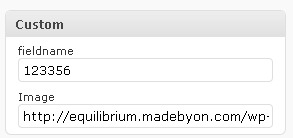
The solution: Define three custom fields in wp-custom, have field names you’ll use in your theme as UIDs and friendly names as field captions. You may also define default values for each field. And voila! A tiny little WP-Custom box in your post publishing screen. Now minimize that old crappy custom fields section and show your client the new way!
If this sounds stupid then you just haven’t tried it yet. It really is more comfortable working with human-readable custom fields. This is the very first stage of the plugin development. I plan on getting it far more forward to make the perfect tool for theme developers.
Examples (theory)
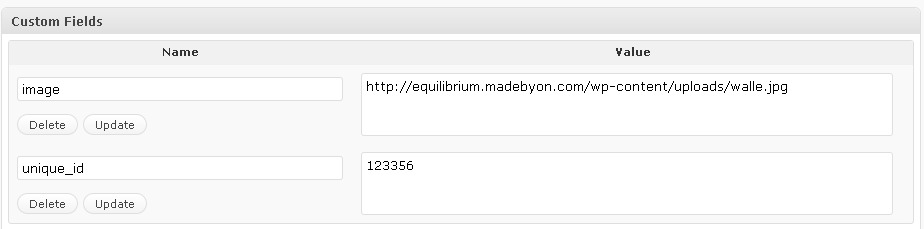
As I wrote earlier it’s all about custom fields. It’s the way they look, and the way they should look. Let’s take a look at the Equilibrium theme for a while. There are images associated with every post and if you look closer, they’re taken from the ‘image’ custom field. If you read the installation tips you’ll figure out that you have to put the URL of the image (303×231 for big ones and 162×118 for the small ones) in the ‘image’ custom field.
Well, if I were the developer of that theme I’d use two custom fields ‘image_big’ and ‘image_small’ (you get my point…). Okay, so three days have passed and I already forgot what the dimensions of the images are and whether I should write the complete address in the custom fields or is it relative to the uploads directory. Jeez! I’d have to go look at the dimesions and open another post and check the custom fields there.
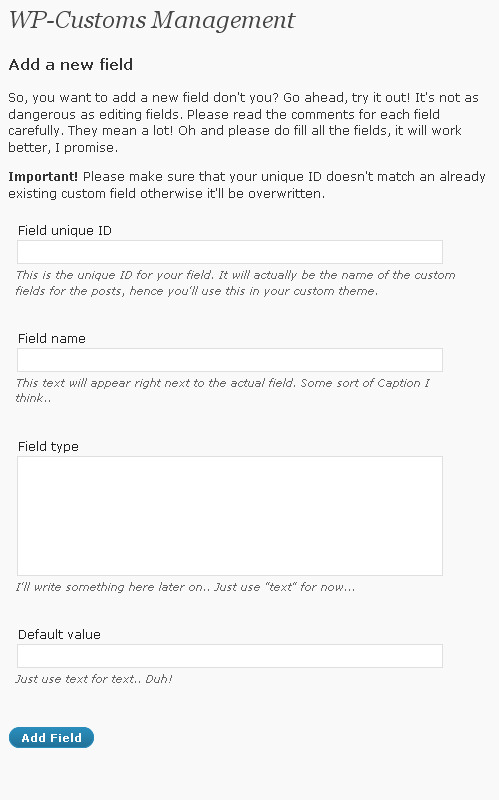
Now let’s try another way. Define two custom fields using WP-Custom with those same unique IDs: image_big and image_small. Define their captions: ‘Image 303×231 URL’ and ‘Image 162×118 URL’. Voila! You’ll never forget the dimensions again. Just think about how much time you can save with this, especially if you’re blogging in a team. So what does it require? A few plugin setup and some theme customization. It’s very simple after you get it right.
I’m also thinking about adding the feature to export and import WP-Custom settings. It’d be nice to ship those with a customized theme, making it an out-of-the-box product, right?
Screenshots
Here are some screenshots to make you proud.
Usage
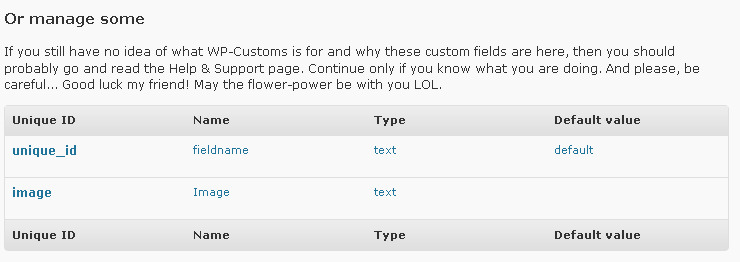
After defining a few custom fields in the Manage section of the plugin, you can see that they’ve appeared in your edit post/page screens in the admin panel (look at the screenshots if you haven’t seen this live). Give them some values, then make them appear in your themes using the wpcustom() function with PHP, like this:
wpcustom("unique_id");
If you don’t want to echo out the field value then there’s a second parameter that forbids echo and returns the value instead:
$output = wpcustom("unique_id", true);
Download, changelog and other notes
 Download link, changelog and other notes. Officially hosted in the WordPress.org Plugin Directory: WP-Custom Plugin. I also like when people with WordPress.org accounts vote it up ;) thanks!
Please supply any feedback to the comments section of this page. Pingbacks and trackbacks are appreciated too. Thanks for all your contribution.
Works great, thank you
You're welcome! Feel free to post any suggestions, requests or anything.
Nice plugin, but only seems to work for posts, not pages. It should support pages too !! I`d also like request a feature, to pick files (images) directly in the custom field
John Myrstad
Wow John, thanks that's a cool request. Okay I'll set it up for pages too on next release and try out the 'insert from media library', some sketches at least. Thx for your feedback.
Hey John, I managed to get it to work with attachments in 0.2.1 (field type: url) you should check it out. Not sure about adding the ability to upload, cause you can do so from within the standard wordpress edit post/page screen. BTW pages are supported as well.
You might want to have a look at the code for http://wordpress.org/extend/plugins/custom-field-… . It support for media buttons in the textarea. Its a nice plugin too, but a little "heavyweight". Your "lighter" plugin will be better in many cases.
John Myrstad
Hey John, that looks great! And yeah, you're right, it's very heavyweight. I'll try to take a closer look and see what's it's capable of, but I really wanna keep mine lightweight. Thanks for the suggestion.
great plugin!
really works when I develope a product cataloque website
thank you for your good work
You're welcome Adi, glad you liked it.
Just added the ability to use the wpcustom() function within the theme. Thinking about adding a shorttag feature as well. Would that be a good idea?
hi, I'm so glad to find your update :)
a little sugestion, maybe would be better if you add a new function (out from wp-meta) to show all custom field that we make on your plugin.
In my case, I use xlanguage to display multilanguange. The xlanguage auto add new custom field on every post. This is bother me when I call custom field (from your plugin) using <code>the_meta();</code>, your plugin and xlanguage (or maybe another custom field) displaying on my post.
using this <code>wpcustom("unique_id");</code>?
I think it's a bad idea, esp. when you have more than 10 fields :(
An user custom name on it's header would be nicer eh? Like this
(this is my manual modification)
http://img151.imageshack.us/img151/2787/skrin.jpg
I add image option (instead url and text) using this code
<code>$value = "";</code>
Hey Adi, thanks for your feedback. I will consider some more functions and filters to work around compatibility with other plugins that use custom fields. You might also try <code>wpcustom("unique_id", false);</code>. Your modification looks good, I think I'll add an Image type in the next version with a few more mods. Thanks.
А не мог бы ты и для русских нормально перевести плагин?
Живешь в Москве, а русских обделяешь…
В русском блоге я устал искать объяснения работы плагина.
И поясни плиз как и куда вставлять – wpcustom("unique_id");
Я в ПХП не супер знаток в ВП тоже. Я пробовал так –
Не работает.
И как вставлять если у меня 5 текстформ.
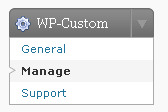
И у меня почему то нет кнопки General, как у тебя на первом скриншоте – это нормально?
Nvastudio, привет. Да, прости у меня мало времени чтобы на русский это всё переводить :( в общем объявив текстовое поле с Unique ID: uid1 ты можешь использовать функцию wpcustom("uid1"); внутри темы в главном цикле (The Loop). Попробуй где-нибудь в файле single.php. Всё зависит от того, какую тему ты используешь.
По поводу General, да, это нормально. Она была в старых версиях плагина, сейчас её нет, так что всё ок.
First, thanks for the awesome plugin – you have saved me a lot of time, my friend. I'm not very PHP savvy, and you've made this so much easier.
However, how can I set things to ensure that blank fields are not shown on the page? In other words, if one of the custom fields is intentionally left blank for a certain post, how can I make sure that it will not be displayed?
Thanks!
Hey Eduardo, thanks for your feedback and glad you liked the plugin.
Here's how you don't show a blank field (put this code in your theme):
<code>if (wpcustom("unique_id", false) != "") wpcustom("unique_id");</code>
Thanks, and stay tuned for the updates!
I really like the plugin, the simplicity is great! A good suggestion would be to rearrange the order of the fields (for example, I forgot to add a field that needs to be third in my list and I would like to be able to move it up from last where it is now).
I tried going in to the wp-options table to change it but always get Fatal error: Cannot use string offset as an array in D:Hosting*******htmlwp-contentpluginswp-customcustom-config-manage.php on line 19. How do I manually move a field without getting the above error.
Thanks,
Kyle
Good suggestion Kyle. Might add an 'order' field in the upcoming update. I'm not sure whether you can change the order so easy from the wp-options table ;) you'll have to manually remove all the fields and add them back in the correct order, or wait for the update ;)
Cheers!
I was using this on a customer's blog, and one thing that we found was that putting HTML in the text field was not allowing us to edit it correctly. Here's what I did to fix it. I took this line:
<code>$field_html = "";</code> and changed it to: <code>$field_html = "";</code>
Oops, that didn't work. Here's the code I changed:
http://pastebin.com/f1b591544
Hey Dan. Thanks so much! I'll put this fix in the next release.
Cool plugin,
I appriciate simplicity of it. I hate when people over think it but you got it just right.
Saved me a lot of time.
P.S works with 7.8 version just fine.
Cheers, Dmitry
Hey Dmitry, thanks. I'm glad you liked the plugin. Oh and the 7.8 version, wow, where'd u get that? ;)) haha
Nice plugin, but it does not work in version 2.8.4
Noted, will try to come up with a fix :) Thanks.
sure, i have error like this on version 2.8.4
"Warning: Invalid argument supplied for foreach() in /Users/ndokceplok/Sites/store/wp-content/plugins/wp-custom/custom.php on line 63"
Yeah, there's kind of a but that's not working with v 2.8.4, I'll fix that as soon as I have some free time. Thank you for reporting =)
Hi,
I'm looking for a quick solution to perhaps apply a wysiwyg interface to a textarea created using your plugin. Unfortunately, my clients need to use html and I'd rather them work within the confines of the wordpress wysiwyg interface to limit what html they can use.
Would you have any suggestions?
Yeah, take a look at a plugin called More Fields, WP-Custom hasn't been touched for months ;)
hi:
always have this error.
Warning: Invalid argument supplied for foreach() in /home3/wilsonla/public_html/wordpress/wp-content/plugins/wp-custom/custom.php on line 104
Warning: Cannot modify header information – headers already sent by (output started at /home3/wilsonla/public_html/wordpress/wp-content/plugins/wp-custom/custom.php:104) in /home3/wilsonla/public_html/wordpress/wp-includes/classes.php on line 1571
please help me.I try 2.85 and 2.7. but it is same thing.
andy
Really nice plugin. im using it at my page that i have linked to above.
Really simple to edit any theme and get some good info in the template :)
Thanks alot for this plugin.
You're welcome :)
How about re-arranging the custom fields created on the list (on the right side where all the once’s created appear).
I mean if your gonna work on it anymore :p
Great plugin anyway! Simple and good for what it was done.
Got it trough PhpMyAdmin and some thinking :p it would be a nice option tho..
Hey Dario, not too much time over here, quite busy, but yeah, I think I am going to work on this plugin once I update the rest, thanks for the tip, I'll try to implement that!
[…] heard the news! My WP-Custom plugin got WordPress.org hosting approval a few days ago. So I finally uploaded it into their plugins repo […]
[…] the original: WP-Custom Plugin Tags: […]
Really want to use this plugin but it is not compatible with WP 2.9.2.
Any news on if this will be updated? I am happy to contribute with payment if you want to work on it! :)
I think others really would love to use this life saver too!
Thanks
You should check out WordPress 3.0 and custom post types.
I think that Kovshenin is telling here that you can do the same in version 3.01 with custom post types, so you do not need the plugin anymore. Right?
Right.
It's very nice. But It's not compatible in wp 2.9.2.Please check the Plugin…
WordPress 3.0 and custom post types ;)
Hi!
I am very glad that there is such a plugin. It works fine.
My question: I own several categories. I would like to define for each category, the fields.
However, it is confusing, since all fields are listed in every categorie.
Would something like Flutter be possible?
You'll be better off with WordPress 3.0 Custom Post Types ;)
Look at wordpress 3.01 and custom post types. And just read it, and you know your answer.
Thanks John :)