Thank you for using Twitter Friendly Links.
Description
So, you promote your blog posts via Twitter, huh? Me too. And those long blog post URLs, ugh! Yeah, we got rid of those using URL shortening services like TinyURL and tr.im but what about the name and/or brand? Your blog posts might be fab – very interesting to read and three thousand comments on each. But are you getting people to remember your website address in Twitter? No. Do you get backlinks from Twitter using TinyURL? No. Can you measure site statistics from TinyURL links on Twitter? No.
Here’s a quick example:
https://konstantin.blog/wordpress/plugins/twitter-friendly-links/
Might look like this in Twitter:
https://konstantin.blog/712
Sweet huh? Here’s a features list:
- Easy to install
- Customizable shortened URL style
- Switch between 302 and 301 redirects
- You can have a list of all your posts/pages/attachments together with their Twitter Friendly URLs on one page (AJAX pagination)
- Shows the short link in the edit post/page form together with the text you can tweet out (trimmed to 140 characters) and a link to Twitter with the predefined text
- You can output the twitter friendly link in your themes using the twitter_link() function
- Compatible with Sociable, Twitter Tools, SexyBookmarks and AskApache Google 404 plugins
- Configurable linking relations (HTML and HTTP) for rel=shortlink and rel=canonical
- Compatible with WordPress MU and BuddyPress
- Super easy tracking with Google Analytics! Destination links are Taggable!
- You can now switch to alphanumeric links for sexy links with numbers and letters like http://example.com/s2e7
- Caching with .htaccess now available!
- Even shorter links with customizable shortlink base!
- Loads more yet to come
Screenshots
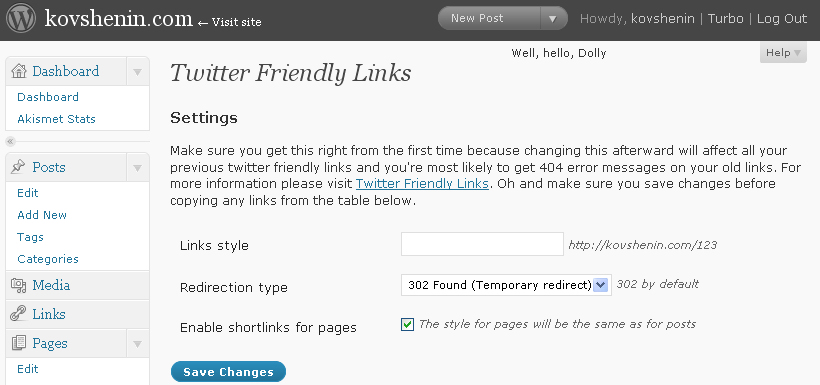
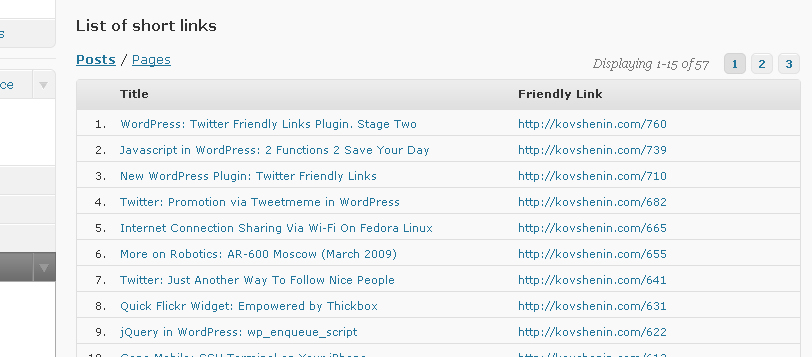
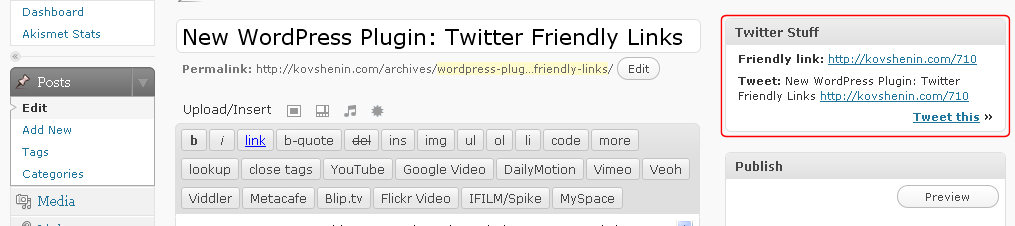
Download
Download link, changelog and other notes. Officially hosted in the WordPress.org Plugin Directory: Twitter Friendly Links. I also like when people with WordPress.org accounts vote it up ;) thanks! Twitter Friendly Links is also hosted on Github so please make sure you report issues there and not comment on this page, thanks!
Even Shorter!
The new version of Twitter friendly links includes a customizable shortlink base URL. This is used in case you want your twitter links to be on a different URL than your blog. This is useful when you run your blog on a www domain name but want your short links to be without the www to save some space. Changing the base URL is also useful when your domain is too long and you have a shorter one that you would like to use for twitter links, for instance if you own yandex.ru and ya.ru, you might host all your blog on yandex.ru, but your shortlinks would be ya.ru/123 which would redirect to the original post at yandex.ru.
Enabling this is fairly simple, no coding skills required. Both domains should use the same .htaccess file, thus you should direct your new domain (virtual host) to the same root folder as your old one.
Translations
- Turkish description by Ömer Taylan Tuğut
Works great, thank you
You're welcome. Stay tuned for the release this week ;)
Great idea, but how does it work? I installed it and activated it, but so far nothing happened.
By the way, I came up with this idea a while back. I'm glad somebody ran with it! It'll be useful on my moped directory.
Start using blogurl.com/go123 where 123 is your post ID
blogurl would be your blog's url then /go with your post ID on the end of the /go I am trying to figure out how to use it to post comments
I figure I will add the /comment-page-1/#comment-624 after the /go and see if it works.
Using this plug in will give links to your blog from twitter as well, tiny url will not.
Thanks for the plugin!
Scott
You're welcome Scott. Glad you liked it. Yeah, getting backlinks from Twitter is one of the main points.
Hey mate. Thanks. Please remember that this is the first beta release. I will extend the plugin to make a configuration part, and then hopefully write a brief documentation, so stay tuned.
howdoes it work?can u give the tutorial…?
I will after the next release. This is the beta, just some sketches ;)
Awesome idea. I don't use twitter, but it's useful for a lot of other reasons.
Thank you Tony.
GREAT START!!!!!! Very simple to install and relatively simple to use. The one hang up is you have to know your Post ID.
Perhaps an Idea to add on would be to Create a page.. public or private.. maybe even an option to publish it public .. that would display the title of the post and the Tiny URL.
Also if you could add the option to post directly into Twitter once you publish a post it would be great!
Works great for what you have so far.
For those asking how does it work…
http://domain.com/go%5BEnter Post ID]
i.e.
http://www.nycrecession.com/go61
To get your post id, go to edit posts scren; roll over the post name and you will see the ID in the URL.
Hey there Tesh, thanks so much! Yeah I will add a bunch more features in the upcoming updates. Posting directly to Twitter is a great idea btw, I'll think about it.
Does this plug in work if you don't use permalinks that give the post a number?
I tried it by just using the post number in the order it was published…like my third post I would use/go3, and it didn't work.
Thanks!
Scott
One way to find the post ID is to edit one of your posts in the admin. Then look at the url at the top of your browser, eg:
http://www.example.co.uk/wp-admin/post.php?action…
So the post ID is 46 and my shortened url is http://www.example.co.uk/go46
Alternatively get the Restore Post Id plugin from http://wordpress.org/extend/plugins/restore-id/
This as the title suggests will show the Post ID in the list posts edit list.
Yeah, Stephen is right, you can get the ids from there. I will make sure to output the short links for every post in future releases of the plugin. Hopefully by the end of this week (if everything goes as expected).
Great plugin. I've been looking for a solution like this for a couple of websites I'm working on. I accidentally found it via the suggested plugins on the wordpress dashboard.
This plugin could have some SEO benefits as the link being shared is your site rather than the url of an external link shortener website. Twitter nofollows urls, but you'll get the SEO benefits once the link is then shared on other websites.
Keep up the good work. I'll be sharing and blogging about this plugin to my friends.
Thank you Stephen, that's so cool. I'll do everything it takes to get this plugin one step further every update. Oh and your comments are so useful, thanks so much!
Thank u love ur plugin it great.., easy and great, for update may be u can add skript so that everbody can see the post id easily . Started it using it on my blog http// :www.BestBoyZ.de,
Sameer, yeah I got that one coming up in the next release :) Thanks.
Beauty. I found the admin panel and Now I've got it rocking! This is a great plugin.
Thank you Mopeds :)
great.. you updatetet it lovin it :D thank you
You're welcome Sameer :)
I added one line so that i can also use it easly with identi.ca here what i added
<code>
echo "Identica this »";
<code>
shit
href="http://identi.ca//index.php?action=newnotice&status_textarea=" . urlencode($title) . urlencode($friendly_link) . "">Identica this »";
Good going Sameer. I don't user identi.ca, although I asked @yoast about making such changes to the plugin. If he will reply then identi.ca will be next for sure :)
Thanks ;)
tried it on my blog but every link just gave ne a 404 error :-(
Jackie, you have to enable permalinks
Bug 1:
Does not work properly when I have wordpress in a separate directory.
Example:
Blog address: http://hmelius.com/
Wordpress directory: http://hmelius.com/blog/
Example URL: http://hmelius.com/archives/hello-world
Twitter link: http://hmelius.com/blog/go1
Should be: http://hmelius.com/go1
Suggestion 1:
Have a way to use custom short url. Example if I want to use http://hmelius.com/g00g to redirect to http://google.com. There is a plugin called Short URL that does that, so you may be able to borrow feature from there.
Suggestion 2:
Analytics! How many times a link has been clicked. Referrer. IP Address. Location.
Hey Elius. Thanks for the suggestions and feedback. Yeah I kind of didn't think about having wordpress in a seperate directory. I'll do my best to fix that in the next few releases.
About the suggestions.. There's a plugin called Redirect where you can add any redirects you like, to any website with any URL. This plugin is for your own posts and pages, not a public trimming URL service. Get my point?
Second suggestion. Why would anybody want to know how many times the short link has been clicked? It still redirects to the permalink which will appear in Google Analytics, right?
Cheers!
I see the fix, cheers ^^
As for the first suggestions, just thought it would add to the value since the two functions seem very similar. It'll be easier to remember about links if anyone wants to share links outside twitter.
Secondly: The same reason bit.ly is gaining momentum. :) Not much use but still fun :P
Hey Elius, glad the fix worked out for you.
Suggestions.. Hmm.. I'm afraid to turn this plugin into "yet another tinyurl" service. I'm thinking of launching a new plugin for social profiles that'd work pretty much like this plugin, instead it'd link to example.com/facebook for instance. Still thinking about that. You see, if this will turn into a private url trimming service, then people will stop linking to eachother on Twitter (and everywhere else) and use their own shortened links instead, to gain more backlinks. That wouldn't be very nice.
Secondly, bit.ly's got stats, cause you can't put your own Google Analytics code to bit.ly's page and that's why they're gaining momentum. So I'm still not sure if there's a need for stats. I should try a poll or something…
Thanks for the feedback Elius, you're great!
Hi kovshenin,
1.) Thank you for this great Plugin, i LIKE it!!! :-)
2.) Now i have install your newest Update up to 0.3, but in my Admin Panel –> Twitter Friendly Links – i get a Plank Page?? Wy? Can you help me?
Now i installed you Plugin compleat new, but nothing – Blank Page in Admin Panel…
Thank
Mario
Hi Mario. What WordPress version are you using? And what's your php version? Thanks.
Hi,
i using WP Version 2.7.1 and PHP Version 4.4.9
Thanks
Mario
Try to reset your permalink settings, then deactivate and reactivate the plugin. Let me know how it goes.
I have never changed the settings. it runs with default settings – go12345
the short-links still work, but after update 0.3 i can't open the Settings Page in the Admin Panel – load a blank page.
Mario
++ All previous updates bevor 0.3 have worked wonderfully ++
Mario
Hey Mario. The only changes introduced in 0.3 are shortlinks for pages and ajax pagination in the settings page. I think it might be a conflict with your other plugins. I'd really appreciate if you gave me a list of your currently installed plugins. Or it would be great if you provided me with a temporary admin account to your blog, just to make some debugging, that would be very helpful! If it's okay with you let me know, I'll send you out an e-mail.
Thanks a lot, buddy.
Hi,
i removed this line:
add_action("admin_print_scripts-$twitter_friendly_admin", "twitter_friendly_links_admin_scripts");
and now it works, but whitout List of Short Links.
Yes, its a conflict with my other plugins.
Its ok, i dont need the List :-)
Thanks for Help
Mario
P.S.: Great Plugin.
P.P.S.: A good Idea for your Plugin: Option for input multiples short URL's (at the Moment i can only create one short URL (example: go123 or 123 or xxx123) – for our Blog we want to use more then one Short URL (example: go123 AND 123 AND xxx123 ……) Its a great way to get many many many Google Links just for ONE Posting……… ;-)
Hey Mario, glad it worked out for you. Any idea what plugin did it conflict with? That'd be helpful. Anyways, about your suggestion. It is possible to enable multiple short URLs, but I don't see a fair reason to do this, even for Google. Because links are being redirected (either a 301 or a 302), the backlink is counted for the page it's being redirected to, not from, right? So I don't think that multiple pages that redirect to one will give you a good Google score, they might even count this as inappropriate…
Correct me if I'm wrong.
Thanks for your feedback,
K.
Hey Konstantin,
Any idea when there will be a release that doesn't assume the blog to in the main directory.
as in http://www.yoursite.com/blog
It was mentioned above, just wondering how far up your to do list it is?
This seems like a great plugin that I would like to use.
Thanks!
Hey Travel Blog (lol, stop SEOing around before I remove comment author links :))
The bug is already fixed. The update will be available this evening (in around 3-4 hours) at the wordpress plugin directory, 0.3.1 I guess. You will be able to update automatically from within your wordpress admin panel.
Hi, just about to install, then just stopped for a moment to check that it is safe.
One question, the urls thta have already been index in the Serps, will they be changed or will they remain as they are?
From the feed back, it look like it is a good product.
Hey Mark. This plugin does not affect your current permalink structure. All your links remain as usual. The plugin only adds the ability for short linking, doesn't replace anything, so feel safe to use it ;)
Thanks for this. Works great on single installations of WordPress but doesn't work on WordPress Multi-User installations that are set up in sub-directories. (i.e. http://example.com/blogs/myblog/ )
It works fine for WPMU installs using wildcard sub-domains (i.e. http://myblog.blogs.example.com).
It would be good to get it working for both types of WPMU installs. I'd be happy to help test it for you. Thanks.
Hey there Joss. Thanks for the feedback. Haven't tested this on WPMU, so your help is really appreciated. I've fixed some permalink bugs in version 0.3 and released 0.3.1 a few minutes ago. Please let me know if that fixed the MU issue.
Thanks again!
I've just upgraded to 0.3.2 but the problem remains. You can see here:
http://learninglab.lincoln.ac.uk/testbp/portfolio…
should link to:
http://learninglab.lincoln.ac.uk/testbp/portfolio…
I'll keep an eye on your updates. If you want me to help test while you develop, please email me (or install http://wordpress.org/extend/plugins/subscribe-to-… ;-)
Thanks!
Thank you Joss, I will install WordPress MU today on local and run some tests. I'll try to come up with a fix by 0.3.3
Just put up the Subscribe to Comments plugin, thanks for the advice.
Hey Joss.
Have a look at 0.3.3. I managed to set it up and running fine on my local WordPress MU install with subdirectories. The details are in an e-mail I sent you a couple of minutes ago.
Thanks for your time.
Sorry for the delay. I didn't receive your email. 0.3.3 works well on my WPMU with sub-directories. Thank you for the quick response. :-)
Thanks Joss, glad it worked out :)
Great, thanks i will let you know how it works for 5 Star Weddings
Thank you Mark, looking forward to your feedback.
Is there any way to integrate this with a plugin such as Twitter Tools, that allows you to automatically post to Twitter?
Hey there Scott. I will have to dig in Twitter Tools to integrate. You can do that yourself though, just find the place where the link is written, and replace it with the twitter_link(id) function, where id is the id of the post you are about to tweet.
Feature Request.
You might consider making this, suppose i have WordPress installed my root, http://domain.com and in someplace i have FTP uploaded some folder like http://domain.com/path/to/my/folder/sample.html which does not come under WordPress.
In that case, would it be possible [of course in future versions] to give me an option to input my long url "http://domain.com/path/to/my/folder/sample.html" in an input field [like other regular url-shortening services provide on their websites], and i can get a short url back?
Hey deb! Yeah, cool feature. Thanks, will consider that for sure!
2 questions
This PI just gives you a shortened link and doesn't send it to twitter? users manually post to twitter?
If so I would like to try and integrate this with twitter tools aswell. Could you give a example of what to look for when looking for were the link is written. I looked and couldnt find were its done.
Thanks Lots
In theory you can use the tweet_blog_post_url filter in Twitter Tools with this plugin to make your own shortURL
Thanks, good idea :)
Hello Bill. Yeah, the plugin doesn't post to Twitter. It can only give you a Tweet this link, that takes you to Twitter.com with a preset status. You can then make some corrections and send.
I haven't used the Twitter Tools plugin yet, but at first sight, changes should be made on line 466:
<code>$url = apply_filters('tweet_blog_post_url', get_permalink($post_id));</code>
change to:
<code>$url = apply_filters('tweet_blog_post_url', twitter_link($post_id));</code>
Or just like Ipstenu said, you could add a filter in your functions.php file for instance.
[…] Twitter Friendly Links is definatly going on my list of best wordpress plugins. Site News […]
Thanks for all the help.
Using ctrl +f did not come up with $url = apply_filters('tweet_blog_post_url', get_permalink($post_id)); at line 466 in TT. Maybe I have a different Version of twitter tools.
Also I dont see how to make a "Tweet this link"
I'm just trying to figure out the best way to use this. I like the idea!
Hi Bill.
I took a look at the latest version (1.6) here: http://wordpress.org/extend/plugins/twitter-tools…
The "Tweet this" link is in your edit post/page section. Take a look at the video, it's somewhere in the middle.
Hey Man,
I had to come back to leave a comment! I love the updates. Here are some ideas
1) Option to eliminate www. from URL? I am not a twitter expert yet, but it seems that twitter automatically shortens your url at times and some of us with larger domain names would benefit removing the 4 characters in the www. if it is not necessary.
2) Option to adjust for Retro Links (confusing I know) I originally installed TFL before the option to change the "GO" portion of the URL was there. And I started distributing urls. It would be great if TFL would have an option to perhap support a list of prefixes. IE in a box I could enter "go, g" and urls
http://domain.com/go12
http://domain.com/g12 http://domain.com/12 (assuming this is my current setup)
Would all go to the same post.
Great work, and you will find a link back to your site on my Credits Page!
Hey Tesh, first of all, thanks for the credits, that's really nice of you.
About your suggestions. You do realize that if you remove the http://www. part you loose the search engines linking benefits, don't you? Twitter will not post a link like that as an actual link, it'll go as text as far as I know. Anyways I will consider the suggestion if I get a couple more requests like this, so keep that in mind, okay?
Retro links. There's been a suggestion similar to this one, and you've got a pretty good reason there, so I guess I'll just add a text field called Retro styles and keep the first textbox as primary.
Thanks Tesh, you're being very helpful!
Cheers :)
Indeed, dropping the entire http://www. would cause most URLs to be be considered as text rather than a link. Twitter recognizes someting as a URL when it starts with either http:// or www. so if the prefix www. is used, it's possible to skip a few characters by dropping the http://
Ah… the same happens here too :P
Of course I meant, it'd be possible to use www instead of http:// in certain cases
Okay I will consider the linkage format and maybe allow people to trim down the http:// :)
Ya the twit this box was on the botton and I didnt see it. Thanks for the help.
I'm still trying to get this to work w/ twitter tools. I tried tweet_blog_post_url filter but it made a bit.ly link Humm?
Maybe it's being bit.ly shortened by the Twitter API? Anybody knows what shortener they use by default? I'm just too lazy to check ;) Tomorrow morning maybe ;)
Every thing was working fine for me and thanks but the "twit this" box keeps floating around and now it appears to be under this list of posts. I can see the corner of it. How could that happen. Its a first.
Thanks
Wow Bill :) actually, I have no idea of how that could have happened. What WordPress version are you using?
2.7.1
Starng it was on the bottom when I installed. I dragged it up top.
I'll see if deactivating TweetMeme Button & other plugins works
Thanks for the service !!!
You're welcome Bill, thanks for debugging :)
deactivated twitter tool tweetmeme and its still not their.
What files should I check on my host? HG
Hey Bill. Are you sure that the box you are looking for is called "Twit this"? Cause the one generated by this plugin should be called "Twitter Stuff"..
I messed something up in the files. Sorry it took so long to get back here. I was able to get twl and tts pu's to work together.
Thanks
I read about your plugin today on weblogtoolscollection.com, and thought this would be a really useful plugin.
I installed it automatically from the WordPress interface, the system said it installed correctly, but when I go to the settings I come to a blank page, no admin menus or anything.
I have a significant amount of plugins installed. Just wondering if it might be conflicting with one of those..
Do you have a 'opt in follow' for this comment thread? Like the 'Subscribe to comments' plugin so I know if / when you respond….
Hey Jeff. Unfortunately I don't. Should put one up though. Sorry. I can reply to you by e-mail if you like.
About the blank page. Yeah, there's been a report before about having a blank page and I haven't figured it out yet. It'd be very nice if you gave me a list of your currently activated plugins. It would be also great if you provided me with a temporary admin account to your blog, so that I could do some debugging there. I won't break anything I promise :) That would save me tonnes of work!
If that's okay with you please let me know. I'm sending you a copy of this message by e-mail, hope you don't bother.
Great plug-in idea and thank you for your efforts on getting it to work with Twitter Tools. A couple questions:
I am unsure of how to utilize either the "twitter_link()" or the "permalink_to_twitter_link()" functions.
With the former, I understand the concept but have been unable to have any type of success in getting it to work. I initially had the idea of placing the code you provided for the "twitter_link()" function into the post section of the pages: "single.php", "search.php" and "index.php", "archive.php". Is this the correct method or is there a single place to insert the code you provided?
With the latter function – "permalink_to_twitter_link()" – I am unsure of how this is to be used.
FYI, I am a novice at PHP, so words like "argument" in the context of the language go right over my head.
Thanks!
Hey Daniel, thanks, glad you liked the plugin.
You don't really have to use permalink_to_twitter_link(), that's mostly for plugin developers I guess (I created that to make it compatible with Twitter Tools).
The twitter_link() function could be used with or without a parameter. If you're using it inside your loop (between the while(have_posts()) and the endwhile) you don't give it any parameters, it'll return a short link for the current post in loop. Same applies for single.php and archive.php (in case you want to show the shortlinks on those pages too). Take a look at the The_Loop section in the WordPress Codex right here: http://codex.wordpress.org/The_Loop They have pretty good examples and you'll get the hang of what the loop actually is. It's not that difficult, seriously.
You can also use twitter_link($id) where $id is any available post id. I don't know why you might want to use this, but it's there just in case. For plugin developers too actually.
Thanks for the help.
I did put the the <pre>twitter_link()</pre> function into my theme, on the <pre>index.php</pre> page. I placed it into the page in two ways: on its own and surrounded by a link tag i.e. <pre>twitter-link</pre>. Neither worked according to plan.
Using the first method, the code itself simply showed up on the page. Using the second, a link appeared but, mysteriously, was simply a link back to the blog's URL.
Any ideas? Thanks, again.
Sorry for the strange formatting on my reply. The third strangely formatted bit that says "twitter-link" was supposed to be more like this:
<opening-link-a href="twitter link
Hey there Daniel. Remember that twitter_link() is a php function, so you have to use it within php tags, like this;
[a href=""]My shortlink[/a]Hope that helps ;)
Replace the [square brackets] with the triangled ones. I used them cause WordPress is breaking my markup ;)
That. Worked. Thank you.
I had the link format down (unless I made a mistake in my coding) but I did not see any reference to the term "echo" anywhere before, so I did not use it. Do you think that is what made the difference?
Yeah, it's cause the function twitter_link() returns the value, but doesn't actually print it out.
Hello,
It's a great plug-in and I am now integrating it into my blog. By the way, What is the plug-in in your video with the title "Twitter Stuff"?
It's this same plugin Tung, the box is just titled Twitter Stuff :)
Thanks, glad you liked the plugin.
Kovshenin ,
Hey hey, you installed the notify plugin…awesome.
I didn't get an email from you, I even checked spam, maybe I missed it.
I have a screenshot of the 40+ plugins I'm using. The 2 updates you've released in the past couple of days haven't solved my problem. If you can try to drop me another line I can send you this screen if it would be of help.
Hey buddy, sent you a line ;) hope you receive it. The screenshots would be great. Unfortunatelly the two latest updates hadn't anything to do with this blank page issue. You see, I cannot fix a bug if I cannot reproduce it, and that's why your screenshot would be very very helpful. Looking forward to that!
Thanks :)
Nice feature, makes the readers curious about your website!
I tried using your plugin, but it doesn't work, even though i activated permalinks. The WP Installation is in a subdomain, but i think it's the same problem with subdirectories mentioned above.
1. A feature, like where your twitterlinks plugin tells another automatic twitterposter (twitpost eg) to use your plugins friednly links.
thanks
Hi Donald.
Not sure about why the plugin's not working for you. What permalink structure do you use? Do you get 404s?
The feature you're talking about is coming up, really. I made the plugin compatible with one called Twitter Tools by Alex King a couple of updates ago, it now posts with shortlinks. Works pretty good ;) I'll be digging into the other Twitter posters plugins next week, so I might come up with a list of compatible ones by the end of it (hopefully).
Thanks chap ;)
It's not working for me either (all 404s for all my links).
Permalinks are on. I reset them, deactivated and reactived this plugin. If I add '?p=' as my links style it (naturally, ugly permalinks) works.
I have my blog in a /blog folder, but none of my links have that. i.e. you go to http://domain.com and the posts are at http://domain.com/2009/05/this-cool-post but on the server side, it's all under a /blog folder.
Hey there!
Sorry to hear that. What permalink structure are you using (Settings – Permalinks)? Oh and a link to your blog would be so helpful!
Thanks.
I'm using Day and Name (the first option on the list after 'default') so my links are: http://jorjafox.net/2009/05/15/sample-post/
Oh and the URL is http://jorjafox.net/ :D
Thank you for helping!
What shortlink style are you using? And a couple of shortlinks together with their original links would be great ;) Oh and a quick list (or screenshot) of your currently activated plugins would be super-great! :)
In testing something for this, I realized that as long as I have SOMETHING with a slash in the shortlink style, it'll work. So right now my shortlink style is t/ (http://jorjafox.net/t/123) and it's fine. But I want to just have it be nothing, so I can go to http://jorjafox.net/123 which seems like it SHOULD work but no.
If I put in g or t or anything without a / (http://jorjafox.net/t123 ) it'll fail. If I put the / in (http://jorjafox.net/t/123) it's fine.
Working Links:
http://jorjafox.net/t/1777 -> http://jorjafox.net/2009/04/17/animal-acres-event… http://jorjafox.net/t/1784 -> http://jorjafox.net/2009/04/20/jorja-at-coachella…
Plugins:
Akismet 2.2.3
Bad Behavior 2.0.26
Ban Hammer 1.0 (prevents anyone on my comment blacklist from registering)
bbPress Integration 1.0-alpha-6
Branded Login Screen 1.1
Comment Form Quicktags 1.1.6
Custom Smilies 2.7
Executable PHP widget 1.1
Google XML Sitemaps 3.1.2
Impostercide 1.5 (prevents anon commenters from using the name, email or url of a registered user)
PollDaddy Polls 1.0
Recently Registered 1.0
Twitter Friendly Links 0.3.3
Twitter Tools 1.6
Yet Another Related Posts Plugin 3.0.4
I'll test the plugin with your list next week and get back at you, okay?
Sure thing!
Of note, I was wrong about /t working :( It's ?p= or nothing for me.
Email me if you need to.
Hey there. Strange, just installed all those plugins in your list and activated them. One of them is discontinued btw, but I managed to find the source. Anyway, works fine on http://proto.kovshenin.com/
This is my permalink structure: /%year%/%monthnum%/%day%/%postname%/
And here's an example link: http://proto.kovshenin.com/1
I think there might be something wrong with your .htaccess file. Could you post its contents here or e-mail me?
Thanks.
I know Impostercide is discontinued but I have a bad egg I need to smack around.
Email'd probably be best, seeing as how long my .htaccess is.
Okay, cool. I've sent you an e-mail so you could get hold of my address.
Thanks once more.
Quite sure my answer to all this is in your spam file right now, for too many URLs ;)
Yep, it was :)
[…] için Twitter Dostu Linkler Admin paneldeki haberler bölümünde rast geldiğim bir eklentidir Twitter Friendly Links. Türkçe arama sonuçlarında herhangi bir bilgiye ulaşamadım bu yüzden kısada olsa hakkında […]
[…] This post was Twitted by kovshenin – Real-url.org […]
Didn't work for me either – it seems to conflict with the plugin AskApache Google 404 [ http://www.askapache.com/seo/404-google-wordpress… ]. When I deactivate it the short URLs work fine, with it activated they stop working.
I'll take a look at that plugin as soon as possible and hopefully make a compatibility fix for the next update. Thanks Paul!
You rocks friend! congratulations for this excelletnt plugin!
Thanks buddy :)
Hello Konstantin,
I absolutely love the plugin. Thank you.
I'm writing because I'm editing an old post (from before installing TFL) and I'm receiving this message: "Fatal error: Call to undefined function: mb_substr() in /home/content/c/y/r/cyrax256/html/blog/wp-content/plugins/twitter-friendly-links/twitter-friendly-links.php on line 424" in the Twitter Stuff widget. This prevents the complete edit post page to appear completely. My hosting provider uses PHP4.X. I updated to TFL 3.0.4 but I'm still receiving this message.
Thanks, and keep up the good work!
Hey Ciro. mb_substr is valid since (PHP 4 >= 4.0.6, PHP 5). Strange…
[…] Twitter Friendly Links es un plugin para WordPress que te permite crear enlaces cortos para las entradas en tu blog, sin la necesidad de servicios como TinyURL o bit.ly, la desventaja de utilizar estos servicios es que al propagar estos enlaces, no estamos propagando enlaces a nuestro blog, si no al servicio, los buscadores no reconocen estos enlaces como enlaces a nuestro blog, por ende el ranking no sube y además perdemos la forma de saber de donde provino el visitante, ya que en nuestras estadísticas aparecen como provenientes de X servicio de enlaces en vez del sitio que nos está enlazando. […]
Excellent plugin, thank you for simplifying things :)
Any chance of making it so that we can use this for the media library. Would be nice to link them directly from my blog instead of having to upload them all over the place.
Hey thanks for the plugin luv. Media Library? You mean like having shortlinks for file attachments?
Yep thats exactly what I mean.
Hmmm. I'll think about that, thanks =)
Love the plugin – couple questions and I think, a Bug.
1) I have htaccess set to force a trailing slash. It seems that the twitter friendly URL does not have that. Im not sure if this is the problem, but I am using redirection plugin to track 404 errors and am seeing all the twitter-friendly URLs in this list, with the trailing slash – logged as 404's. The odd thing is that they do seem to go to the correct post.. Any ideas?
2) Is there anyway to get this to work with Tweetme, or is there a comparable plugin that you could create.
3) I was using twitter tools to automatically send posts to twitter. This is the only feature of the plugin (twitter tools) that I am interested in using. Is there a simple way to modify your plugin to automatically post to twitter accounts?
Thanks so much in advance for the assistance.
Hey Mark, thanks for your feedback.
1. I came across the Redirection plugin (if that's what you're talking about) a while ago, haven't noticed the feature to track 404's though. Anyways, the trailing slash is not the one causing the problem. You see, tracking 404s means looking at the requested URL and checking if it's a valid post or page. example.com/123 is NOT a page at all, it's just a URL that the Twitter Friendly Links plugin tracks down, and redirects to the actual post, so it's counted as a 404 by the Redirection plugin.
I had a similar problem with the AskApache Google 404 plugin prior to 0.3.3 which was fixed in 0.3.4, so I guess I'll dig in Redirection and find out what it's all about, then hopefully come up with a fix on next update. Thanks for noting :)
Any notes about the Broken Links counter plugin? ;)
2. I wrote about Tweetmeme a while ago. Their Tweetmeme button structure is pretty strange actually, it pops up in a frame and works via javascript queries, which outputs the button together with the shortened (usually by bit.ly) link. I've read some jQuery articles about working with frames, but it seems that there's no way to do it when the frame contents are from a different domain.
I also spoke to some Tweetmeme support and developers on their forums. Posted suggestions about letting the authors pick their own shortening service, including the Twitter Friendly Links plugin. They haven't replied anything yet ;)
3. Why'd you ever stop using Twitter Tools? It's a pretty good plugin IMHO ;) You might want to take a look in the WordPress plugin directory for some other simple auto-tweet-on-publish plugin, because I believe there's no "simple way" to modify my plugin to tweet. Tweeting ain't that easy, it's all about the Twitter API ;) haven't had a chance to play with that yet. Anyway, I might release some simplified auto-tweet plugin compatible to Twitter Friendly Links in the future :)
Cheers!
Thanks Kovshenin for the detailed answers. Dont have "broken links counter plugin" but thought I would mention that re:redirection plugin as it seems to be a popular one…. Would love it if you would let me know if you ever delve into the API and do something that encompasses Tweetme (which helps tremendously with tweets, but hate the restrictions) as well as something simple like the autoposting portion of twitter tools. I would love to use only your plugin and not all 3 ;-)
PS – your jquery sitemap thingy is great. Wish I knew enough about coding to figure it out ;-)
Wow thanks :) I thought nobody would ever notice that one ;) It's pretty simple by the way: https://konstantin.blog/622 ;)
Ah yeah, I sould probably create a plugin that can have its own plugins =) and that would be called the Twitter Universe for WordPress LOL. I'm already thinking about a commercial :D Like if you wanna tweet only, you install the tweet-plugin-for-twitter-universe. Then you decided to have your latest tweets in the sidebar, you add up the twitter-widget-for-twitter-universe :D yeah, that'd be fun ;)
Anyway, I'll let you know if I come up with something =)
HA…. Ok, how about this… ? Can you get it to work or can you suggest a hack to have it notify PING.FM when a new post is created with the twitter friendly link?
Hmm, sounds like a good suggestion. I'll think about that, stay tuned for the next update ;)
Thanks!
There is a plugin for Ping.fm – maybe you could get the guy to tell you how to integrate twitter friendly links?? – http://www.soldoutactivist.com/pingpressfm
Yes, I will take a look at that. Thank you :)
Hmm, can't seem to get this to work.
I have two WordPress installations, one at http://www.emoore.co.uk/ and another (which is the one I have Twitter Friendly Links installed on) at http://www.emoore.co.uk/blog.
On the second blog I have permalink structure set to /%category%/%postname%/
The links that Twitter Friendly Links produces don't seem to work.
Is this something to do with the various .htaccess files?
E
Hey Ed. No, you shouldn't touch your .htaccess file if permalinks work okay. Try to reset your permalink structure. Do you get 404 errors? What plugins are you using?
http://code.google.com/p/shortlink/wiki/Alternati…
Yeah, I were there. But I decided to go with the "shortlink" one =)
[…] you run a WordPress site, there is the nifty TwitterFriendly Links plugin which creates a short URL based on the WordPress database id of a post, so this post can be read by […]
I just wanted to drop you a note and thank you for the WONDERFUL plugin(s) you've made. I just finished implementing TFL on my site, and I love it! The Twitter Tools integration is fantastic!
Oh, and one other thing I wanted to mention if anyone was wondering: To use the shortened links that TFL creates with the Tweet This plugin, all you have to do is open the "tweet-this.php" file within the TT plugin, find all instances of "/?p=" and replace them with "/", TT will use your TFL-shortened URLs.
This will work when the "Link Style" is left at the default value within the TFL settings panel, and you select use the "Local" URL service within TT.
Hey there Adam :) Thanks buddy, glad you liked it. The tweet-this implementation is great, well done!
What am I missing. Inastalled the plugin, but links produce 404 page error. Thx
Did you enable your permalinks? What plugins are you using?
Where is there installation instructions that document this? In the "Permalinks Settings" which is the correct radio button. Right now, it is ion "Default"
Hey Thomas. You have to pick anything but Default. It will apply some rules to your .htaccess file. Make sure that's writable.
Thomas,
Just check the HTTP and HTML shortlink relation boxes, and it should fix your 404 error problem. I had the same issue at first.
Great plugin… I love it, was more useful if there can be some stats for each created friendly link.
Thanks Iulian. You can go ahead and use Google Analytics for stats.
Right, but I think will be more useful if this plugin can show us how many click are for each created short link. I use already Google Analytics.
I'll think about that ;)
Hi Konstantin,
thanks for the great plugin its really helpful..
i have also wp mu system with buddypress and TFL is working pretty good for my main site and all other sub directories except two.
and this two site have same plugins with some others which is working fine.
only difference is theme.
http://chris-wallace.com/2009/05/04/gallery-wordp…
and plugins
TFL ver. 0.3.4
AddThis Social Bookmarking Widget (drop-down) 1.2
All in One SEO Pack 1.5.1
Google XML Sitemaps 3.1.2
Akismet
thanks..
Hey there, still not able to figure this out. Any more info? Has it been solved since WP 2.8 and TFL 2.3.5?
Thx.
no luck with the new TFL 0.3.5 version with wordpress mu 2.7.1
only problem with this gallery wordpress theme.. its framework based.
all other subdomains working perfect with TFL, other plugins and other themes.
i think ill change the theme..
thanks.
Strange.. I looked thru the theme, it's based on Thematic. But I haven't found anything that would cause TFL not to work =)
Anyway, good luck solving that ;)
hmm maybe problem is about something else.. i will try this theme with my single wp2.8 installation now.
same again.. TFL 0.3.5 and wp 2.8 with this theme.
i have changed the theme and TFL working now for same wordpress mu blog ;)
Heh.. Okay, so it’s the theme.. Too bad :(
Hi, first of all i want to say thanks for the plugin, been using it on my blog for a while without problems.
Now im trying to introduce the friendly link on the twitter button i have on the index, single and archives pages but i'm unable to make it work, i've read your sugeestions in teh comments but no luck, wondering if you can help me, this is the code i use:
i replaced "the permalink" with "twitter_link" but it only prints currently reading on twitter
Thanks
here's the full code
http://paste2.org/p/243838
Hey Ricardo, you're welcome, I'm glad you liked the plugin.
About your question, yeah, that's fairly simple. You see, the_permalink() function is made to actually output the url, while twitter_link() only returns it. So you have to use either <code>echo twitter_link();</code> or perhaps a shorter version: <code><?=twitter_link();?></code> like I do in my themes. Also, make sure that you're using the function within The_Loop.
Good luck!
You might also want to check for existance before using the function (to omit errors in case you deactivate the plugin or whatever) like this: if (function_exists("twitter_link")) …
thanks Kovshenin
I got it working with your first suggestion
Once again, thanks!
You're welcome Ricardo, glad you worked it out.
Hi Konstantin, I have try to use your plugin with Twitter Tools so the automatic New Blog Post announcement from Twitter Tools to Twitter will show your Twitter Friendly Links link.
I have add a filter to my function.php file:
<code>add_filter('tweet_blog_post_url', twitter_link($post_id)); </code>
When I first publish a new post. The link that Twitter Tools send to Twitter was:
” target=”_blank”>http://www.chinasmack.com/0
I was surprise that the # was 0 (because my posts are XXXX number now) but I thought it would begin at 0 and increase for each new post. When I click the link, it work and take me to the real URL.
However, when I publish a new post, the new Twitter Tool message on Twitter was:
” target=”_blank”>http://www.chinasmack.com/0
So now I know something is wrong. The shorter URL takes me to the real URL of the NEW post, but there is no more short URL for the previous post. This mean the old shorter URL on old Twitter messages always take people to the newest publish post URL so I know what I did was not correct.
I have try to search for solution but I only find many ways of using Twitter Tools with other URL shortener service but not with your Twitter Friendly Links. Is my filter incorrect? What is the correct way to use Twitter Friendly Links to change the Twitter Tool new post announcement URL? Thank you for your help and I think your plugin is very useful.
Hey =) thanks, glad you liked the plugin. I've included a fix for compatibility with Twitter Tools (by Alex King) plugin. All you have to do is check the appropriate checkbox in the Twitter Friendly Links settings page. Doesn't that help?
I do not understand. I have already check that. Do I need to add filter to my function.php file? Are you saying that I do not need to do anything? Just install Twitter Friendly Links and Twitter Tools and check the compatibility fix checkbox? I do not need to do anything else to have chinasmack.com as my shorter link in my automatic Twitter messages?
Yes, that's right. Just check and you're done ;)
I have just test it and it works as you say. Sorry for my confusion and thank you for your help!
Glad you made it =)
Thanks for the update. Just noticed it.
I'm really enjoying playing with this. I made the change for the mod to work with twitter tools on a couple sites. Will doing the update clean that up a re wright the entire plugin?
I'm a little confused about the shortlink relation. Should I check one. what does it do?
Thanks lots
Hey Bill. One of the latest fixes included compatibility with the Twitter Tools plugin by Alex King, so you shouldn't worry updating. All you have to do is check the appropriate box in the Twitter Friendly Links settings page.
The shortlink relation is not a standard yet, so you shouldn't bother much, although if you might enable one of them (clients should support both). The rev canonical is experimental. You should play with that if you don't know what it does.
Cheers.
[…] Twitter Friendly Links: creates Twitter friendly URLs from your blog posts. […]
Your Plugin is great. Just one idea: It would be cool if the plugin doesn't automatically gets the hostname from get_option("home"), but rather let the user configure an own URL prefix. That would make it possible to have a short domain for twitter links (like amzn.com).
Hmm. Good idea, I'll think about that. Thanks so much!
[…] the plugin transforms permalinks on your blog into short fancy links within your own domain name: https://konstantin.blog/wordpress/plugins/twitter-friendly-links/ into a short and Twitter friendly https://konstantin.blog/712 similar to what TinyURL does, […]
[…] Here’s the plugin page: Twitter Friendly Links […]
[…] 2: Scratch everything I just said! Don’t edit Twitter Tools, instead download the Twitter Friendly Links plug-in. It works with rev=canonical, Twitter Tools, and it will also add the short link on your posts […]
Good job with this plugin, easy to use, works great, thanks for Update
Hey Kaingo, thanks. I'm glad you like it =)
I just want to know if this plugin allows admin to tweet the post url to twitter multiple times? suppose if i want to tweet a post link that was published on my blog a week ago. Does this plugin do that?
Hey there.
Heh, not sure how many times I have to repeat this.. The plugin does not tweet anything. If you've seen the video, the "Tweet this" link takes you to twitter.com with a predefined text, but doesn't actually tweet it, doesn't use the Twitter API. Twitter Friendly Links only makes links, that are short, nice and good for Twitter =)
What you're looking for is Twitter Tools by Alex King. The Twitter Friendly Links plugin has compatibility mode with Twitter Tools, so go ahead and check that out =)
P.S. Why would you want to tweet old stuff?
Cheers.
Interesting idea indeed Konstantin – have you thought about adding Google Analytics campaign tracking features i.e. tracking URLs within the shortened URL e.g.
http://www.advanced-web-metrics.com?utm_source=twitter&a...
That way, anyone clicking on the shortened URL will be attributed to the correct referrer. Otherwise, GA will show it as a "direct" visitor for someone clicking using a twitter client (e.g. tweetie, twhirl etc.) – which obviously is not the case…
Best regards, Brian
Wow Brian, that's such a great idea! I'll make sure to include some GA options in the future update. Thanks so much!
I love this plugin!..many many thanks.
Hey Simon, you're welcome =)
weird, I updated to the new version and now Im getting a redirect error when I go to preview posts. Im pretty sure it is related as I havent done any other changes to the site today other than to upgrade and the schema for preview contains the post ID in the URL, similar to the short URL. Any ideas?
Hey Mark, could you give a more detailed example? And what kind of error do you get?
Thanks.
[…] Es wird die ID des Post benutzt. Wer das jetzt nicht glauben kann: http://eigenartig.es/wissenswertes/manifest-digital-performance-bauhaus/792/ ist auch erreichbar unter: http://eigenartig.es/792/ Fazit: Yay! Danke nach Moskau an Konstantin. […]
I'm getting &#xxxx numbers in my Twitter Post when the Tweet This Post + Twitter Friendly Links is activated.
Thanks SoulSeekah, will fix.
Fixed in 0.3.7
Hi kovshenin,
after new Updates 0.3+ all works fine, great work.
For my Idea:
Have you any news? In one of our Blogs we use it, but for this we must change your Plug-In and installing 3 times, not so good. We need it for our new Blog
Mario
Hey Mario, sorry I had to remove your links, kinda irrelevant y'know ;)
No news yet on the multiple URLs feature cause I'm still doubting it. Not sure it will give any + from Google, as it will probably count them as the same URL. Unless you set a Temporary redirect for all of them (I guess), which wouldn't be very nice though.
Anyways, good luck with the new blog ;)
Cheers,
K.
OK, once I got my permalinks working, twitter friendly links works like a charm! Thx for the help! I have a question though. Is it possible to set Twitter Friendly Links to send to Twitter automatically, similar to the way Twitme works?
Hey Thomas.
No, currently TFL is a way to support short links, not send data to Twitter. It has though compatibility with the Twitter Tools plugin by Alex King. You might want to use that.
Good luck.
Hi,
thank you, works great. Very good for Google & Co.
Hey Sandy, you're welcome ;)
Hey there… just 2 things.
1) what exactly does the fix for apache404 do? I have it turned on and have twitter friendly links on – cant figure it out.
2) Since the latest upgrade, Im getting 404 errors for all twitter friendly links – any ideas.
Thanks in advance
Hey Mark.
The Apache 404 fix is a compatibility fix with the Google Apache404 plugin, so you should turn that on if you use such a plugin. If you don't though, make sure it's turned off.
Are you talking about the 0.3.7 upgrade? Please take a look at your configuration and make sure everything's fine. Make sure shortlinks are enabled for posts and pages (and attachments if you would like to). Also double check your permalink structure in the settings – permalinks page.
Good luck ;)
Thanks Kovshenin –
Yes, the last plugin update.
I did check the settings and just have posts marked – but that is not working – all 404's
I am using askapache and do have that checked in your plugin admin as well.
Im stumped.
Also checked my permalinks and nothing has changed that Im aware of.
Hey Mark.
Still not sure about this case. Maybe there has been a change to the Ask Apache plugin that I have not yet checked which might have caused the compatibility fix to break. Please try to roll back to a previous version of Twitter Friendly Links ( http://wordpress.org/extend/plugins/twitter-frien… ) the 0.3.6 perhaps, and let me know if it works.
Thanks,
K.
Ill try the old version. However, I just deactivated ask apache, and I still have the problem. Should I still try the older version?
Hey Mark, well that's very strange. Yes, please try an earlier version of TFL and let me know how it goes.
P.S. Please reply via blog comments, not by e-mail. You might not be the only one experiencing this issue, so it'll be helpful for others to see this public, okay?
Thanks.
Weird, tried the old version, cleaned out the options tables, disabled Apache, still no luck.. Do you know if there is anything that conflicts with wp-page-navi? That is the only other think I can think of that was added… Weird. Something must be going on with my site but everything else seems ok. hmmmm?
PS – my feed seems to be ok..
No Mark, haven't had issues with the page navi plugin. Try deactivating your plugins one by one with TFL activated to see who's causing the problems. Make sure you let me know so I could put a compatibility fix for the next update.
Thanks,
K.
Hi everyone, I want to recommend everyone to check their RSS feed with http://feedvalidator.org/. I notice recently that my RSS feed is invalid (extra space in front of XML) and after many tries, I discover the problem is with Twitter Friendly Links. I deactivate the plugin and revalidate and everything is okay. I then reactivate the plugin and revalidate also and no problem. I am not sure what happen but I just hope everyone will check their feed since there may be a small problem with your feed and this plugin (but only deactivate and reactivate and should be no problem). Hope this help everyone!
Hey chinaSMACK, not sure that TFL caused that, but anyways, my feed is okay, thanks for noting!
will do, although Ive done so for the most part. I wonder if something is up with my htaccess. Can I email that to you so you can check? Doesnt make sense..
Sure. You have my addy..?
Great plugin, I just installed and enjoyed it.
I wonder if it could be possible a fix for "Twitter Publisher".
I tried to use Twitter Tools but it does not support per author twitter account.
Thanks Luis. I'll see what I can do abouot the Twitter Publisher plugin.
[…] desenvolvedor web freelancer chamado Konstantin, dono do site xx, criou um plugin chamado Twitter Friendly Links. Com ele você pode criar short URLs de seus posts e publicá-los no twitter ou em qualquer outro […]
[…] supply any feedback here. Thanks for all your […]
Hi Konstantin. Love your plugin, but I am having trouble getting it to work on my site (lekkerhapje.nl). When I activate it, all shortlinks lead to 404-errors. My permalinks structure is standard /year/month/day/slug and the only extra rules in my htaccess are to remove leading www and trailing phpsessid's.
Any idea what might be causing this?
Hey Alberto.
You wrote about a particular website. Have you tried the plugin on any other? Or locally perhaps? I'm not sure what's causing the 404 errors, but those extra rules in your .htaccess file really freaked me out ;) Don't use .htaccess to remove the leading www, WordPress does that automatically with an appropriate redirect response code (try browsing to http://www.kovshenin.com). The trailing session ids? Woah, where'd you get sessions in WordPress? I mean it is difficult enough to get sessions in wp and once you do, why would you want to remove them? Jeez, did I miss my coffee this morning? :D
Anyways, Alberto, try removing the extra lines, and if that doesn't help, you should give me a list of your plugins and your WordPress version (hope it's 2.8).
Cheers!
K –
Hi Konstantin, thanks for your swift reply!
I was not aware that WordPress removed the www. part. I put those rules in years ago and never had any problems. The SESSID's were showing up in Google, lots of duplicate URLs with different SESSID's. That's why I put those rules in.
I have removed them, the .htaccess file now only contains the WordPress specific rules. I have deactivated and reactivated the plugin and I still get 404 errors when using the short URLs.
My active plugins: Akismet, Basic Bilingual, Customizable Post Listings, FD Feedburner Plugin, Get Custom Field Values, Google XML Sitemaps, Random Quotes, Search Hilite, Subscribe2, Theme Switcher, Twitter Friendly Links ;-) , Universal Edit Button, WordPress.com Stats, WordPress Database Backup, WP Easy Uploader & WPhone
Cheers,
Alberto
If I add a prefix to the shorturl (e.g. s/) all shortlinks point me to the same article. So no 404s anymore, but no matter waht link I follow, I end up on the same post.
Weird =) Try deactivating all the plugins except Twitter Friendly Links and see if it works fine.
Hey, I think it's your permalink structure.. The year is in front.. Like if I browse to http://lekkerhapje.nl/2009/ I get into the 2009 archives page. Lol, never thought of that. Try a different prefix, without a slash..
I think you're right!
A different prefix doesn't fix it though, lekkerhapje.nl/s1700 for
example still leads to 404 errors. I guess my permalink structure
won't allow me to use your plugin. Too bad.
Thanks a lot for all your help though!
Alberto
Heh, sorry for that..
[…] Twitter Friendly Links 0.3.7 […]
[…] Download Twitter Friendly Links or Visit Plugin Website […]
[…] Download Twitter Friendly Links or Visit Plugin Website […]
I was wondering if you could added support for
Sexy Bookmarks – http://eight7teen.com/sexy-bookmarks
and
WP Shopping Card – http://www.instinct.co.nz/
I love the plugin and being able to have short URL's to the products in my website that use WP Shipping card (wp-e-commerce) I'd love to see that happen.
Hey Jason, brilliant idea, I'll see what I can do.
Kovshenin, can you also please add support for Tweet Old Post? I tried hacking a fix and it just isnt working as fluid is yours do.
Tweet Old Post: http://www.ajaymatharu.com/wordpress-plugin-tweet…
Jason, I'll see what I can do, thanks!
[…] Download Twitter Friendly Links or Visit Plugin Website […]
[…] Twitter Friendly Links […]
Just installed this cool plugin. However, after installing it I get this weird message:
"Hey, this version of Twitter Friendly Links had some core changes. Make sure you double check your settings, which may have not been saved from your previous version, okay?"
Previous version? This is the first time I installed this plugin. Is this something to worry about? Or I'll just ignore it?
Hey Loy, ignore that ;)
[…] handy plugin which I have added is Twitter Friendly Links which runs in partnership with Analytics 360 and gives me my own personal short […]
Great plugin! Thanks!
You're welcome Gena
[…] Twitter Friendly Links […]
Hi, great plugin yet I have a little problems with it and pages. Is there somewhere a trouble shooting section?? I get 404 errors
Hi, thanks.
No, not really, tought it's all pretty straightforward.. Does it work fine with posts? Are you sure you've enabled pages in the Twitter Friendly Links settings?
Hi – this is quick. yes I do have pages enabled. ANd yes, it works for posts. Any suggestions??
I was not real aware of it i.e. did not check it but just went thru the list of pages and they are all not working / 404's
Thanks for any assistance
(maybe conflict with twitter-tools?? (fix enabled)?? i will de-activate, refresh perma-link sand see if it does change
Nope – disable twitter-tools no made a change
Maybe a conflict with some other plugin? Strange though, short links to posts still work. If you'd temporarly provide me with your wp admin credentials I could try and sort things out and that would be very helpful to both of us. Catch me on Twitter or Skype, my screen name is kovshenin.
Thx.
Hi Konstantin,
Great plugin .. er, but I can't get it working!
Let me get this right, because I note that on the admin page it says to get it right from the outset, or have problems down the road:-
1. activate and set options.
2. add ..
if (function_exists("twitter_link")) { echo 'Twitter Friendly Link'; } ?>
.. within the loop, presumably the loop in which the Sociable plugin is placed?
3. Thassit?
So does that mean that all Sociable links will be shortened, or do I need to add any other code anywhere, particularly as my costom theme has multiple loops. You can see the site at http://guvnr.com if that helps.
Sorry, maybe a bit cautious, dim even, but I just don't want to create 404's down the road.
Many thanks.
Hey the_guv, first of all, the links won't be shortened themselves, you have to activate the Sociable fix for Sociable links to be shortlinked, AND only the Twitter link will be shortened, while delicious, digg and the others won't (it is after all Twitter friendly links ;)
You don't need to touch your theme code unless you want to add the shortlink somewhere in the theme, so step 2 isn't needed sometimes. I added mine on the single.php and page.php only. The shortlinks will still work (well at least they should)
Cheers!
Well I say – on a Sunday too – what a gent you are for replyin' so swiftly, Konstantin.
OK, that makes sense, thank you. But how can I test this? Just had a go, and sent a TwitThis, but the regular long link was included, not the shortlink, from Sociable's Twitter link. Shouldn't I see the shortlink?
One other thing. I have it disabled at the moment but have plans to reactivate the Broken Links plugin .. would you foresee any conflict with that plugin. Again, probably I'm being over-cautious.
Many thanks again.
Hey there, no probs.
To test that Twitter Friendly Links is working fine, browse to the TFL Settings page in your WordPress admin panel, scroll down to the bottom and you'll see a list of all your posts together with their short links. Click them to see if they redirect correctly. For Sociable and TwitThis to work you have to enable the appropriate fixes in the TFL settings page.
Good luck =)
OK .. will test again, thank you.
Can you see about adding in WP Greet Box compat? http://wordpress.org/extend/plugins/wp-greet-box/
Hey Jason, I'll see what I can do about that, thanks for the suggestion ;)
Hi I like your plugin and it works great HOWEVER I have wordprsss installed in a directory so all the urls are based on this directory. Is it possible to get
http://trinifieds.com/2238
instead of
http://trinifieds.com/classifieds/2238
? Thanks for a great plugin
Hi there. Thanks. If your index.php (the one with the wordpress core) is located in /classifieds/ then you shouldn't be able to get any links outside /classifieds/. If all your URLs are based on /classifieds/ then your shortlinks would be there too. I'm not sure I'm allowed to do stuff outside the wordpress core, I mean the / directory could contain a different index.php and a different .htaccess files which I'm not allowed to touch. Might come up with some hack though, I'll keep thinking. Thanks =)
[…] Download Twitter Friendly Links or Visit Plugin Website […]
Nice work Konstantin,
Now that WordPress.com have announced support for rel=shortlink for their 7 million+ blogs perhaps it would make sense to drop the other alternatives so as to encourage others to follow suit. As it's a space separated list you could expose them all but this isn't guaranteed to work with all clients and does nothign to sort out the confusion.
In any case rev=canonical should be dropped as it is fundamentally broken.
Sam
Yes Sam, great suggestion, thanks so much!
Please update so that links can include letters too (uppercase and lowercase), it looks "cooler" than just numbers, which are too "generic".
Another cool feat would be custom slug.
Otherwise, great plugin! Thank you! :)
Darko, will think about that, thanks =)
Sorry it's taken me so long to make it over here to thank you, but here I am nonetheless!
Thanks for adding the compatibility support for SexyBookmarks!
No problemo, you're welcome =)
Hey I noticed a bug with your latest version…
When I had it activated, any pages on my site (not posts) were being redirected to my last post… Very odd.
I could never figure out what was causing it, but when I deactivated TFL the problem stopped.
I also thought it might have been a plugin conflict, so I activated each of my other plugins one by one with TFL to see which was causing the problem… but alas, it seems as though it is an issue with TFL and not just a conflict with another plugin.
Hey Josh, thanks for your contribution to TFL. Please do let me know which version of WordPress you're using as I'm running the 2.9 branch, which is pretty much equivalent to 2.8.4 and everything seems to work fine out here. https://konstantin.blog/712 (which is a page) redirects right here.
Thanks.
Solved ;) Thanks again.
I use pingpressfm along with twitter friendly links, wondering if anyone has successfully edited the code to allow for the TFL links to be used in pingpressfm.
Upon initial glance at the code I thought i should be able to replace $post->permalink with permalink_to_twitter_link() but have yet to get it to work. Any help would be greatly appreciated
I'll try to release a fix for pingpressfm, but right now you could just hack it and replace $post->permalink with permalink_to_twitter_link($post->permalink) or perhaps twitter_link($post->ID)
hiya…does this plugin work with macs?
Any reason why it shouldn't?
Great plugin! If you could add an option to override the default site URL (say with one that lacked the "www") that would be great; in the meantime I've modified the twitter_link() function to accomplish it.
Hey Andrew. Good suggestion. I was actually thinking about overriding the site URL completely. I mean like if you own both wordpress.com and wp.com which both redirect to wordpress.com (via .htaccess or whatever) then you could change that short URL to wp.com and the shortlinks would be wp.com/123 which would redirect to wordpress.com/123 and then another redirect to wordpress.com/blog-post-canonical-address. Two redirects isn't such a good idea and you can't skip that unless wp.com and wordpress.com are one wordpress installation so that wp.com/123 could lead you to the canonical address directly. Bunch of thoughts on this one. I wouldn't like people to redirect twice (the ones on shared hosting plans), but getting rid of the www is fair enough. I'll think about something.
Thanks.
[…] Twitter Friendly Links kovshenin.com/wordpress/plugins/twitter-friendly-links – view page – cached Thank you for using Twitter Friendly Links. Description Screenshots Download Feedback Translations Description So, you promote your — From the page […]
i'm having trouble with tweet this integration… when you click on the "tweet this" link it shows the correct shortened url, but if you have tweet this set to automatically tweet your posts it is using a different url. what should i do to correct this?
Hey Travis. I'm not sure that you can do something besides hacking into the Tweet This code or TFL code to make this work, but I'll make sure to check out the compatibility one more time to make it right. I'm also thinking about integrating my own mechanism of auto posting to Twitter with TFL so you won't need any other plugins and compatibility setup. This is just a thought though. Perhaps you can wait a month or so ;)
Hi there…
sorry to bother you; but it keeps giving me bad URLs i mean, the integration works, the short link appears where its supposed but the links that it is giving me are incorrect and i have to modify it via the .htaccess :S
And its some sort of random stuff that happens when i save a draft for later review. thanks in advance :)
Hello Mariano. Well that's definitely not enough information. Perhaps you could give me a few links and explain what you mean by "incorrect links". Do they give 404s? What modifications have you made to .htaccess?
Hi there.. sorry for not being more specific; for instance on http://www.uberbin.net/8158 it sent me to a random post, so i had to go edit the .htaccess and add this to avoid problems with the twitter followers telling me it was wrong :s
Redirect Permanent /8158 http://www.uberbin.net/archivos/open-source/los-7…
It was directing me to an older (really older) post :S
And sorry it was the only info i could get :S
Hmm, that's strange. I'll try to take a closer look and come up with a fix or something. Any other plugins you're using that might affect permalinks in some way?
Is it compatible with tweetmeme and share this? I have both installed and the plugin isn't working. The shortlinks for those plugins are overriding.
You have to enable the appropriate fixes in the plugin configuration section.
I recently had a problem with Twitter Friendly Links (im assuming) which caused the most recent post to be 'linked' to all page links. so if a user clicked on any page it would send them to the most recent post. i upgraded a little while ago and it seemed to have been 'fixed' but a subscriber brought it to my attention this morning.
has any one else had this problem? or is there a fix in the works…
thanks ian
Hi Ian, does deactivating Twitter Friendly Links solve the issue?
it ended up that the subscriber was referring to something else. However i did notice this happen with the previous version, when i updated it fixed it. When i upgraded i did deactivate and check, then upgrade and checked again. It seems to be working fine now. thanks, semi-false alarm.
Err, alright. Bug me if you notice more strangeness ;)
Hi,
I installed your plugin and all new and existing posts deliver 404s. I also have twitter tools installed. I was trying other twitter tools before I found yours. Any ideas?
Matthew, are your permalinks turned on? And which permalinks structure do you use?
kovshenin,
It was the theme. I was using simplr. I switched to a different theme–journalist 1.9 and the plugin works fine. Simplr has been working great with 2.8.4 and my plugin set but was only approved to 2.6 there must be an issue in the code. Love the plugin, exactly what I've been looking for.
thanks,
Matthew
You're welcome Matthew, I'm glad you solved it.
[…] Twitter Friendly Links – When posting a link in Twitter most people use URL shortening services like TinyURL. One issue with these sites is that you’re never sure what you’re clicking on until you do so. Another is that it never references your own blog’s URL. With this plugin all the Twitter friendly links to your posts are created using the domain name of your blog (i.e. http://gabrielnovo.com/32) giving potential clickers at least an idea of what they’re in for. It also supposedly helps with SEO. Integrates well with Twitter Tools. […]
Can you explain how the Google Analytics tie-in works with your plugin in a bit of detail? I don't quite get "Destination links are taggable!" in your description.
Thanks!
Sure Scott. It's very simple actually, just add something like this: utm_source=twitter&utm_medium=shortlink&utm_campaign=shortlinks to the destination tag in Twitter Friendly Links configuration, wait a day or two and look for the results in your Google Analytics profile. You should have a new source right next to direct, referrer website and search engine called twitter (shortlink). That's the way to track them. Hope it's clear enough.
Peace.
I constantly have a problem with "Tweet This" plugin compatibility.
I'm Using "Twitter Friendly Links" plugin with turned on "Linking fix for the Tweet This plugin" option. But, in TT plugin all links generated as "local" URL like http://mysite/?p=1234
How could I get TT to use links provided by TFL plugin? If needed, I'm ready to patch the code manually :-)
Hi Tim.
Look through the sources of the Tweet This plugin and find the place where the link is being constructed, then use the twitter_link() function to fix it. I hadn't had the time to look at the latest changeset of the Tweet This plugin and something crucial might have changed that crashed the fix I wrote in TFL. Well anyways, I'll have to take a look there some time and come up with a new fix perhaps.
Hi Kovshenin,
I have a pretty long domain name. Is it possible tweak things so that I can remove the "http://" from the shortened links?
Hi Mahogany, yeah twitter-friendly-links.php line 335, use str_replace to remove the http part before returning.
Also, I can't figure out what I'm doing wrong in making it show up. I added this:
Tweet This!
to pages and it doesn't make the twitter friendly link show up (basically, I replaced the "the_permalink()" with "twitter_link()").
This line works with "the_permalink()" but not with "twitter_link()" so now I am guessing that additional code needs to be added someplace else to make this command work instead of the other. But, where though? No clue.. I don't actually know php, just have been tweaking my theme/blog for a while now is all.
Thanks
Mahogany, the difference between the_permalink and twitter_link is that the_permalink prints out a value, while twitter_link only returns it, much like the get_permalink function does. So in your case you should use echo twitter_link();
Hey there, all of a sudden the last 2 Twitter Links I have posted have not worked for most users. For example the link http://www.curtoneil.com/272 works for me but others using Chrome or FF on PC (worked for me with FF on PC) are not able to get the link to work. I noticed when testing in IE on PC that an extra / is being put on the end of the link and then a 404 given from my website. I'm sure there's an easy fix for it but semi-confused – any mini tips? I'm running the latest version of WP as well – 2.8.5
Hey.. I don't think it's a browser issue, more like a cache issue. You're logged in from your browser, your pages are never cached, people that aren't logged in go see the 404 pages being cached. Say, what caching plugin are you using? If there's a field to reject certain pages, try and input this regex: /[0-9]+/?$
I'm using WP Super Cache… like I said it just started to happen and found it weird. I'll give that a shot.
I think it involves some update from WP-Super Cache because I used it a few months ago without any issues.
Hi kovshenin,
2 people on twitter also say that my links do not work (404). I have confirm that it does not work for me when I log out and am using Firefox. On IE, it will only load part of the page (for me, to the title but not the post or sidebar, etc.), stop loading, and then the rest will appear much later by itself.
I am using Hyper Cache & DB Cache Reloaded.
There is a "URIs to reject" option on Hyper Cache with this instruction:
However, when I try to add "/[0-9]+/?$", it does not do anything. There is still the same problem. I have clear the cache too. Perhaps that is not the right place or the right solution for Hyper Cache?
Please let me know if there is a solution for this problem. Thank you.
Hello Fauna,
Yes there's a big problem with TFL and caching support and it seems that Hyper Cache's "URIs to reject" field is not for regular expressions so I'm not sure there's a compatibility fix with this one. You might want to try a very neat plugin called W3 Total Cache which supports both page caching and database caching (so you wouldn't have to use DB Cache Reloaded either). At least that works for me. Other than that, oh well I guess I'll have to rewrite the plugin in some way and add rewrite rules directly to .htaccess, that might solve everything.
Thanks for pointing this out,
~ K.
[…] WP-Optimize, Broken Link Checker, Smart 404 y Kael.me Url Shortener. Se van: Contact Form ][, Twitter Friendly Links y Viper’s Video Quicktags ¿alguna […]
[…] Twitter Friendly Links […]
Excellent plugin! One question.. My primary domain is http://www.[domain].com but I've also specified an A record for http://[domain].com I'd prefer to use the later to generate short links but Twitter Friendly Links apparently pulls http://www.[domain].com from the admin settings. Is it possible to change this? Thanks!
Hey, why are you still using www? Isn't that like the 90's? I'd use domain.com as my primary domain and have www just redirect to without-www. Anyways the choice is yours, but regarding Twitter Friendly Links, there's currently no way to customize the domain name, though I'm working on that one because peeps asked for shortened versions, when owning two domains. For instance the blog would be at domain.com but the short links would bat at dom.com, so that should suit your prob as well. Stay tuned ;)
Hi kovshenin,
I am using u r plug in from the beginning and it works great, last days i saw in the options that u know also support "Alphanummeric base32" i am still using it like go/111. but know i want to change them to Alphanummeric is it possible that the old ones still work go/111.
No Sameer, not yet, but I'll think of that for the next release, thanks.
[…] Twitter Friendly Links […]
thank you for sharing this plugin.I actually came to the site looking for a solution to links that do not work on twitter unless you manually push the url on a sperate line since twitter does not allow tags so i cannot insert a return
Nice work. Your plugin rocks. And I like automatic requests to interact with it after updating. (Oh and thanks for keeping it up-to-date.)
Thanks, so kind! :) Make sure you check out the .htaccess caching feature too, if that rocks I think I'll make it the only option in the future as there's no need to waste CPU resources to search for permalinks on every page hit, right? :D
Cheers!
Hi again kovshenin!
Just wondering if theres a way of enabling the friendly links through the retweet button, ive noticed yours isnt using the friendly links url?
Thanks
Ricardo, right, tweetmeme output their stuff via iframe, thus I'm unable to modify any content inside the frame. I've been trying to ask them for a solution, but still no luck.
Thanks for the quick response kovshenin!
Too bad it doesnt work.
Thanks
No probs, maybe in the future..
ive installed the tweet this plugin and the the friendly links only work with the twitter button…it doesnt work with facebook or digg buttons for example.
is there a way of enabling it to the other buttons or do you know the html code for twitter, facebook, digg and myspace?
instead of the plugin i can do it the manual way and add the html code but i dont know how to do it for the other sites i mentioned
any help?
Ricardo, I don't overwrite links for facebook, digg and myspace for a reason – there's no 140 limit.
:) forgot that….still the friendly url looks better , for example:
big url ok to use on a blog/site as it can be "masked" on a link:
http://www.ricardouk.com/2009/06/video-guia-%E2%8…
but when posting it on social sites where we cant hide the huge url the friendly version looks nicer/better/tidier:
http://www.ricardouk.com/11207
I'll see what I can do ;)
so I'm wondering, if I configure a different domain to use as the short URL, say my domain where I'm hosting my posts is a-really-long-domain.com and I have short.com as the shortener, how do I make sure that short.com redirects all the posts properly?
I dont see any code which I need to add to short.com's website to make sure it redirects properly…
thanks!
You don't have to add anything, you just direct short.com into the same root folder where you long domain is, they can use the same .htaccess file ;)
Actually, nevermind, I found a solution :)
For our site, I'm using this bit of .htaccess code:
RedirectMatch 301 ^/(.*)$ http://wpvibe.com/?p=$1
And the WP engine does the rest :)
Thanks!
[…] just found, and started using Twitter Friendly Links on my blog. What a cool plug in. Instead of using a URL address “generic shortener…like […]
hey Konstantin! thanks for sharing your amazing work!
I love your plug-in, i use it in several websites, but since i updated to wordpress 2.8.6 all my links are broken.. i get a 404 for all short links, in all websites.
let me know if you plan to release a update!
thank you!
peace,
Guigo
Howdy Guigo,
Thanks for the plugin luv, sorry to hear about that, I haven't tested it on updates but the only thing I could think of right now is some permalinks problem. Which version of Twitter Friendly Links are you using, and if it's the latest, have you tried enabling caching in .htaccess? (Note that your .htaccess file should be writable at all times).
Cheers,
K.
Hi, I am not sure if there has already been a solution for this problem so maybe you can tell me if there is and what it is. People on Twitter complain that my shortlinks do not work and go to a Not Found page.
Example of my shortlinks: http://chinasmack.com/12506
I am using the fixes for Twitter Tools and Sociable. I am also using W3C Total Cache for my caching but I think I have the same problem before with Super Cache and Hyper Cache.
I test this using Firefox Private Browsing. When I paste a shortlink, the first time I open it, it works. But when I try to reload or open it again, it becomes Not Found. I do not know why this happens. Is there a solution for this problem? Thank you for your help!
Hey, yeah the problems are at the caching plugins compatibility. One good way of fixing this is enabling .htaccess caching in Twitter Friendly Links settings. Note that your .htaccess file has to be always be writable. I'm planning on removing the old style linking anyway and use only .htaccess in a future version.
Cheers.
What permission should I change .htaccess to? 777? Is this safe?
Yeah 777 will work for sure.
Everything depends on your server's configuration though. If it's running mod_suphp via php-cgi then 644 should be fine, or even 640. If it's running the standard mod_php then it depends on the owner of the .htaccess file. If the owner is apache, then 644/640 should work, if it's not then 777 is the only key.
I wouldn't worry about security issues unless you have root access to the server and could modify a few polices. If you don't then the administrators should have done that for you ;)
Cheers, and let me know if you solve this one.
Hi, I used 666 since you say it must be "writable" but if you say 644 or 640 will work, then maybe I do not need that. Anyway, I test it again in Private Browsing and the 5 shortlinks I tested earlier still do not work. However, all of the other shortlinks that I did not test before earlier today DO work. So this is still very strange. It should not be a browser cache issue because I am using Firefox Private Browsing, right? If it is, I also try to refresh and reload too. I check the htaccess file and the rewrite rules are there for those shortlinks too.
Did you clear your W3 Total Cache?
I clear it and now it works! Thank you! Russians are great people!
You're welcome ;) there is one tiny issue though with "scheduled posts" at the mo, the rewrite rules are not being written immediately but that'll be fixed soon ;)
Cheers!
I tried that and my links come through odd (but work).
For example:
http://www.dswfoto.com/blog/105
links to:
http://www.dswfoto.com/blog/blog/http://www.dswfo….
instead of
http://www.dswfoto.com/blog/engagement-photograph….
Wow, that's very odd Kevin.. Please send me a screenshot of your Twitter Friendly Links settings so I could investigate that, thanks.
[…] Muss ja nicht gleich ein eigene Redirect-Service sein. Für WordPress gibt es da zwar (mindestens) ein PlugIn für, aber es geht ja auch ohne PlugIn.Die Kurz-Adresse wird am besten auch in den Header der einzelnen […]
Any thoughts of specifically integrating this with Yourls? Currently it just grabs a hexidecimal URL to assign. I would love for it to grab the next URL from Yourls in order.
Thanks for this though. I like it.
Nice thought Andy, I'll see what I can do.
Can I second this request? I'd very much like TFL to work with Yourls so I can take advantage of both!
Thanks so much for the useful plugin.
[…] happy I have an inherently short URL to start with, so am using yet another WordPress plugin to internally direct users from short URLs to canonical ones. […]
A fantastic plugin that I have been using for a couple weeks now! I'm going to be blogging about it tomorrow to help spread the word!
Thanks Erica, that's so nice of you!
[…] Twitter Friendly Links […]
[…] Twitter Friendly Links […]
[…] Twitter Friendly Links […]
[…] install the Twitter Friendly Links plugin for WordPress. It’s free, and very easy to use. I had this set up within a couple of […]
I installed the plugin and left most of the configuration with the defaults, but it does not seem to be working. I posted a short comment to twitter this morning and it still showed up on the blog as a ity type posting….
I have no idea where to start finding the problem…any suggestions would be appreciated.
Try playing with the configurations a little bit and read the installation docs, it should be pretty straightforward.
[…] Página de Twitter Friendly Links […]
I'm using the Twitter Friendly Links plugin in association with http://fullthrottledevelopment.com/twitter-post , which I don't think is the problem, but when the links are made they point to my site in the url and then the site again along with the correct link. An example: http://www.adasyd.com/wordpress/wordpress/http://… Any idea on how to fix this?
Adasyd, please correct your URL base in the TFL config page, also try to enable .htaccess caching and update your permalink settings.
kovshenin – love the plugin man. I'm using the Tweet This plugin but I don't know what "url service" to set Tweet This to in order to use the Twitter Friendly URL's. Any help would be appreciated. Thanks!
Brad, you should just activate the fix in Twitter Friendly Links settings, has to work with any Tweet This setting.
Great plugin! One small problem. When a shorty is created and the redirection is happening a 404 screen flashes during the redirect… This happens for both 301 and 302 settings. Any thought? e.g. http://airceo.com/7wv
Try .htaccess caching meanwhile. It's your caching plugins that's causing 404's
Same problem, wordpress 2.9.1 with Plugin version 0.4.5.
All short links throw 404!
My blog is under a separate URL, does it make any difference? root starts from /blogs/aroundtheworld/
Thanks
Dave, will fix no probs, stay tuned my friend ;)
Hello!
I have just typed in the necessary information into the "Tag destination links" field (utm_source etc…) and while I know my redirects are working perfectly, where inside Google Analytics can I see if my redirections are being logged correctly?
Also… I am using a separate domain for my redirections. The separate domain has an apache 301 redirect to the same URL, but on the new domain, and then the "Twitter Friendly Links" plugin (presumably) redirects (this time with s 302) to the correct final URL (with utm_source etc… tagged on the end).
In the above situation, (a) where in Google Analytics can i find the logged redirections, and (b) which referrer gets logged in Google Analytics? Is it the original web site that the link was on (twitter, facebook, whatever), or will the referred be the short redirection domain?
I hope my questions make sense.
Thanks in advance! :-)
Richard, it may be referred by the short URL you're using, but when tagging the link with UTM parameters, GA tags the visit differently. Use the sources page to track the visits via short URLs, they'll come up with a 4th (5-th and so on) colour on the pie chart. Or browse to Traffic Sources – All Traffic Sources inside Analytics.
~ K.
Hello again – one more question – does the use of utm_source etc… allow you to track which shortlinks are being hit the most?
When i use "tr.im" for my shortlinking, for example, I can see which shortlinks get the most hits. Does utm_source etc… allow me to do that, or can I just see what proportion of my overall visitors were from one of my many shortlinks, but not be able to tell which one?
For example, if i have two popular pages, and i post each shortlink to twitter – will i be able to tell which page had the most shortlink clicks?
Sorry if i've repeated myself 3 times above – it's a difficult concept to explain! :-)
Richard, hey no probs. Yeah, you're able to track your shortlink visitors as well. If you tagged the incoming short links, find that source in Google Analytics (see reply above) and set the dimension to Landing Page. This will show you where, via the short links, have the visitors landed this month.
Hope that helps ;)
Any word on why the 404 screen flashes during redirect? I've tried EVERY combination of settings within the plugin to make it go away but it does not… ANY help would be greatly appreciated. Please see http://airceo.com/7tm for an example. I'm running on godaddy platinum hosting…
You may want to try to enable .htaccess caching.
I tried that but it didn't fix it I'm afraid. e.g. http://airceo.com/86w
Will be fixed in next release.
i left a comment a while back but i can't see if you responded because it looks like you only show the last couple comments and clicking "older comments" doesn't work. Is there an issue with your site or am i missing something?
Oh, and my previous question was that i want to use your plugin in conjunction with the Tweet This plugin but i don't know what to put in the URL Service section of the Tweet This settings. any help would be appreciated.
Put whatever there is by default, it shouldn't really matter, as long as you have the fix enabled in the TFL settings.
Err.. I think there's something wrong with my website.. Will fix ASAP :) Thanks for reporting!
Fixed the website issue, thanks again for reporting ;) Cheers!
Hi there,
First, thank you for the wonderful plugin. Second, I am trying to use a separate domain for my shortlinks. The blog domain is cats3dayadventure.com. The shortlink domain is catslinks.com. It's my url shortening links. They are both hosted under the same parent account but there are separate htaccess files. Do I need to get a separate domain that's just a domain? Then do I redirect it to the cats3dayadventure directory? Thank you for your time?
You could use an .htaccess redirect all queries appending the query string to your full domain name which would then capture the short link.
Hi Konstantin,
I have notice my .htaccess file is now over 100kb large. Will this be a problem? Will this cause poor performance for my hosting? If it will, how should I stop using TFL? Should I deactivate the plugin and then delete all the .htaccess rewrite lines?
Thank you for your help, we have a lot of problem with our hosting so we are just trying to do our best to improve our situation. :(
It's quite a problem, though if you remove it all your short links will be gone. One option is to disable .htaccess caching. Another is to wait a little until I release a new version of TFL, which doesn't work with .htaccess at all, preserving all your links.
Hi. Thank you for your response! I already remove it but we also change from apache to nginx server also so it would have been removed anyway. Looking forward to your new version!
Hello, I'm using WP-Super-Cache together with Twitter-Friendly-Links. They don't work together at first, but WP-SC's author helped me identifying a solution. This is how I fixed it:
http://wordpress.org/support/topic/379953?replies…
koveshin, can you please add such a fix to your plugin?
BTW, thank you very much, TwitterFriendlyLinks is really great!
Giovanni, will do.. There's actually a new version of Twitter Friendly Links coming up very soon, so please stay tuned ;)
Hi @kovshenin, would it be possible to replace the permalink structure and disable the redirects completely? Using something like %twitter-friendly% as a permalink setting would be nice. Please let me know…
You mean show the posts but no redirection?
[…] Twitter-Friendly-Links-Plugin for WordPress […]
Interesting 'bug' on WPMU.
I use Twitter Friendly Links on 3 blogs on a WPMU site. The first two run just fine. The third one, however, perpetually tells me I need to update my permalinks. No matter how many times I go in and click 'save' on my permalinks, it continues to bark at me.
Of course, it all works just fine, so I ignore it (and I'm the only editor on that blog, so I don't mind), but it's weird.
Should be fixed in 0.5, please confirm.
Works!
Oddly, now my error log has a slew of these:
<code>[Fri May 21 17:24:54 2010] [error] [client xxx.xx.xxx.xx] PHP Warning: ereg() [function.ereg]: REG_BADRPT in /home/ipstenu/public_html/wp-content/plugins/twitter-friendly-links/twitter-friendly-links.php on line 198</code>
Hi,
I'm having a problem with W3 Total Cache (using Page Caching) and Twitter Friendly Links. When page caching is enabled users get a 404. This seems to relate to the WP SuperCache issue the person above is posting about. Disabling caching isnt the way to go since the whole idea of caching is to allow the site to be cached when lots of people hit the website. The website I'm working on get MANY hits concurrently when a post is tweeted using your plugin and this would defeat the purpose.
To add to this it seems to work ok when in Disk Basic mode but when in Disk Enhanced mode it does not.
To add to this it seems to work ok when in Disk Basic mode but when in Disk Enhanced mode it does not. One other quick thing is I dont want to enable htaccess caching with your plugin because I have over 4000 links that that would make for a big htaccess file.
It looks like basic disk mode doesnt work and our visitors to the site using a Twitter Friendly Links link are getting an error when visiting the site. "Sorry, no posts matched your criteria." is the generic error the users are getting.
So what's the solution to this? Even if it's a temp one until you can cook something up?
Jason, please see if the new version (0.5) works for you.
[…] Página de Twitter Friendly Links […]
[…] 45. Twitter Friendly Links […]
Hi Konstantin,
Great plugin. WP 3.0 supports new custom post types. I use the "Custom Post Type UI" plugin to add them. (http://webdevstudios.com/support/forum/custom-post-type-ui/)
It would be great if your plugin would support custom post types too for short links.
Great work,
Abe
I see that it does work with custom types. Bravo.
Best
Wow haha :) Cool, I didn't know it would :D
thank you for this great plugin!
I currently having a problem like this:
my site permalink structure is= http://websitename.com/postid/postname/
now I use the plugin to create a structure like= http://websitename.com/postid/
but the main problem is, it doesn't redirect correctly. when I click on the new twitter link, it stays on that link, not redirecting to the original permalink. so, I have two different accessible pages of the same post.
is that an issue or is it suppose to run like that?
thanks :)
Not sure. Are you running the latest version?
I just found this plugin, and I'll want to try it with my new WP3 MU setup.
Is it possible to point my short link to an external site that is not hosted on my WordPress ?
NTB, no. Why would you want to create short links to external websites? Are you trying to do another bit.ly clone? ;)
Hi there, I was wondering if it's possible to somehow replace the permalink redirection for all Buddypress activity entries? Would be great, please let me know. Best, F.
Flo, unfortunately I don't know much about the internals of Buddypress yet..
Could you add to your plugin the Tweet This WP Plugin's URL Service and Tweet Text options? Thanks.
Do they have filters or do I have to hi-jack them? ;) Last time I looked through Tweet This I had to manually hack it…
Hi, great plugin, and it works well. I have a couple of questions though:
I use a separate domain name for the short links to make them shorter.
Main site http://www.fidgetwith.com and short urls are http://fwith.com
1) I have turned on the headers and am seeing instead of
2) I also use Digg Digg plugin and Sexy Bookmarks plugin – is there any easy way for these to use my onw fwith.com short urls instead of bit.ly they are using at the moment?
Thanks for your time and keep up the good work!
Looks like your site filters out HTML – anyway I've fixed problem 1, it was the wordpress 3.0 default short urls i was seeing. I see sexy bookmarks is also working – but it would be great to intergrate it with tweetmeme (which is what digg diig uses)
Or alternately, a fix for the Topsy button? That would work too :)
Heh, quite a lot of features heh? I'll investigate Topsy and Digg, not sure about them though, since Digg is probably javascript.
Hi!
I use 0.5 of your Plugin and WP 3.0.1. Works like charm with only one issue:
In html-head, the link rel=shortcut is not formed the way I configured it in your plugin. (Yes, i checked "HTML Shortlink relation" on the configuration page).
Is there a way to do that?
Thank you for plugin and support!
Karsten
There are some configuration issues I guess, I'll check that out, thank you.
I noticed a conflict. it doesn't work properly (almost for me) with lifestream plugin enabled. if I use the nuermic redirect it fails with the message "no posts matched your criteria", if I change to alfanumeric, it works. if I disable lifestream, it works.
wordpress 3.0.1, TWL plugin 0.5, lifestram plugin is this one: http://www.enthropia.com/labs/wp-lifestream/
I'll investigate, thank you!
I have found a bug (I think!) If you set an article to post at a certain time (scheduled) it comes up with an incorrect URL (always seems to link to the latest article).
Will investigate.
Thanks for a great and promising plugin!
I have a small feature request:
At the moment it is possible to track via Google Analytics – but only on a very general basis.
If I in the admin interface add "?utm_source=Twitter&utm_medium=Sociale-medier&utm_campaign=BlogPosts" as the tracking variable I will only be able to see people visiting my site from twitter because of my tweeted blog posts… However, I would like for it to be more precise and add the blog post title dynamically, so that the tracking will be uniqe for each blog post.
I am not a programmer, but I have looked through your code and have found this "wp_redirect(get_permalink().$ga_tracking, $redirect);".
If I in the admin interface indicate "?utm_source=Twitter&utm_medium=Sociale-medier&utm_campaign=" as the tracking variable, what would I have to add to the code to achieve what I want?
Something like this: "wp_redirect(get_permalink().$ga_tracking.ADD_POST_TITLE_HERE, $redirect);"
My solution of course is only a hack – the feature request is that it is possible to select this as an option in the admin interface.
Sounds like a nice feature, thanks!
Hello, thanks for your great job!
Is there any plan to set a fix for "Twitter Comments – Twitoaster" in later update, just like the fix for Twitter Tools, and Tweet This?
No plans yet, but thanks for letting me know!
This is a really great plugin. Is there any chance you could add an interface to allow manuall addition of short url to external links?
Also, any joy with lookin gat the timed post bug I found above?
Yup, will look into that, thanks!
[…] Twitter Friendly Links – When posting a link in Twitter most people use URL shortening services like TinyURL. One issue with these sites is that you’re never sure what you’re clicking on until you do so. Another is that it never references your own blog’s URL. With this plugin all the Twitter friendly link s to your posts are created using the domain name of your blog (i.e. http://gabrielnovo.com/32) giving potential clickers at least an idea of what they’re in for. It also supposedly helps with SEO. Integrates well with Twitter Tools. […]
The most valuable feature of Twitter Friendly Links to me, by far, is the customizable shortlink base URL. It has endless possibilities for optimizing my URL– I appreciate the job well done! I should pop into WordPress now and vote it up :) Cheers!
Thanks =) appreciate it
[…] Página de Twitter Friendly Links […]
Thank you for a great tool
I look forward learning how to use it better
It appears to be everything I have wanted
best wishes,
Jeff faldalen
Useful information, many thanks to the author. It is puzzling to me now, but in general, the usefulness and importance is overwhelming. Very much thanks again and best of luck!
my problem:
when you click on the “tweet this” link it shows the correct shortened url, but if you have “tweet this” set to automatically tweet your posts it is using wp default /?p=1234
[…] create your own URL shortener you can use a WordPress plugin or subscribe to a service (Bit.ly Pro) to manage your URL shortener and […]
Excellent ! I love it and using it on my Blog…
Thanks a lot
Hey, this looks great. Will you be adding posts to Facebook in future? Thanks.
Hey Ross thanks, probably not — Facebook doesn't need short URLs ;)
Hi, great plugin. One problem though, today it created two (out of five) bogus links that when clicked take you to a 404 file not found page. When looking in the "Post" of the article, the twitter-friendly link is A good example is:
http://superzoid.com/328
That is the link assigned by the plugin, but it does not go to the article. The actual article is:
http://superzoid.com/32328/dead-space-extraction-…
However, most of the links assigned do work, but what about these bogus links, Any idea?
Thanks.
As a followup to the previous post, I was wondering if you could possibly add a feature that would allow us to quickly re-generate a new link, so that if a link was bogus we could generate a new one. The best solution is to fix the bug. I am using WordPress 3.0.1 by the way.
Thank you.
Sam, thanks for giving a note on this. I think the problem is with your permalinks structure, try changing the permastruct for a while and see if it helps. I'm talking about the numeric string that follows your domain, it seems that there's an id there. Anyhow, I will investigate and try to fix this in the next release.
Hey, I just wanted to respond to make sure I am giving you the full information, even with the permalinks structure, the bug occurs in only about 2 to 4 percent of the links it generates. It just happened to do two out of five yesterday so I thought I would report it. My site is a Google News site so we can't change the permalinks structure, it is the official structure.
[…] create your own URL shortener you can use a WordPress plugin or subscribe to a service (Bit.ly Pro) to manage your URL shortener and […]
[…] Página de Twitter Friendly Links […]
[…] Página de Twitter Friendly Links […]
I was lucky to find this kovshenin.com website. Thanks for sharing your talent and helpful information with us. You are a bright light!