Thank you for using Retweet Anywhere for WordPress.
Description
Retweet Anywhere for WordPress is a nice and easy way to allow your readers to instantly retweet your blog posts through their Twitter accounts. It uses the slick Twitter @Anywhere bundle which works through OAuth and never requires your readers to input their Twitter names or passwords.
The plugin is customizable, URLs could be shortened through bit.ly, the retweet format is defined by the blog administrator. Visitors can modify the tweet text before actually sending it to Twitter, allowing them to add hashtags or addressing somebody in particular.
Feature List:
- Easy to install
- Customizable message format
- Shortcodes or manual PHP integration
- Bit.ly shortened links
- Customize Facebox, fading background, etc, super fancy!
- Works fine when javascript is disabled
- Includes an awesome customizable retweet widget!
- Implement the RT button in your text widgets
- On-going development
- Literally anywhere!
Screenshots


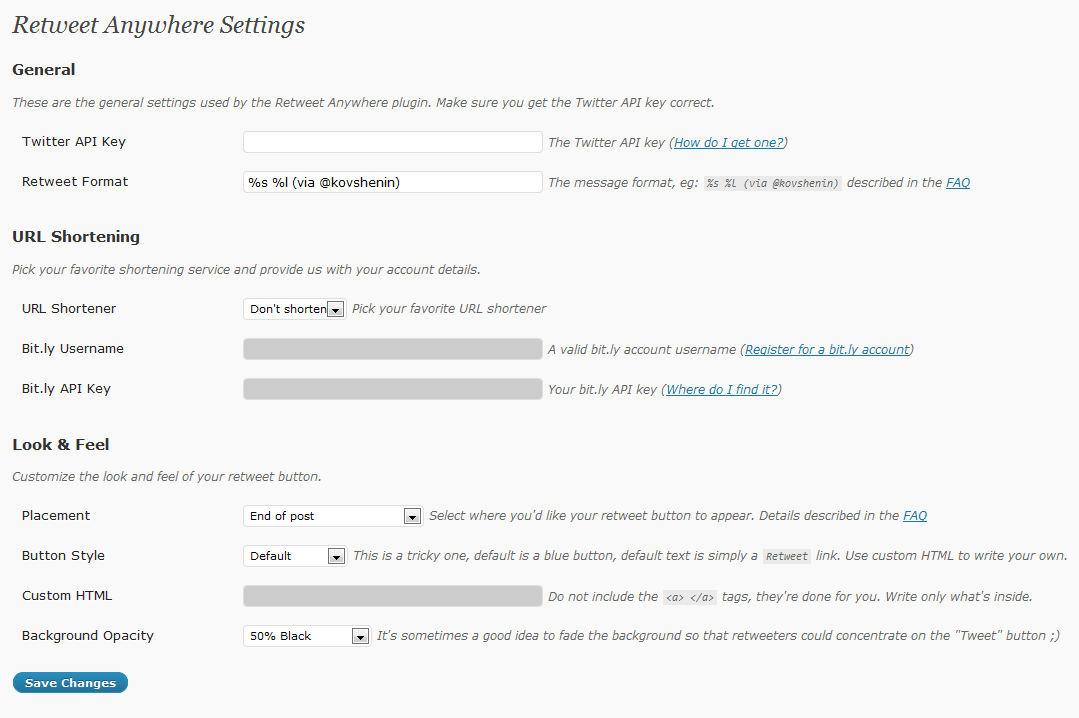

Download, changelog and other notes
 Download link, changelog, FAQs and other notes are located in the wordpress.org database. Retweet Anywhere is officially hosted and maintained at the WordPress.org plugin database, contributors are welcome. Updates and support is available through WordPress.org as well. I also like when people with accounts vote it up ;) thanks!
Frequently Asked Questions
Where do I get a Twitter API key?
The Twitter API key is one assigned to your Twitter applications. Go ahead and Register a new Twitter @Anywhere Application. Make sure that the Callback URL matches your blog’s domain name and Access type is Read and Write.
After your app has been register just copy your API key from the application profile in Your Apps.
Retweet Message Format
This option specifies how the pre-defined text in your retweet box will be formatted. Use %s to shot the post title and %l to show the link. Here are a few examples:
%s %l– My Brand New Blog Post http://example.orgReading: %s– Reading: My Brand New Blog Post%s %l (via @kovshenin)– My Brand New Blog Post http://example.org (via @kovshenin)
Shortcode Specification
Additionally you can use the retweet-anywhere shortcode to implement retweet functionality inside your posts, anywhere in your text! You can also override the standard settings any time by specifying them as arguments. For instance, if your settings are set to the standard retweet button and your format is, say RT @kovshenin %s %l, try this code in your post:
Please [ retweet-anywhere html="retweet this post" format="Reading: %s %l /by @kovshenin" ]
See what I mean? It’s literally anywhere! You can also use the title attribute to override the default tweetbox heading.
Retweet Anywhere with PHP
This is even simpler! Just make sure you’re inside your loop when calling the retweet_anywhere() function:
if (function_exists("retweet_anywhere")) retweet_anywhere();
Retweet Anywhere.. What About Sidebar Widgets?
No problem. You have two options here. One is to use the Retweet Anywhere Widget, which you can find in your Appearance section in the admin panel. All settings are self-explanatory. Second option is to use the shortcode in your text widgets. All you have to do is enable the widgets shortcode in the plugin settings and use the twitter-anywhere shortcode in your standard text widgets. Voila!
Please supply any feedback to the comments section of this page. Pingbacks and trackbacks are appreciated too. Thanks for all your contribution.
I can't get this to work. Plugin is installed and api is correct. Button shows on posts. When you click it pops up you hit tweet box closes but no tweet is ever sent nor does it ask you to auth. No other plugins installed on vanilla WPinstall. Is it broken?
ok so deleted app on twitter created a new one added new api key and now the lightbox does not include the input box or tweet button. LOL. I've been having a nightmare using @Anywhere and it's just cut and paste code!
Vanilla? Wha? Could you provide me with a link to investigate?
[…] Démonstration du plugin Retweet Anywhere ! […]
[…] Kovshenin´s Retweet Anywhere ermöglicht es den Bloglesern direkt vom Blog aus zu Retweeten. Zur Identifikation wird OAuth […]
[…] Retweet Anywhere von Konstantin Kovshenin ist es Bloglesern möglich direkt vom Blog aus zu Retweeten. Zur […]
Alright, I have tried it, here are my first remarks: great plugin, does the trick! I would have loved one more line in the plugin settings panel: a way to customize the message above the tweetbox ("Retweet This Post:") without touching the code.
And I added a rel="nofollow" to the link of the button, that's how I used to integrate my social bookmark buttons, for SEO reasons.
There also seems to be a problem in the admin panel, when entering code in the Custom HTML input box. I have entered twitter and it broke the layout a bit: http://www.twitpic.com/1hgr7p
That's all for now, I will keep playing with it a bit I guess.
Ah, didn't take my code in the latest comment: the code I entered in the Custom HTML input box was the word twitter surrounding by a span (that's how I get my image).
Awesome, will fix that for sure, thanks for your input!
Social comments and analytics for this post…
This post was mentioned on Twitter by themelab: [Plugin] Retweet Anywhere for #WordPress – http://bit.ly/bEzIBK (via @kovshenin)…
Question! Does anybody think that embedding hashtagging by post tags (sort of like what Feedburner does) is a good idea? Should I implement this in the next release?
Personally I do not feel the need for such feature, but maybe others do…
It look great on your site, but I got the same problem as modemlooper, and my hovercard box works.
any idea ?
Delete your Cookies or Reset the Consumer key
Done, it seems to change something, when i use a different account,.. Thank you.
So my question:
You can't use tweet with the same account that youuse to log at the twitter dev. api the app ?
I don't see a reason why. I'm using it and it seems to work fine.
[…] Retweet Anywhere von Konstantin Kovshenin ist es Bloglesern möglich direkt vom Blog aus zu Retweeten. Zur […]
Hi!
It seems I found another issue. When I browse pages of my blog where there is no php call to the plugin, I get an error on IE: "Expected identifier, string or number", line 23 of retweet-anywhere.js
Can anybody reproduce?
Link?
Sure thing, sorry about that! Here you go with an example of a static page on the blog of the company where I am working:
http://www.liligo.co.uk/travel-blog/your-opinion-…
объективное ощущение, что с плагином WP выдает белые страницы в разы чаще.
Thanks for this! I just installed it on my blog and it seems to be working great.
FYI, there seems to be a minor bug in the settings. When I added quotation marks around the %s %l, after pressing save everything shows up properly in the lightbox, but in the settings everything after the first quote goes blank. It still works, but the settings themselves don't reflect it.
Really though, just wanted to say thanks. :)
Yeah Roxanne, known bug, will fix in next release ;) Thanks for reporting, cheers!
[…] Retweet Anywhere: como su nombre indica solo nos permite añadir una caja para enviar tweets directamente. Lo mejor de todo es que lo hace de forma muy elegante con una caja flotante. El el plugin que he usado en este blog. Si hacéis click en el botón al final de la entrada que pone Retweet […]
Keeps asking for client ID? where do I put that?
Jay, you have to get a Twitter API key.
I just take a look at widget box, how can i put that box in the post?
Box? In the post? Wha?
This is very nice but I have 3 issues with it.
1. The retweet image is a png, but the the corners don't use alpha transparency so they show up white on my blog's dark background. I fixed it by using an image from another plugin.
2. For the url shortening setting, you should replace "Don't shorten" with a setting that uses shortlinks. I tried making a patch but I couldn't get the_shortlink() to work so I worked around it by hard coding in my blog's url and appending $post_id.
3. I'd like for the retweet button to only show up on individual posts (and perhaps pages). There's no way to turn it off for links that show listings of posts (the home page, category listings, etc).
Dawn, howdy
1. Your fix is correct, not all browsers support alpha transparency anyway ;)
2. Will fix as soon as 3.0 is out.. I guess ;)
3. Of course there is. Turn off the automatic insert in your settings, then open up your wordpress theme files, such as single.php and page.php and use the retweet_anywhere() php function to fire it wherever you want to ;)
Cheers! ;)
[…] этого прекрасного плагина Константин Ковшенин. Я решил перевести админку плагина на русский […]
Hi, really nice plugin but I have a question : is it possible to load it only on pages where it is used ?
I have Re-Tweet buttons only on my blog page, but the plugin calls twitter on every page, slowering down the static pages (especially the static home page).
Is it possible to limit the use of the plugin to my blog page only ?
Found a way, if someone is interested. Jusd add the following line to the functions.php of your theme :
add_action( 'wp_print_scripts', 'my_deregister_javascript', 100 );
function my_deregister_javascript() {
if ( !(is_home() || is_single())) {
wp_deregister_script( 'twitter-anywhere' );
wp_deregister_script( 'retweet-anywhere' );
}
}
Allows Twitter Anywhere to load only on my blog pages (index + single pages).
Can be flavoured to your test using WP conditional statements… Will work with any plugin using the wp_enqueue directive…
netking, as mentioned in the plugin description and usage, you can use the PHP functions or shortcodes to display Retweet Anywhere wherever you want to, all you have to do is switch via the settings, then use the retweet_anywhere() function in your theme templates.
Also, you don't have to deregister scripts, as static content (including javascript) is cached in your browser on first load, so you're not loosing any load time actually ;)
I wasn't talking about loading times, but about the fact that the plugin was calling the Twitter API, even on pages where not used…
I don't believe it calls the API, it simply loads some javascript. @Anywhere actually queries the API when events like hover occour, which again are asynchronous and don't slow down the website at all. If you're not using any of those features on a page, then no calls to the API are made.
Maybe only the verify credentials part is fired on load in case it's used.
Thanks for a great plugin! I know it's probable out of the scope of this plugin, but do you know a way to change the retweet popup?
On my test site I'm using a sliding div to display post meta information below each post on the frontpage. Is there a way to include the retweet box in the sliding div, instead of it popping up?
Not with this plugin, as it uses Facebox to pop out the message, but you can always tune it for your own sliders and poppers, after all, it's @anywhere ;)
I was afraid you would say that ;).
I'll try to figure it out myself, but I think this is out of my league, skillwise. Any plans on writing that chirp tutorial, that could of help ;).
[…] Retweet Anywhere […]
It doesn't seem to work correctly in IE. Anyway to get it to work in IE?
Ah, die IE! Will run a few tests before the next launch. Thanks for noticing.
Hi Konstantin,
Incredible work here. I truly like the facebox popup aspect of this plugin, and felt compelled to replace the one I was using http://wordpress.org/extend/plugins/topsy/
The only thing I'm truly missing is to customize the retweet button. I wish you'd provide sample/step-by-step instructions. In particular, I'd also like to know how I can get the button to "Float:right".
Still, even in default settings, this plugin is definitely a winner!
Hey there, no probs. The link around the image (using default settings) has the "retweet-anywhere" class, so fire up your CSS and type in: a.retweet-anywhere { float: right; }
Cheers!
Thanks Konstantin,
Lastly, is there a way to show retweet anywhere only in single posts? Can it be hidden from the main page?
Yep, I explain how in a comment above…
[…] WP plug-ins ! Plugin activer la compression Un autre Slideshow pour wordpress Plugin Category Icons Plugin Retweet Anywhere Plugins 8 plugin d’intégration vidéos sur votre site Plugin Tabs Slides (onglets) Plugin […]
Hay,
Ho do i set Retweet to apear on my blog posts but not on the pages of my site??
Paul, look through the comments above.
hello, I'm using this plugin and i love it. :) I do wanna ask one question tho.
Can this plugin show who retweeted my post? so everyone can see who retweeted when they click retweet button.
Thank u for the plugin :)
I think you're trying to achieve what tweetmeme did, but go further and display who retweeted the post. Unfortunately this plugin is not that complicated, but maybe one day will be ;)
Well now it doesn't work :(
I already configured the ReTweet format and always showing a default %s %l. Is there any idea to change this?
Are you running the latest version?
Отличный плагин! Так держать Костян!
Спасибо ;)
This is exactly what I was building myself. Thanks for saving me the time.
You're blog rules! Keep it up.
OK. For IE6 twitter's @anywhere currently doesn't work. This isn't a problem with the module, but twitter.
For IE7, there are bugs which cause this module not to work. I have fixed them. In IE6/7 you can not do this when defining an array (the final comma):
var data = {
foo: 'bar',
};
Here's my patch to resolve the issue:
+++ b/htdocs/blog/wp-content/plugins/retweet-anywhere/js/retweet-anywhere.js
@@ -13,7 +13,7 @@ jQuery(document).ready(function($){
var data = {
action: 'rta_getmessage',
post_id: $(this).attr("rel"),
– format: $(this).attr("rev"),
+ format: $(this).attr("rev")
};
// Set the Facebox settings according to settings from localize_script
@@ -82,10 +82,11 @@ jQuery(document).ready(function($){
height: r_height,
width: r_width,
label: r_label,
– defaultContent: response.message, // Received message
+ defaultContent: response.message // Received message
});
Having an interesting problem. When I envoke ReTweet Anywhere via php, My tweets end up in the format: ""Chaoctic+Sky"+by+Kevin+Thornhill +http://www.shutterphoto.net/?p=3232" – all those "+" shouldn't be there, and the URL isn't shortened. For that matter, it doesn't use the format I set via the WP Admin page for the plugin (which was "%s %l (via @shutter_photo)
Any thoughts?
The titles and URLs are urlencoded() for correct HTML. URL shortening is a different option in the plugin settings.
I know this is a beginner's statement but still, if you're trying to figure out why the manual placement doesn't work, here's the correct string:
No…not a code placement. That works perfectly. The problem is that in the text that will be (is) tweeted, it replaces all the spaces with +'s. It's also not using the formatting that I changed int he control panel.
I will investigate that.
Figured it out. Blame it on my minify option in my W3 Total Cache plugin. I disabled minification…site runs a tad slower, but at least it works the way I want.
I like your widget, but when it is displaying in my individual posts on my home page, the url is linking to current page. Is there any way I can link it to the post's permalink?
Chris, it's because you're using the widget. The widget is intended to share the current page, thus if you're on the homepage you'll share the home page, otherwise you'd have to display 10 widgets if there are 10 posts on your front page. For sharing posts on your homepage use the button placement (end or beginning of post) or a shortcode inside your post like I do on my blog. Cheers!
My mistake, but I am not using a widget, instead the manual button placement. It is within the loop yet still links to the current page (homepage). If I use the shortcode it works, but I prefer for it to automatically include the retweet link.
Hey Chris, I will investigate that and fix for the next update.
[…] Retweet Anywhere is customizable and the retweet format is also set by the administrator. Aside from that, users can edit their tweets before it was automatically retweeted in their twitter accounts. This plugin also includes a customizable retweet widget. […]
Naturally I like your web-site, however you have to take a look at the spelling on several of your posts. Many of them are rife with spelling problems and I find it very troublesome to tell you. Nevertheless I’ll definitely come again again!