In a previous article about Custom Post Types in WordPress 3.0 I outlined one of the most exciting features coming up in 3.0 and I noticed that people have already started building websites upon these new features. It’s not a secret that I’m working on a project myself which involves 3.0 so just like everybody else, I can’t wait to see it being released!
My project involves a custom post type for real estate and in this post I’d like to show you some tricks on:
- Working with custom post types and permalinks (a.k.a the 404 issue)
- Using WP_Query to find your custom-typed post
- Adding custom meta boxes to your edit post screen
We’ll deal with more code than images today so get a clean copy of WordPress 3.0 (Nightly build) to experiment upon. We’ve seen the register_post_type function already which is clearly explained in the Codex and even more clearly in the source code so I expect you read those bits if you haven’t.
Permalinks with Custom Post Types
This is one side of the feature which is not thoroughly explained in the source code, and I’ve seen many people end up with 404 pages while their permalinks point correctly. The trick here is in the rewrite and _builtin part. The _builtin parameter simply tells WordPress that the new post type we’re registering is built in. Most of us specified it as true (and I did too in my previous post) as part of the code was just copied from the core part where Posts, Pages and Attachments were being registered, and those are built-in. Built-in post types are handled differently by the core, so make sure you switch that option to false.
The rewrite parameter is not too tricky if you went through the sources, it’s simply an array to specify how would you like your permalinks to look like for this specific custom post type. Let’s look at an example:
register_post_type('property', array(
	'label' => __('Real Estate'),
	'singular_label' => __('Property'),
	'public' => true,
	'show_ui' => true, // UI in admin panel
	'capability_type' => 'post',
	'hierarchical' => false,
	'rewrite' => array("slug" => "property"), // Permalinks format
	'supports' => array('title','author')
));
Straightforward. Now if you registered your custom post type this way, your edit post screen should show you the correct permalink, i.e. /property/post-name which now gets handled by the core rewrite module so you’ll be able to see the contents of your post if you click on View Page. There, no more 404 errors!
One other way around this would be to use the add_permastruct function of the $wp_rewrite object and manually define what kind of permalink structure you would like to use for your custom type posts. Don’t forget to filter post_type_link if you do.
So how about using different templates for custom post types? Well, you could do that somewhere inside your theme, but I like to hook to the template_redirect action, so here it goes:
add_action("template_redirect", 'my_template_redirect');

// Template selection
function my_template_redirect()
{
	global $wp;
	global $wp_query;
	if ($wp->query_vars["post_type"] == "property")
	{
		// Let's look for the property.php template file in the current theme
		if (have_posts())
		{
			include(TEMPLATEPATH . '/property.php');
			die();
		}
		else
		{
			$wp_query->is_404 = true;
		}
	}
}
Note: It has become much easier to use templates with custom post types with WordPress 3.1 and especially 3.2. Take a good look at the new Template Hierarchy ;)
What we did here is looked for our custom post type and redirected it to property.php located in the currently active theme (assuming it’s there of course). This part may be done in several different ways and mine’s not the best, but it gives you an idea of how to capture custom posts requests. Let’s move on to querying.
WP_Query and Custom Post Types
This is easier than you think, there’s absolutely no tricks in here, and it’s all straight forward. Just like you used to search for posts and pages, you search for your custom post name, in my case it’s property:
global $wp_query;
$wp_query = new WP_Query("post_type=property&post_status=publish&posts_per_page=5");
That’s it. Custom post types are handled pretty much the same way in WordPress loops, this means that you’re free to use template tags such as the_title(), the_permalink() and so on.
Metaboxes for Custom Post Types
Metaboxes are just as easy as queries. Just take a look at the $page parameter of add_meta_box. That’s where you have to clearly state which screen should hold your metabox. In my case it’s property, so here’s what I got:
add_meta_box("my-property-meta", "Property Options", "my_property_meta",
    "property", "side", "low");

function my_property_meta() { echo "Boo!"; }
Awesome, isn’t it! It’s also a good idea to fire add_meta_box in the admin_init hook ;) Here’s a sneak preview of what we’ve got:
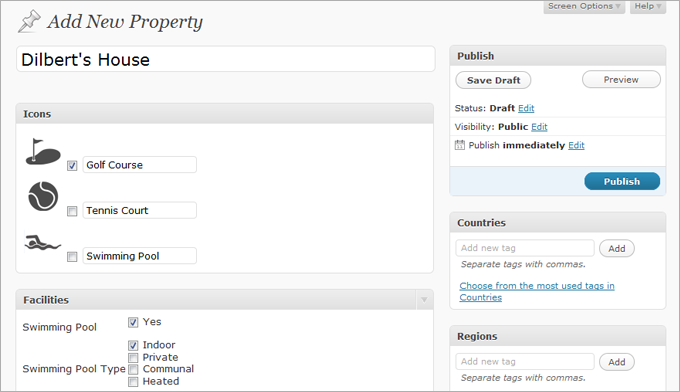
I’m not sure where all this is going, but I see people getting excited about this. I see other people who don’t care and say they could do all the same stuff in the edit post page, then extend all the stuff using custom fields. That’s true, until you got a say not very computer literate client. I’d like to see somebody explain custom fields to those types ;) I didn’t manage to, maybe I haven’t got the skills, but hey, isn’t it easier to click, drag & drop, etc? I mean you do use your mouse, don’t you?
Anyways, let’s see where this goes. I’ll be working on the real estate type for some time but I’d like to hear out your ideas and perhaps some written examples of how we (the themes and plugins developers) could benefit from custom post types and make our clients a tiny bit more happy. Cheers!
Working Example: Podcast 3.0
Here’s something I’m working at and will hopefully finish this in time for WordPress 3.0. You can look through the source code to see how the Podcast custom post type is registered, the way a meta box is added to it, and the way custom taxonomy is used together with the custom columns in the edit post screen.
There’s a template_redirect action which fires a theme file called podcast.php which would be the template used to display podcasts so you’ll get an error if you don’t create such a file in your theme. Feel free to use the standard template tags inside the file, it goes as an ordinary WordPress loop.
Download: Podcast 3.0 (update:outdated) for WordPress.

[…] This post was mentioned on Twitter by Ruhani Rabin and kovshenin, Stefan Persson. Stefan Persson said: RT @kovshenin Extending Custom Post Types in #WordPress 3.0 https://konstantin.blog/2119 […]
Have been looking for this kind of functionality for quite a while, so thanks for the great write-up.
One question though – where do I add the code above? Do I create my own plugin and introduce it there, or is it part of my theme, or somewhere else?
Steve, it could be a plugin or you could do it from functions.php in your theme.
Thanks, I think the problems I was having was due to too early initialisation in my plugin – had a lot of problems with the "rewrite" part of the register_post_type and with add_meta_box.
Is there any chance of doing a post with a complete example of a (very) simple implementation (including add_meta_box!) to show how it works? There is still very little information available on how to implement this in the correct manner, unfortunately.
Steve, I'll write a short plugin which would illustrate how it all works. I'll upload it as an attachment to this post, so stay tuned, aight?
Cool, thanks!
Hi, that's fantastic, a great help! As far as I can see, all the missing pieces of the puzzle are there, and I look forward to getting my own custom post type up and running now!
I'm glad you liked it Steve :)
Social comments and analytics for this post…
This post was mentioned on Twitter by kovshenin: Extending Custom Post Types in #WordPress 3.0 https://konstantin.blog/2119…
Today I am getting 404 pages for some reason.
The only thing I did was upgrade to the latest nightly build.
Was working yesterday.
I thought that maybe i had something else wrong, then i tried your podcast plugin. Same problem. I blame it on nightly build.
thanks for the sample plugin! Most important part of the plugin is the meta update section. Invaluable code there.
Specifically the section :
// When a post is inserted or updated
Ah yeah, that's something I came up with quite some time ago, very useful indeed =) Cheers!
Could be a nightly build, though I'm running the trunk version and updating it two or three times a day, so dunno. What permalinks settings are you using? And are you using them at all?
Wasn't working all morning, but I didn't care, i knew i could grab the information with a custom query. Then i thought hey, maybe i should just change the rewrite settings again, and that seemed to help it.
Konstantin, nice follow up ~ thank you, I've added this and the frumatic blog feed to the reader
Thanks! Got you on facebook ;)
Very nice indeed, however beeing a beginner on these add_meta_box and etc, could you explain to me how i can insert additional input fields and display them at separate locations in the template using the podcast.php you attached to this post if possible?
Would be really grateful
Sure, check out the meta_options() function on line 137, that's where you retrieve the custom fields and set the options for your current edit post screen. If you add something there make sure to add it to the $meta_fields array on line 12, which is used in the wp_insert_post hook. Also make sure you name your input field accordingly.
To output custom fields in your theme us the same $custom = get_post_custom() code and print_r($custom) to see what it returns. Hope that all makes sense.
More details in the codex: get_post_custom and add_meta_box. Cheers!
Thanks alot, i think il get the hang of it :)
But to output the data wouldn't <code>get_post_meta(ID, 'key', true);</code> work aswell? just seems better if you want to output the data at specific places :)
Thanks for everything
/Regards
Patrick
oops see that inserting code directly didn't work :P what i meant to show was "get_post_meta" function and x= the specific custom field
Gotcha ;)
Of course, assuming it's single ;) It's just that I use multi-check fields sometimes, it means that I could have several values under one key in custom fields, that's why I'm used to dealing with arrays and imploading rather than retrieving singles :)
Aaah i see, thanks for the clearification :)
how do you query custom post types by custom taxonomy types on the frontend?
Matt, use <code>WP_Query("post_type=my_type&my_taxonomy=value");</code> assuming you applied this patch to query.php – there's a little glitch there in 3.0 which sets post_type to any if taxonomy is being asked for. That patch solves the issue and will probably be implemented after some more testing.
thanks, i was using the taxonomy ID. switching to the slug works perfectly.
I'm still having issues with rewrites 404ing with my adapted code and your sample with the latest trunk. Can you confirm this is an issue with trunk? Pulling my hair out trying to get the rewrites to work on the front end.
Finally got it to work. I had to call $wp_rewrite->flush_rules(); every time for some reason. I thought you're not supposed to call it on every page load, but that's the only thing that works.
Aaron, you shouldn't flush rewrite rules every page load, that will slow down your website. Rewrite rules are flushed when you visit the Permalinks settings page in your admin and press save and you should hook to 'generate_rewrite_rules' if you'd like to make some cusom entries. Also make sure query_var for your custom post type is enabled, otherwise WP_Query will not recognize the request and ignore it.
Ok, I think I figured out the flush rules thing. Another (poorly designed) plugin was flushing rules on every page load before init (on include) where I was registering the post type. Other than fixing that plugin, is there a way to check if my rules are present and flush if necessary to prevent conflicts with other poorly designed plugins?
And to other devs, it seems to be necessary to call $wp_rewrite->flush_rules(); on plugin install (after your post type is registered).
You can always take a look at the global $wp_rewrite object which contains all the rules. Maybe you can hook somewhere near init and do a quick check.
I just spent half an afternoon trying to get my custom permalink structure to play nicely with my custom post types, and finally figured out that it only worked when register_post_type included the argument 'query_var' => true, although I am not sure why. Thought I would post this here in case it comes in handy for anyone else.
Thanks for sharing! I think that it's quite obvious as the created permastruct does include the extra query variables and they're not set into the allowed ones, so query_var should be set to the appropriate value, not necessarily true as WP_Query will be expecting a string (more info in query.php and post.php). Also, make sure that you flush your permalink structure by visiting the Settings – Permalinks page in your admin every time you do changes to WP_Rewrite, that could help in certain situations.
Hmmm. 'query_var' => true is the only thing that works for me.
This article is really great and very intuitive. Im working on a project that might really benefit from this custom post type thing in terms of organization and ease of management especially in the admin side (for the client to easily manage their posts).
This is the gist of the project, The site will have a regular blog feature and another post type which will handle their products containing details of it, some screenshots and a link to the app store. Well this kind of project has been done plenty of times before but I think its really a good idea to have the blog and the product posts separately in the admin side.
But I still need to delve into how this could be done cause Im planning to make this as client friendly as possible. Where the add-post page will only contain what they need and with the proper labels for them to easily understand. I want to customize it according to their needs.
Ben, custom meta boxes could help you, and use the supports argument to remove anything that is extra.
Hi again,
Im really not an expert in here but I get the idea. I just want to add another field in my custom meta box. This time I want a checkbox but Im having difficuty making it work.
Great write up.
Any ideas on creating an "index" or "archive" page for your podcasts example?
It seems logical that I could have a url: http://www.domain.com/podcast/ which would be an "archive" page of all podcasts…
Any wisdom?
Yup, we do that by adding custom permastructs which form new rewrite rules for podcasts. Other than that you could just try domain.com/?post_type=podcast, that should work.
Can you paste an example of your permastruct code to get archives showing on your custom slug? Especially paging i'm not sure about.
<code>$wp_rewrite->add_permastruct("property", 'property/%location%/%property%/', false);</code>
Hi, Just wondering how do I implement this code? Where will I place it and how do I call the custom slug using the new "Menu" feature in 3.0.
Thanks!
Ben, it's all pretty complicated as you have to deal with WP_Rewrite, more on that in the Codex. But the standard register_post_type call should handle permalinks quite good and you shouldn't have any rewrite trouble. In my example I did that because of the %location% part, which is not there by default, and I do some replacements in the rewrite rules at a later stage.
Would you share the rest of the code that you used to implement this permastructure?
There's not much 'rest of the code', I'm pretty sure you'll figure it out from the codex and source codes ;) mine's pretty messy, too much information :D
I hacked together something that worked for me, and posted a big mess about it.. check it out if interested http://www.ballyhooblog.com/custom-post-types-wor…
I am experiencing a problem with permalinks with both your Podcast 3.0 plugin and my own Custom Post Type test plugin.
When I go into 'Add New Podcast', instead of displaying the slug underneath the title, wordpress prints out the following ugly URL:
Permalink: http://mydevsite.com/wordpress/?post_type=podcast…
And then a button 'Change Permalinks'. Can this be fixed?
Err, Vlad your settings are probably the default type permalinks, i.e. without any rewriting – domain.com/?p=123 so what you see there is normal. Go to Settings – Permalinks and switch to something more interesting ;)
Oops – forgot to mention – my custom structure is:
/archives/%postname%/
I am having problems with this permalink structure.
Strange. Did you specify anything for "rewrite" when registering custom post?
I have tried with and without setting 'rewrite'. I have also tried with and without 'query_var'.
I note that I can access my posts if I manually enter the url:
http://devsite/wordpress/mycustom/testcustompost
where 'testcustompost' is a slug I manually assigned in the quickedit screen.
The problem is that the pretty permalink is simply not picked up in the edit screen. Here is my current line:
<code>
function register_mycustom()
{
$supports = array( 'title', 'editor', 'custom-fields', 'revisions' );
$args = array ('label' => __('My Custom'),
'singular_label' => __('My Custom'),
'public' => true,
'show_ui' => true,
'capability_type' => 'post',
'supports' => $supports,
'exclude_from_search' => true,
'hierarchical' => false,
'query_var' => true
//'rewrite' => array('slug' => 'mycustom')
);
register_post_type('mycustom', $args);
</code>
Try to uncomment the rewrite line ;)
Very funny.
Tell me, do slugs appear correctly in the editor on your installation?
Yeah ;)
In the file you posted for the podcasts one. How would I now do the following:
-Create a parent page to show all posts under podcast type
-Display "length" custom meta box in the podcast.php template that displays the podcast post
-Display the speaker custom taxonomy term in the podcast.php template
Thanks a lot.
Wade, use a custom WP_Query in your parent page template and specify: <code>post_type=podcast&post_status=publish</code>
Length is stored in the post meta, so you would display it exactly the same as I did in the edit podcasts screen where the list is. Same applies to custom taxonomy, they're all there, take a look at the code.
Thanks a lot, got it going!
Great, you're welcome ;)
Another bug I think I have found is that the quickedit screen displays the checkboxes 'allow comments' and 'allow pings', even though I did not specify these capabilities in 'supports'.
You should report that to the WordPress trac I think.
I have reported both my problems to http://core.trac.wordpress.org/
Cool, keep tracking their status, i.e. add yourself to CC
Patches have been released to fix both problems I was experiencing – the superfluous checkboxes, and the more serious one involving missing pretty permalinks in the editor for custom post types.
The links are:
http://core.trac.wordpress.org/ticket/12870 http://core.trac.wordpress.org/ticket/12869
Awesome! Nice going!
Hi, excellent post, people like you get us all excited for the new WordPress :).
I was wondering, how did you "delete" post content box from the Edit screen in the Real State example image? And how can I replace it with checkboxes and so?
Hope yo understand my english XD
Thanks
Marshal, look for edit screen meta boxes and take a look at the supports argument in register_post_type, it's all there.
Thanks men. I'll take a look
Thank you for this. This example continues to be so helpful.
I can see a problem with "add_meta_box()". If I create a plugin that add a box to post, they won't show it other post types right? It's ok if it's my plugin and my custom post types. What about your podcast type plugin and another meta box plugin.
Well, I wouldn't call that a problem. You can always loop through registered post types and add meta boxes to them one by one ;)
Hello again,
I've encountered a new problem with template redirect. The post seems too get the right body class from the template i specify in redirect however it doesn't have any of the markup like the template file i specified.
Any chance you could look into this?
A nevermind i resolved it. just some typo i had done in the code. Thanks for this great article! :)
Hi
The function add_meta_box() no longer appears to be in WordPress SVN on the head revision (r13890 at time of writing).
Any ideas?
Leo
I had the same problem with the nightly build dated 04-10-2010.
When I used add_meta_box(), I received a fatal error: call to undefined function add_meta_box() in… functions.php. (I was doing this in functions.php and not via a custom plugin.
I grepped for 'function add_meta_box()' in the core, and found the function definition in wp-admin/includes/template.php. Then, I included the template.php file prior to calling the add_meta_box() function:
// Ensure that add_meta_box() is available.
require_once( ABSPATH . 'wp-admin/includes/template.php');
// Add the meta box
add_meta_box("my-property-meta", "Property Options", "my_property_meta",
"property", "side", "low");
function my_property_meta() { echo "Boo!" . ABSPATH ; }
After that, I
…was good to go.
(Previous comment was truncated.)
add_meta_box() should only be called in a hook on the admin side. http://codex.wordpress.org/Function_Reference/add…
add_meta_box should be fired in admin_init, you should't do it earlier.
How would I go about making a more complex type of field. So, with your real estate example…
Say "Realtor" was a field. But there were fields associated with Realtor, like "name," "phone number," and "fax." I could have all these be separate fields, but I'd prefer to just select an existing Realtor name and have it use the properties I had already associated with it. But still be able to edit somewhere in the UI if I need to, say, change a phone number.
To build something like this myself, since there's presumably no plugin, can you point me in the right direction?
Use a custom post type called Realtor with meta data for default phone number, fax, etc. Then use some quick WordPress AJAX on real estate objects to query Realtor and gather default data to prefill the inputs. Doesn't seem too complex to me ;)
Well, it's just constantly throwing me a 404 error. I can only get custom post types top work when i set rewrite => false
Any idea what might be causing it?
Set rewrite to true and go refresh your permalinks via settings.
I have tried your Podcast 3.0 and it throws
Catchable fatal error: Object of class Podcast30 could not be converted to string in C:wwwaquamarinespawp-includesclasses.php on line 277
(it throws is only on some screens, e.g. when you go to Media, Manage pages etc.)
i have tried to find the solution (not yet succefull) but it seems it is some wordpress bug when using with PHP 5.2
Meh.. As I said, it's a pilot ;) Maybe you got an ugly trunk, try 3.0 beta1
Fatal error: Call to a member function add_rewrite_tag() on a non-object in /home/iampearc/public_html/wp-includes/post.php on line 862
I tried using that code directly as it is, I just wanted to create a very simple additional post type, and I get this – which prevents access to any of WordPress at all, until where I added the code is removed.
I'd be curious to see what you think of this? I used your exact code from above.
Thanks!
Perhaps you used in in a wrong place. It should be wrapped up in admin_init, I suppose that's obvious. You don't just do it via functions.php .. See http://codex.wordpress.org/Function_Reference/add…
Great, this is making more sense, since the rest was accomplishable in functions.php I thought that hook would also work. Cheers.
forgot my problem witch catchable fatal error – my fault (conflict with other function).
But i got 2 other problems
1. i had to save rewrite rules again, so it started to work, otherwise the pages were not accesible (i use %category%/%postname%)
2. I use child template but the TEMPLATEPATH points to parent template. You should use STYLESHEETPATH instead
My bad ;)
one note – even better would be to use
locate_template( array( ’your-template.php’ ), true )
as it should search child and then parent theme, but i was unable to make it working.
It also probably do not work with special page template, if you allowe them for your post type
best would be to define fallback templates (first page template, then child theme your-template.php, then parent theme your-template.php, then e.g. post.php (first child, then parent), then index.php (first child, then parent)) but i do not know how to do it inteligently (without checking existence of every file).
BTW the function should allow to define if to fallback with page-like path or by post-like path.
P.S.: I also miss the definiton of template for the taxonomy
Wow, sounds cool, didn't now about that, thanks! ;)
Has anyone had any luck getting thumbnails (featured image) into a custom post type?
add_theme_support( 'post-thumbnails' ); Works for ordinary posts.
Banging my head against the wall here.
Lane
I think someone broke it in SVN. I had an installation working at r13802, so I just moved all versions to this, which works fine!
Leo
Lane, look at the supports parameter when registering custom post types. I believe it's where you can allow post thumbnails.
re: Lane – with no problem. Don't forget to add thumbnail to support field of register_post_type. Playing with it just now
Yes yes. Should have checked the codex better. You are right. It works. Many thanks.
did you get this working? i get nothing, using the follwoing:
function post_type_person() {
register_post_type(
'person',
array('label' => __('Person'),
'public' => true,
'show_ui' => true,
'supports' => array(
'post-thumbnails',
'title',
'editor'
)
)
);
register_taxonomy_for_object_type('category', 'person');
register_taxonomy_for_object_type('post_tag', 'person');
register_taxonomy_for_object_type('role', 'person');
}
add_action('init', 'post_type_person');
Ha, yes! I had the identical typo! Your supports line should read.
<pre>'supports' => array('thumbnail')</pre>
I know, I was thrown off by the <pre>add_theme_support( 'post-thumbnails' ); </pre>
excellent thank you!
Great post. Was playing with the thumbnail issue (supports=>thumbnail) all good. But wanted the thumbnail to NOT be in the sidebar. Hmm. My workaround was to NOT add thumbnail to the supports array, but rather add a meta box…
Thanks for the great example!
Looks to me like it's trying to include(TEMPLATEPATH . "/podcast.php"); to edit podcasts but that file wasn't included with the plugin. Could you upload it so we can see the full example?
Thanks again!
I haven't written that file Jay, but feel free to just add a standard wordpress loop or whatever. Or a copy of index.php ;)
Hi, Im trying to count the number of images on a gallery and this is the code that I used in my single.php.
This album contains: get_var( "SELECT COUNT(*) FROM $wpdb->posts WHERE post_parent = '$post->ID' AND post_type = 'attachment'" ); ?> pics.
It works fine in a regular post but there is an error when I use it in a custom post (custom.php).
This album contains:
Fatal error: Call to a member function get_var() on a non-object in C:wampwwwmysitewp-content hemes wentytencustom.php on line 51
Any help will be appreciated.
Thanks!
Does anybody have an idea why this code doesnt work on custom post type? It works fine on a regular post and I really need to make it work on my custom post type badly. T_T
Please help me with this guys.
Thanks in advance!
not tried, but the error says, that you are not giving get_var function an object. E.g. do you have
global $wpdb;
global $post;
in the custom.php ???
P.S.: i think it would be better to use wp_query for such database queries but not sure if it is possible for select count(*)
Thanks Man! its working perfectly now.
Cheers! :)
I've gone over this a million times, and I just can't figure out how to get the "length" into the template. I'm using get_post_meta and it just keeps coming up blank. I've tried this a million ways.
Please help?
what function do you use? You can e.g.
ID, 'length', true);
?>
$post->ID,'length', true
ups, comments broke the php code
global $post;
echo get_post_meta($post->ID, 'description', true);
i mean
echo get_post_meta($post->ID, "length", true);
of course (comment system will probably replace quotes, use standard php ones.
if it does not work, try
print_r (get_post_custom($post->ID));
global $post; was the missing piece. Thanks.
you are welcome
I have checked your podcast again and your wp_insert_post is imho not optimal – you should work with all your meta with one serialised key. And also update_post_meta is never false (and you do not need add_post_meta)
See my version (my post_type is "virivky" and post meta key is "virivka_meta"
// When a post is inserted or updated
function wp_insert_post($post_id, $post = null)
{
if ($post->post_type == "virivka")
{
$virivka_meta = array();
// Loop through the POST data
foreach ($this->meta_fields as $key)
{
$virivka_meta[$key] = @$_POST[$key];
};
// Update meta
update_post_meta($post_id, 'virivka_meta', $virivka_meta);
}
}
I experimented with storing all of the meta data for each "post" in a single key, and was able to get it working, but this caused me problems later when I needed to use WP_query along with the meta_key and meta_value args. So, heads-up if you need to do queries based on your meta data and you're using a single key for everything.
If anyone has a good way to have the best of both worlds, I'd love to hear it. For now, I'm sticking with kovshenin's technique. Good point though noname, never-the-less. The array method could come in handy sometime.
Hi, I have an error when editing custom post types, I mean when going to "wp-admin/edit.php?post_type=podcast" for example, there's an error "file not found".
Does anybody knows whats going on?
Thank you
The same when trying to delete or sending to trash a post from a custom post type
You running 3.0 beta1?
Yes, 3.0 Beta 1
Update: This problem is when installed on local server on a Windows Machine (e.g. Xampp).
Trying on a Linux server everything is ok.
Strange.. Mine's working on both XAMPP and Fedora Linux box : maybe something with your apache config..
[…] post types trying to get a grips on making this lovely little feature do what I want. Namely https://konstantin.blog/archives/extending-custom-post-types-in-wordpress-3-0/ and WordPress Codex, and this […]
Hi Konstantin,
I found a problem:
Because there is no Default "Speaker", when you delete all the Taxonomies from the "Speakers", creates an error. Cannot create a array without any values, and then error on the foreach, my solution is this one
Right =) thanks
I saw this too but dont know how to solve it. Thanks for sharing! :)
Hey Kovshenin, could you elaborate a bit more on filtering post_type_link and $wp_rewrite?
Lane, sure! I've got an article about that lined up ;)
Excellent!
Does anybody know how to add meta box only to upload image? I want to add box, where wordpress user click on 'explore' button, browse his disk to search image file. and when he publish his custom post type, this image is uploaded on server
It should not be too difficult – there is allready this functionality on the add post page – add media button. So if you would copy the add media code (probably some action) on your custom meta box, it should work.
Other way is to normaly add input type="file" and then catch the file on post save action from $_POST and then use save attachment action to save it as post media.
Konradk, use add_meta_box to add a box to your edit post/page screen and include a file input as a form element, then hook to save_post and find your file from there. Here is one issue though, as the form in the edit post screen is simply a POST form, that generally doesn't support files. You'll have to add an enctype = multipart/form-data in order to process files. And you have to do it by modifying original sources, thus gone when updated. Maybe you could do a patch out of it, but unfortunatelly there's no filter to access that part of the code.
Cheers.
[…] Shared Extending Custom Post Types in WordPress 3.0. […]
Great article, having an issue though.
I created a custom post type called "featured" as outlined in the backend. Then I created a post in it. So far so good.
In the template for the homepage slideshow the following line grabs the data from a category in the standard post type.
if (get_option('wdg_use_pages') == 'false') query_posts("showposts=$featured_num&cat=".get_catId($featured_cat));
But I need to change it to incorporate this:
global $wp_query;
$wp_query = new WP_Query("post_type=featured&post_status=publish&posts_per_page=5");
I've tried several different ways but to no avail. Any thoughts? Thank you!
Cheers,
Christopher
not sure if i understand the problem right, but i see that you are using two functions for queriing posts: query_posts and WP_Query. Both do the same (WP_Query is Class, query_posts is a function that calls WP_Query Class), so if you want to use query_posts, do something like query_posts(“post_type=featured&post_status=publish&posts_per_page=5&showposts=$featured_num&cat=”.get_catId($featured_cat)); if you want tu use WP_Query, do something like WP_Query(“post_type=featured&post_status=publish&posts_per_page=5&showposts=$featured_num&cat=”.get_catId($featured_cat));
Thank you for the response. I called my post type featured, but in my functions file it was called feature, and I forgot a $ in front of a variable. Works like a charm now.
[…] Extending Custom Post Types in WordPress 3.0 […]
The screenshot is awesome. Adding some custom meta box and tweak into the permalinks of custom post types are good hacks. Thanks for sharing.
Youre welcome ;)
When I try to set a template with the template_redirect code from above, or the slightly different version in the podcast plugin, in my functions.php file directly after I register the post type but before declaring the metaboxes I get the following error: Warning: call_user_func_array() [function.call-user-func-array]: First argument is expected to be a valid callback, 'Array' was given in /home/servernameconcealed/webapps/php/wp-includes/plugin.php on line 395 Doesn't look like anyone else is experiencing this problem though. Using the latest nightly every few hours.
Oh your code was missing a "my" and moved the add underneath instead and now it works! <code>// Template selection
function my_template_redirect()
{
global $wp;
if ($wp->query_vars["post_type"] == "work")
{
include(TEMPLATEPATH . "/casestudy.php");
die();
}
}
add_action("template_redirect", 'my_template_redirect');</code>
Sorry, my bad, fixed ;)
Hi Konstantin,
I found an issue in here that might cause some problems in the future. When I try to "Quick Edit" a custom post, the values in my custom meta box disappears after I update.
I hope you could find time to look into this.
Thanks!
confirm with latest (today's) wordpress 3.0 nightly, go to report it
Yeh, add a hidden input in your edit-screen, name it edit-custom-post-submit and give it a value of 1. Then, in the wp_insert_post hook check for its existence. Had same issue a few weeks ago.
sorry to bother you again konstantin but can you give me an example of the code you're telling? Do you mean I should add a hidden input field in the custom meta box you used to have in the podcast example then add another condition in the wp_insert_post hook? Im not sure how to do this and I think this is a necessary fix. Im sure most people will need this too.
Thanks!
Ad mentioned in the comments below it seems that it's a reported bug and will somehow be fixed in a future version. Until then,yes, just add a hidden input in the custom meta box, and inside the wp_insert_post hook check for it's existence in $_POST, I think that's quite simple.
I'm having a problem where the posts under my custom post type are displaying the wrong page's content and taxonomy. They all are under a post type I created called Artists with a template artist.php attached the way you did but when you go to the post it displays a completely different posts content and custom taxonomy.
Does it have anything to do with where I'm including in the template?
Thanks,
Wade
Wade, could you pastebin your code somewhere?
I am having the same problem. Here is a link to my code: http://pastebin.com/jqLpvRiA
Another issue I had with your sample code was that query_vars["post_type"] was not set. My base permalink structure is "/%postname%", so a sample permalink for my custom type would be …/merch/some-merch-title
The only valudes in query_vars in this case would be array("merch" => "some-merch-title"). I fixed this by looking for a key in query_vars called "merch", but this is not ideal, as another post type could have a "merch" variable in the query. Anyway, the main problem is that it is pulling content from the regular post type (this is a fresh install so it just has the one "hello world" post, and that's what is getting populated in my template page).
Help?
Nevermind – just grabbed the latest nightly and it works fine now.
Cool ;)
[…] As for other popular CMS’ (such as Drupal), post types function as a kind of “Content Construction Kit,” giving you the ability to smartly add, manage and present specialized content. If you’re interested in trying this new feature, here is a good tutorial. […]
[…] and present specialized content. If you’re interested in trying this new feature, here is a good tutorial. Other than post types (and until major plug-ins update support for this feature), the only […]
[…] As for other popular CMS’ (such as Drupal), post types function as a kind of “Content Construction Kit,” giving you the ability to smartly add, manage and present specialized content. If you’re interested in trying this new feature, here is a good tutorial. […]
[…] As for other popular CMS’ (such as Drupal), post types function as a kind of “Content Construction Kit,” giving you the ability to smartly add, manage and present specialized content. If you’re interested in trying this new feature, here is a good tutorial. […]
[…] present specialized content. If you’re interested in trying this new feature, here is a good tutorial.Other than post types (and until major plug-ins update support for this feature), the only feasible […]
[…] As for other popular CMS’ (such as Drupal), post types function as a kind of “Content Construction Kit,” giving you the ability to smartly add, manage and present specialized content. If you’re interested in trying this new feature, here is a good tutorial. […]
Hi – great article. I have a couple of questions: I am running WP 3.0 and TwentyTen theme, but when I create a custom post and submit data into that post, I am getting a 404 error for the single post page – it says file is lost or not found. I have played around with permlink settings but will only show posts from the 'old' post categories, and not posts using new taxonomy scheme. Can you advise? Is this a theme problem?
Also I wonder if you could show us how you got the Icons and Facilities metaboxes into your Custom Post screen? How do you do that? Many thanks!
As an update, I downloaded latest nightly build but still have problems with 404's If I use only the default /?p=123 I notice that the uri changes to /?cat=123 if I use the normal post category, and this works fine. But if I use the custom post and new taxonomies/terms the URI changes to /?taxonomy-name=post-name and this is the archive page – this shows the post excerpt. When I click on post title to get to single view of this post (created from custom post) I get a 404. I think this must be a problem with WP right? Pls advise. Thanks
Maybe WP yeah, we should still wait for the actual release, but I had it all working fine in 3.0-dev and 3.0-beta1 so not sure why you're having these issues..
David, try to set the rewrite option to true when registering your custom post type, then go to settings and update your permalinks, that should fix it.
This is a great tutorial. I've learned a lot with it. Many WP deep concepts are now getting into my head… But I tried to figure out how you did metaboxes like this and I simple couldn't find how. Could you share with us how you did that? Maybe in another post. I'd really enjoy it!
Thank you very much!!!
Download the Podcast 3.0 code, there's a meta box there so you can see the declaration from the source code ;)
I love the tutorial, but I have a question, have you tried the download against the current beta1 via svn? I copied it to my functions.php in twentyten after a fresh install, and for some reason, it does not see the podcast post, when I try to view it. Is it some change they have made in the beta process? Any help would be appreciated as I am trying to implement something very similar and the documentation is lagging behind.
thanks,
Danny
Haven't tested the code against 3.0-beta1, maybe they did change something, but it couldn't be too crucial. I'll take a look later and see if I can come up with a newer version.
Hi everyone,
I’m relatively new to WP and I’ve been looking for a solution to paginate custom post types for quite a while now with no success yet.
Konstantin, your suggestion works to the point of displaying my custom posts list. I'm also using wp-pagenavi to paginate those custom posts. The plugin is working as it should but when I try to go to page 2, 3 … the same posts keep showing, although the url shows (http://localhost:8888/wp3.0beta1/?page_id=100&paged=2).
Other relevant details:
– I placed the query on a page template. Create a new page and chose this custom page as template.
– This page is not my front page. It’s accessed by a wp_page_list menu item.
– During my tests I noticed the query and pagination works with cat= in place of post_type=, displaying regular posts instead of my custom post types.
Isn’t it possible to paginate custom post types? I don’t believe so. I prefer to believe it’s my fault.
Can someone help me out of this problem? I’m almost throwing the towel.
Thank you in advance.
Take a look at template_redirect and dump your global $wp_query object and you'll see what's going on. Perhaps some query is overriding the actual query from the browser.
I am also seeing a problem with the Podcast plugin – no podcast post is showing – I am using Beta-1
I am agreeing with David G
Also do you have a release of the Real Estate plugin that you have shown in some screenshot, I really want to develop this – I am currently making a Student Housing website so this would be useful.
Please let me know
Cheers
Chris
Chris not yet, I still have tonnes of work on that plugin, but I'll see what I can do as soon as it's done, maybe share it partly ;) As for Podcast 3.0, well.. *sigh* ;)
How would I get an RSS feed for a custom post type? I'm trying to figure this out as I am creating a podcast using custom post types and I want to create an RSS feed so that it can link to iTunes.
Use domain.com/?post_type=yourtype&feed=rss2 ;)
How do you list pages or posts of custom post types in the menu? They dont appear in the menu builder in WordPress 3.0 beta 2
Figured it out from: http://justintadlock.com/archives/2010/02/02/show…
Paste following into functions.php in your theme and add post tyes:
add_filter( 'pre_get_posts', 'my_get_posts' );
function my_get_posts( $query ) {
if ( is_home() )
$query->set( 'post_type', array( 'post', 'page', 'album', 'movie', 'quote', 'attachment' ) );
return $query;
}
I think that'd show pages and attachments on your front page.. Huh?
I'm stoked for 3.0 and custom post types. I totally agree with you that custom post types will help make sites client proof!
In your photo example above for add property, I see you have a really nice image showing how a user can assign icons to the property, 'golf, swimming, tennis'.
brings up 2 questions:
1. How did you design the interface so that an icon shows up as well as the name 'tennis'?
2. What if the user is adding a new property, but the icon he wants to use is not present in the list, can he add a new icon directly in the add property UI, or do you force the user to go to the icons screen to add it in first?
— say that when the user is adding a property, he wants to add an icon for a 'barn'. It is not in the list. I understand that it would be easy for the user to simply go to the 'icons' type and add it in, and then return to add the property, but that will confuse many users. Would be simpler if the icon does not exist, to simply add it while still in the 'add property' UI.
Is that possible yet?
(been trying to figure that one out for quite some time now)
Shawn, not in my plugin, but yeah, that's pretty much easy to accomplish. It's just that we have a fixed set of icons that could be associated to a property, so no need for uploads. About your first question, well it's just a simple algorithm that uses custom fields to store the checkbox value and more custom fields to store the names ;)
[…] naplno s WP 3.0 se do WP dostaly vlastní typy obsahu, o nichž jako první psali Justin Tadlock a Konstantin Kovshenin. Šikovný plugin pro správu taxonomií a typů obsahu se jmenuje Custom Post Type […]
[…] As for other popular CMS’ (such as Drupal), post types function as a kind of “Content Construction Kit,” giving you the ability to smartly add, manage and present specialized content. If you’re interested in trying this new feature, here is a good tutorial. […]
Beautiful, just beautiful. WordPress is all grown up now. [wipes tear of joy from corner of eye]
Thanks for breaking this down. I really dig your skills with organizing content logically for display (and for client usability). Sweet post series.
Thanks Benjamin ;)
[…] As for other popular CMS’ (such as Drupal), post types function as a kind of “Content Construction Kit,” giving you the ability to smartly add, manage and present specialized content. If you’re interested in trying this new feature, here is a good tutorial. […]
[…] As for other popular CMS’ (such as Drupal), post types function as a kind of “Content Construction Kit,” giving you the ability to smartly add, manage and present specialized content. If you’re interested in trying this new feature, here is a good tutorial. […]
Hi Konstantin
Thanks for this superior tutorial. Great work. Helped me a lot.
One thing I couldn't figure out is to set the correct css class "current_page_parent" for my new single-customposttype.php template.
For example:
In my "portfolio.php" i return all elements with the link to my "single-portfolio.php" template. The redirection works, but in the wp_list_pages() menu, the css selector "current_page_parent" is assigned to the default Blogpage "Blog" and not to the Page "Portfolio". I've played around with various register_post_type settings (show_in_nav_menus, hierarchical and rewrite for example) but I coulnd't tell wordpress to use portfolio.php as parent for my single-portfolio.php templates.
Any ideas?
That's a nice one rofflox, good thinking. I actually have no idea as what I'm working it is mockups and skeletons, no actual styling, so I don't think I could help you at the mo, but if you do figure out how to solve this (perhaps a different method of firing the template) make sure you let us know ;)
Cheers and thanks!
After hours of researching, i've probably found a work-around or even hack for my problem. I don't know if this is a adoptable solution, but it's working so far.
The Walker class, which is used in WordPress to generate the hierarchical tree view of content, looks for the post_parent id in the wp_posts table. If the id matches a page/post, the css selector "current_page_ancestor", "current_page_parent" will be added to the list.
So finally, I've added a filter-hook for "wp_insert_post_data" and added the id of the portfolio-index page as my post_parent.
The last thing I have to modify, was to set the wp_query param "is_post_page" to "true".
The next step is to automatically get the pageid of the page, which uses the portfolio.php template. Another way is to simply add a custom option in the post metabox for this problem. Note that a post can only be attached to one post_parent, so if you want to list your custom post type on different index pages, that would probably not work with this "fix".
Cheers Roman
Hmm, here a pastebin url for the code above.
http://pastebin.com/bCkZnjfC
Sweet! Thanks for sharing ;)
cool, this really helped, especially with setting up the custom columns. the only difficulty I've been having is when updating a custom post type with the quick edit dialog all custom fields get erased. any idea how to fix this?
it is a reported bug
Hi kovshenin,
Thanks a lot for the tutorial (and the source code) helped me figuring out a couple of the new changes in WordPress 3.0
I do have a question though. I'm currently unable to view content I create using the "podcast" post types.
I'm using the nightly build and get the following error : Apologies, but the page you requested could not be found. Perhaps searching will help.
Am I missing anything ?
Maybe it's a nightly build issue, but most probably a permalink one. I'm working on a tutorial that will explain permalinks in custom post types so hang in there ;)
Hi Konstantin,
I am having the same problem like Guy Nesher and I cannot solve it. I continue to get error 404 when trying to view my custom post type. I created a fresh installation of WP without any plugins just yours, to make sure that I am doing everything correctly. Again – error 404 :)
I also think that this one is a build error and the WP team will fix this in future builds.
Anyways, I have a question, if I create custom post type with custom taxonomy, will I be able to have permalink structure with the taxonomy and post-name, something like /my-custom-taxonomy/my-custom-post-name/ ?
Now I am using /%category%/%postname%/ for my permalink structure, is this ok?
You could actually have any kind of permastruct as long as you learn how to work with WP_Rewrite ;)
I actually solved the problem by reinstalling wordpress 3.0 and reverting to the default parmalink settings.
Do notice that once you do that you get a new error as the plugin requires a specific template file called /podcast.php (you can just duplicate the page.php page and rename it)
Guy, I disagree that this is a solution :) I don’t like the default ugly permalinks (with question marks & GET variables). Let’s hope that the WP Dev team will fix this soon.
Konstantin, I’ll take a look at WP_Rewrite :) Thanks!
I’m just using WordPress 3.0 / Konstantin plugin for testing purposes so that permalinks are less relevant for me at the moment.
Having said that, due give us an update if you solved the problem :)
Hi again,
Another problem I noticed is that the new post type (podcasts) does not appear in the new menus creation page.
I believe I did see it there in the nightly build, but can’t be sure (had to remove the nightly build due to some other errors).
It appears that you should add in the register_post_type another key to make it available in the nav menu –
'show_in_nav_menus' => true
I looked in the core code of post.php and nav-menus.php, and it should be working, but it appear not to work..
I've just submitted a ticket to trac now, you may follow that –
https://core.trac.wordpress.org/ticket/13621
[…] È importante infatti la novità della gestione dei post-type che permette di gestire diverse tipologi di contenuti del sito: in sostanza non ci sono più solo post e pagine ma ci potranno essere contenuti di qualsiasi tipo (personalizzati), per gestire per esempio un e-commerce o un portfolio… Uno sviluppatore russo lo spiega molto bene in questo post. […]
Hello
I'm beginner
please tell where I must paste this code in my theme.
My theme contains next php files:
functions
index
page
single
style
and some others…
I havent property.php file in my theme.
I had paste codes from "Permalinks with Custom Post Types" in functions.php
what I need to do next?
Спасибо!
Vitaly, functions.php .. I suggest you get to know the WordPress Template Hierarchy before doing any coding.
[…] https://konstantin.blog/archives/extending-custom-post-types-in-wordpress-3-0/ […]
This is great stuff! What would you recommend would be the best way to add per-user data to custom post types? Like a rating or event attendance?
Custom fields? ;) i.e. post meta.
But that would not allow every user to add their own rating?
Why not? A few meta boxes in the editor section would do, no? Or you could do it on the front end too, some AJAX style with the stars, etc. Hmm?
The normal users won't have access to the editor. You wouldn't want all people attending an event to be able to edit the event itself.
And I can't store the values with the post item, since I would need a separate value for each user, all connected to the same post.
Hi, I wonder if you could help me out. I followed the permalink tips, but I'm getting a 404 error anyway… Could it be a htaccess problem?
This is my code:
register_post_type('clients', array(
'label' => __('Clients'),
'singular_label' => __('Clients'),
'public' => true,
'show_ui' => true,
'capability_type' => 'post',
'hierarchical' => false,
'query_var' => false,
'menu_position' => 5,
'supports' => array('title', 'editor', 'thumbnail', 'custom-fields', 'author'),
'_builtin' => false,
'rewrite' => array("slug" => "clients")
));
Thanks
It's probably a permalinks issue. Read through all the comments to this post, there are some tips around here on how to get this solved. Whan you need is WP_Rewrite, I guess ;)
[…] Extending Custom Post Types in WordPress 3.0 […]
[…] Konstantin’s overviews were a great insight into the possibility Custom Post Types in WordPress 3 and Extending Custom Post Types in WordPress 3.0 […]
Thanks for your detailed post and the podcast example. It look great.
There are some issues that are yet not clear enough, I'd be happy if you could explain them:
1. If I tried to use Permalinks structure of /%category%/%post_id%, then I get error404 when trying to view my single podcast. Only when I changed the structure to %post_id%, it worked. How can this be fixed?
2. I tried to browse to mysite/podcast, in order to see all podcats (like the regular archive), but I was redirected to the mysite/podcast/1 all the time, meaning I couldn't reach the archive of the podcasts.
3. In the image above of your posts, you have very nice checkboxes and icons with checkboxes etc. How have you created them in the meta boxes?
Great job done here ! thanks again.
Maor, thanks!
I'm working on a permalinks in custom post types tutorial, as it's quite tricky, so please stay tuned. Your %category% is not working probably because the Category taxonomy isn't assigned to your custom post type. As to the redirection, still not sure, maybe it would be easier to create a page with a template that would be your archive? Not sure if it's the best way to fix, but it definitely is one. As to the checkboxes with icons, oh my so many people have asked for that ;) it's a simple meta box with a little table.. If you're wondering about the icons, they're from iStockPhoto ;) haha
Cheers ~
Thanks for your quick reply!
I'll be waiting for your tutorial of the permalink structure. It seems that WP did great job about the custom post type in 3.0, but left some things not so handled easily, such as the permalinks issue or the archive page.
Well, it is a possible fix to create a page with a template to show the archive, but if for posts it's handled so easily with archives.php, why haven't they done it also to archives of custom types?
By the way, to show the single post of your type, you really don't need the template redirection you made on your podcast demo. If your content type named podcat, all you have to do is to create a file named single-podcast.php and the WP 3.0 template hierarchy know to show it!! So why didn't they do that also for archives?
http://codex.wordpress.org/Template_Hierarchy
About the icons and checkboxes – I didn't mean the usage of the specified icons, but how you achieved the effect.. Are these just simple input types = checkbox that its name is as the name you define for the meta fields?
Cheers
Hopefully we will have arvhice-{post-type}.php in WP3.1 template hierarchy
http://core.trac.wordpress.org/ticket/12974
Thanks for the tip, it seems that it wasn't in the trunk.. And since all this will be solved in 3.1 then what's the point in my permalinks fix? Haha :D
There is a point, since 3.1 will solve the archive template file issue, but still there is the issue of the permalinks themselves, that don't work smoothly as expected… Isn't it?
Maybe.. Let's see what other bugs are reported in 3.0 ;)
[…] Post Types Showing custom post types on your home/blog page Custom Post Types in WordPress 3.0 Extending Custom Post Types in WordPress 3.0 Introducing WordPress 3 Custom Taxonomies Artículos relacionados:Taxonomías en WordPressNuevo en […]
[…] As for other popular CMS’ (such as Drupal), post types function as a kind of “Content Construction Kit,” giving you the ability to smartly add, manage and present specialized content. If you’re interested in trying this new feature, here is a good tutorial. […]
[…] Custom posts explained by Kovshenin – Part 1 and Part 2 […]
Thanks! Your section on Meta boxes with Custom Post Types was exactly what I needed. I have a quick question with regards to your naming conventions. How do you usually name functions? Is there a standard that WP developers should use? I want to create names for my functions that describe what the function does and provides some consistency. Should I use like hh_ before every function?
Hayden, you can find some general tips in the WordPress Coding Standards document. Other than that, well hh_ is not a very good idea. Object oriented programming is not new, so I suggest you uses classes for all your plugins. If we're talking about short snippets in functions.php, then yes, hh_ would do, but if it's a big set of functions and filters, then it would be easier to understand it if it was wrapped in a class.
Anyways, these are just my thoughts ;) Cheers!
I'm new to WordPress development, I like your approach to real estate and look forward to seeing more. This may be a dumb question (pardon me), what are your Permalink custom setting.
John, /%category%/%post_name%/ ;) but it doesn't really matter, as I rewrite most of them in WP_Rewrite
@kovshenin
Can you share the code you used to rewrite the /%term%/%post_name%/
[…] same situation didn’t occur with kovshenin.org’s Podcasts post_type plugin example (see https://konstantin.blog/archives/extending-custom-post-types-in-wordpress-3-0/). It turns out the cause of the problem was the length of the post_type name. After looking into […]
Can you please make the code for the Properties page available for download and use? I'd love to pick through it for understanding. Also, I assume you just use the normal custom fields when showing them on post pages? Lastly, have you gone further than making a Podcast type and created an XML feed using it? I'd be interested in the code for that as well.
Brandon, unfortunately I can't, as it's a commercial project under an NDA, so we'll have to wait until the product is released.. As for the Podcast type, I don't know where that's heading, but I'm working on it.
Intuitively, but ONLY intuitively do I know that "custom post" can be used to numerically serialize posts. Example – I am writing content in draft form and at random, to be serialized into a flow-of-content at the time of publishing. Still, I may need to insert content later. So any numerical serializing could probably be based upon incrementing by five, which would still serialize and also make room for subsequent insertions. Any suggestions how this could be done? I see no plugin that provides for numerical serialization. It would merit a premium plugin (payment), to enable such approach.
Didn't really catch your thought there, but if you're talking about the posts order when they come out as published, then you can simply use the time and date settings to customize it.
Kind of you to reply, indeed. The date-serialized publishing of post is the default sequencing used by all WordPress versions, as far as I know. Thus, I could publish randomly generated drafts in proper date and time stamp order, and all would be fine. But many times, as I write my content flow, the need arises for inserting items later into that stream and in the 'right' place, which would disrupt the date/time order. Another sequencing scheme could give me the needed freedom to insert content any time, in any place and consistent with content flow. A plugin that made this possible existed in a prior WP version but was discontinued at WP version 2.6, or thereabouts, and it was quite popular then. So the issue I face is not uncommon, yet I know of no solution that more skilled users may have employed subsequently. Custom order seemed to offer such option "IF" properly implemented. I hoped that some "how-to" could come out of my prior response or this one. Thank you for answering, though.
Ah, I get your point mr. Stumbler ;) I'm pretty sure you're looking for quite a simple solution, but I don't know what it is. I doubt that custom post types could come in as the posts stream doesn't depend much on the type. It's still a date/time issue.
Not sure which plugin you're talking about, but what you could do is some post meta magic (I call it PMM ;). Define a custom field and call it my_post_order or whatever, then hook to the posts_orderby filter and add your custom SQL to do a quick reordering by post meta key/value pair.
It sounds easy when you write it, but when you actually get to doing it, it might need some more magic..
Cheers ;)
my custom taxonomies for categories and tags doesnt show up in custom post list. how to get it works?
Depends on how you declare them.. Can you pastebin your code?
[…] Codex entry, Justin Tadlock’s posts on the matter, and Konstantin Kovshenin’s excellent posts as well. My code is structured after the example in the Codex with a little bit of […]
Nice work!
I'd one question: What I have to make like in this picture https://konstantin.blog/core/wp-content/uploads/2010…
I mean about "Icons", "Facilities"
And can I do link between two custom post type.
On custom type is teachers, second – lessons which the teacher will leading.
In Lessons I will have a link to teacher. In Teacher – link to lessons
[…] off to a great start thanks to kovshenin’s post on Extending Custom Post Types and learned a lot from his sample podcast […]
Mighty impressive, any chance you can let us all have a look at the code for the property page with the icons as that is pure genius?
Patrik, sorry, but you'll have to wait until the official release. And I have no idea when that is ;) Cheers!
Ah boo! ;-) Not even a little peak? Very, very super intrigued
There's an NDA involved, sorry ;)
At what time to wait for a release?
No deadline set ;)
Just have a look at the add_meta_box reference. There's a piece of code at the bottom that should get you on your way. You basically define functions which output html, so you're free to generate any makeup including images / icons.
I think so too, thanks
[…] https://konstantin.blog/archives/extending-custom-post-types-in-wordpress-3-0/ […]
Found a Bug:
When you go to podcasts, select several and select "Bulk Edit" and then say change the comment status, or the author, you loose the content of the meta data.
Does anyone know how to fix this?
Thanks.
Lee, run a few checks in the save_post hook, I believe it breaks on quick edit as well with the default code.
[…] Extending Custom Post Types in WordPress 3.0 […]
[…] and easier to display it on the front-end, but with a little bit of extra work, developers can customize how content for custom post types is added in the administration […]
I agree with Lee, the "quick edit" function kills the content of self-defined custom post type meta boxes like the "length" box in the podcast thingy.
Any tips, ideas of bugfixes (or at least a hint towards a tip) on how to make those self-defined meta boxes contents survive a "quick edit" or "bulk edit" (which is somewhat the same problem).
I bet it's just a hook, but I can't find it in the wordpress online docs.
I cant find a solutions myself. Anyone else got any thoughts?
Thanks :D
OK I seem to have fixed. Used the add_meta_box method from this site: http://apartmentonesix.com/2009/03/creating-user-…
Replaced wp_post_insert and add_meta_box.
Works a treat.
[…] via Extending Custom Post Types in WordPress 3.0. […]
Thought I'd ask if you can see this replacing plugins like Flutter which allow you to define custom fields within custom post types? Do you have a solution for image uploading? I'd much rather use the WP core as opposed to a plugin to make custom fields, it's just that currently there's no easy way to add an image other than pasting a path into a custom field (which can be tedious for clients).
Isn't there an option to upload media like in any other post? You may also use the "featured post image" and its funnctions to retrieve it later in the template, there no need to use custom fields for image.
Also, you may define your custom post type to support custom fields, like regular posts, so what the difference?
About plugins, I don't use flutters, but used the Pods CMS and Pods UI plugin framework a lot.
I don't think custom post type can fully replace Pods, since Pods creates for each type its own table in the DB, which is a very strong behavior which lets you do some nice filters between different Pods, and also a "public form" option which let you easily give your users to submit new item for certain Pods (custom post type)
Maor, remember Matt's speech at WordCamp SF? He said that the WordPress data structure is (almost) perfect, which is why you shouldn't add any extra tables, fields or whatsoever. The WP eCommerce plugin is being rewritten to use only the WordPress default tables, as opposed to what they had earlier (around 40 tables I guess).
Brandon, you can try this code in a custom meta box: do_action('media_buttons'); Worked for me
I have setup a custom post type called photos. I made sure to set it up as a post and not page also. Though when I use the code it does not return any of the custom posts – only regular wordpress posts. Is there anyway of having a link to display all posts by the author (normal and custom)?
Did you get your post by next code?
global $wp_query;
$wp_query = new WP_Query("post_type=property&post_status=publish&posts_per_page=5");
where post_type must be equal to your post_type's name ?
My code is the following:
array('post', 'photos') ) ); ?>
Sorry, copied it wrong:
——————-
$paged = (get_query_var('paged')) ? get_query_var('paged') : 1; query_posts("paged=$paged");
query_posts( array( 'post_type' => array('post', 'photos') ) );
if (have_posts()) : $count = 0;
while (have_posts()) : the_post(); $count++;
Adam, are you sure that post_type could be an array? Hopefully it makes sense, but I've never seen it. Perhaps you could try reporting this to their bug tracker as a feature request.
I tried that code and it displayed my posts on the main page fine, but it still does not allow me to click on the authors name and see all posts he/she contributed (including the custom post type).
Talking about a real state site, do you know how to make it possible for the user to make an "advanced search"/filter like selecting drop-down itens, where each drop-down show different categories, and then click "ok" to list the posts that are inside all of the categories that the user selected?
And anyway: congrats for the great post =D
Cayo, thanks! Yeah, we did an advanced search mechanism here in Frumatic on a real estate website – novrealty.com which is mostly based on post meta and custom taxonomy. It did though involve some extra SQL filtering, but nothing too complicated.
I visited novrealty.com advanced search and I found it excellent, that is exactly what i was looking for. Would you please explain how to do that? I'd be prepared to pay for it, let me know, thanks a lot.
[…] Extending Custom Post Types in WordPress 3.0 […]
[…] para iniciarse en el tema, aunque todavía les encuentro algunas limitaciones. (Primera Parte y Segunda Parte del […]
[…] This lets you easily create custom landing pages for post types and custom single page templates.Kovshenin has another real-world tutorial for extending custom post types, including creating metaboxes and […]
[…] Kovshenin has another real-world tutorial for extending custom post types, including creating metaboxes and making it easy to be able to query based on post type. […]
[…] Kovshenin has another real-world tutorial for extending custom post types, including creating metaboxes and making it easy to be able to query based on post type. […]
[…] Kovshenin has another real-world tutorial for extending custom post types, including creating metaboxes and making it easy to be able to query based on post type. […]
Great post and well done for being name-check by Matt Mullenweg in his Word Camp SF speech.
As a slight variation to this idea, is there a WP function to rename the existing "Posts" admin menu item? I have searched high and low and can't seem to find anything.
I am looking for code to rename it as such: Posts -> News, Add New -> Add Post,
Label -> News Post… etc.
If you have any clues, that would be great!
Astrotim, thanks! Just watched the keynote from WordCamp SF, he DID mention me wow :)
Anyways, you can rename the default post types from the core (in wp-includes/post.php I believe) as well as the labels.
Additional note: my workaround solution is to create a custom post type called "News" and hide "Posts" from the admin menu.
Why not just rename Posts? ;)
[…] Kovshenin has another real-world tutorial for extending custom post types, including creating metaboxes and making it easy to be able to query based on post type. […]
[…] Kovshenin has another real-world tutorial for extending custom post types, including creating metaboxes and making it easy to be able to query based on post type. […]
[…] Kovshenin has another real-world tutorial for extending custom post types, including creating metaboxes and making it easy to be able to query based on post type. […]
Nice writeup, I also caught this site being called out at WordCamp San Francisco.
Creating a new custom post type is easy enough (thanks Custom Post Types UI), but where I'm a bit hung up is creating the custom input fields/meta boxes.
I see you made some in an example above, under Dilbert's House (icons, facilities). Do you have that code available to check out? Or is there another site that really dives into that?
Ideally, I'd like to remove the default boxes such as the text editor, except, trackbacks and Custom Fields, and put on the right side of an Add New page only my custom created input boxes.
I did same things. I'd made additional DB table and have store selection's value in DB. And I show meta box I get value from additional DB table. May it be useful for you.
As all WordPress core & plugin developers, I suggest you do not use any additional database tables with WordPress. The current schema is quite flexible, you can literally store anything! It would be more interesting to hook the schema up to different engines, rather than changing it, for instance, I always wondered how WordPress would behave itself if it was driven on the Amazon SimpleDB database ;)
I add the date/time to custom post type "lessons", when they start up for next six and more weeks. And I get "lessons" with sql query like that:
select post.* from wp_posts post, wp_lessons_datetime dt where lessons.id = dt.id and dt.dateof > NOW() order by dt.dateof limit 0, 10
And I showing the 10 next lessons in a sidebar.
So, may you give us some examples which I made same thing without additional DB tables?
p.s. Do you speak russian?
Sure, add the date/time as a post meta to wp_posts and filter the SQL join in order to select them.
Yes, I do speak Russian :)
ИМХО, в таком варианте будет больше нагрузка на БД. :)
Сомневаюсь, если правильно расставить индексы ;)
Индекс индексу рознь :)
Wow, never thought someone might mention me on WordCamp SF ;) About custom fields & meta boxes, I do have the code, but as I mentioned above I cannot share it at this stage. Check out the Codex for the "supports" argument when registering custom post types, you'll be able to remove all the unnecessary default fields from the edit screen.
As to adding custom fields, take a look at add_meta_box. It clearly explains how to add custom meta boxes to your posts, pages or custom post types, and the rest is up to HTML! Form processing is quite simple too, you need to hook up to "save_post".
Hope that helped!
Drupal has this [if not all] functions for ages now. Im using at [if u dont mind?] http://www.topicasia.com. On the other side, using this future on [if u dont mind?] http://www.rhpilates.com is working fairly well. I just find all this very complex & time consuming. All this in 2010! Is all old idea from past 10 years and badly implemented. Great for us having Open Source, it will be free for how long? But there is a big MESS of info, codes, APIs. I can go forever…
There will always be fans of Drupal. And there will always be fans of Joomla. But we .. We're fans of WordPress ;)
All Hail TH3 WORDPR3SS!!! :-D
[…] As for other popular CMS’ (such as Drupal), post types function as a kind of “Content Construction Kit,” giving you the ability to smartly add, manage and present specialized content. If you’re interested in trying this new feature, here is a good tutorial. […]
FYI, for those that don't want to deal with the template redirect code, I've created a plug-in that adds fully baked custom post type archive support to WordPress 3.0.
http://www.cmurrayconsulting.com/software/wordpre…
Looks cool, well done!
[…] Extending Custom Post Types […]
[…] and easier to display it on the front-end, but with a little bit of extra work, developers can customize how content for custom post types is added in the administration […]
In podcast-30.php on line number on line number 173 in function package_custom_columns, the code
echo $custom["price"][0];should me replaced with echo $custom["p30-price"][0]; to display it correctlyYeah ;) thanks
[…] now it is here it is awesome. I’ve created a custom post type (‘papertoy’), and extended it with custom meta fields, to make managing my paper toys far easier than before. I may write a post with more detail on this […]
[…] Extending Custom Post Types: 3.0: Permalinks, Metaboxes, Querying […]
[…] Kovshenin has another real-world tutorial for extending custom post types, including creating metaboxes and making it easy to be able to query based on post type. […]
[…] WordPress 3.0: Permalinks, Metaboxes, Querying for Custom Post types […]
I've enjoyed reading your post, and have utilized the Podcast 3.0 file within my theme. However try as I might, I cannot figure out how to create additional custom meta fields.any suggestions as to adding additional text fields, or check boxes as shown in some of the screenshots above? Thanks for the post
Take a closer look at the add_meta_box function in the Codex. It's all there, explained ;)
[…] Kovshenin has another real-world tutorial for extending custom post types, including creating metaboxes and making it easy to be able to query based on post type. […]
Thanks for the post, really helped in getting metaboxes setup on my theme.
I do have one question though, as usual!
Is it possible to setup different write panels/metaboxes for different custom post types?
I am using 4 custom post types and each 1 requires different metaboxes. Do I need to copy/paste the new_meta_boxes, create_meta_boxes, save_postdata functions for each custom post type or is there a way to output them all in 1 function then only display certain ones on certain custom post types?
Thanks!
You should copy your add_meta_box function to different contexts. I guess that's the only way..
[…] https://konstantin.blog/archives/extending-custom-post-types-in-wordpress-3-0/ […]
How to set up showing on index page custom post types with custom template for each type?
I've installed "Custom Post Templates" plugin, and created a few custom templates:
for videos, photos, regular text post, quote and so on..
Next, I've installed "Custom Post Type UI" plugin, and created custom post types for each my template.
I wanna display on index page all my custom posts with their own look and feel.
Maybe smth like "if post type video => then show video template and so on.."
but all of them must be shown on one page one by one.
MechanisM, take a look at the new (3.0) template hierarchy in the Codex. Templating is a little bit more flexible now. Oh and you could always global $post; echo $post->post_type; in your class and access by class name via CSS selectors if you're talking about styling entries.
[…] (Credit: Kovshenin.com: Extending Custom Post Types in WordPress 3.0) […]
Is it possible to make multiple meta boxes on the same custom post type have the tinymce editor controls attached to it?
Ben, since you're allowed to write any HTML into meta boxes, the answer to your question would be yes.
Thanks for the post. Really helped me create a plugin I'm working on.
One thing , ….when updating a custom field (in this case , named: Price) in the edit post screen (using your podcast php example) , and outputting the value in the a template file like this:
ID);
$price = $custom_fields['re30-price'];
foreach ( $price as $value )
echo "$" . $value . "" ;
?>
I get duplicates in the DB, and the duplicates are displayed in my post also.
I'm not too experienced with PHP so is my echo of the array incorrect and that's why I'm getting duplicates?
Brian, take a look at the add_post_meta function in the Codex. It has a parameter called $unique. Maybe that will help you get rid of duplicates ;)
Looks like some of the code from my last comment got stripped :/
Try pastebin.com ;)
Nice one, thanks for the tut. A small addition: in my case all custom meta values where getting deleted when I used the 'Quick Edit' feature. Basically, just change
if ($post->post_type == "podcast")
to
if ($_POST['action'] != 'inline-save' && $post->post_type == "podcast")
This will not trigger saving meta field values for the custom post type when clicking on 'Update' in the 'Quick Edit' editor.
Cheers!
Good solution Pete ;) Thanks!
[…] little mini-tutorial with the option to download some source code from Konstantin over at kovshenin.com Share and […]
[…] of Custom Post TypeCustom Post Types in WordPress 3.0Custom Post Type UI Plugin for WordPressExtending Custom Post Types in WordPress 3.0MenuThere’s been a lot of talk about new Menu feature and the way it looks now is certainly […]
Just downloaded the podcast-30.php to have a good nose around and get to grips with the post types. Think I've worked it all out so firstly thanks for taking the time to post these tutorials and the file, it's been a great help.
The only problem I've had though, and a fairly major one is that when I add a new post I can't view it. I click the view post link and it pops up with page not found. I thought this may be because I was missing the post specific template file so I made a file with that name and tried again and still no luck. I even tried commenting out that stuff from the file. Am I missing something?
Noticed an earlier post mention this and you suggested the permalinks may be to blame. Set it URL to get by post ID as is the WP default and it picks up the post but can't get a thing to work with permalinks on.
On the off chance you didn't figure this out yet, or someone else has similar problems, check that your custom post type slug doesn't match one already in the system.
For example I had a portfolio page (slug: portfolio) and a portfolio post type (slug: portfolio) and the two did not get on at all well.
Great article. I just stumbled upon your web log and needed to say that I have truly relished reading your site posts. In any case I’ll be opting-in to your RSS.
[…] posts. Yay? Not so much, because you still have to code stuff. Konstantin Kovshenin wrote couple of articles on how to implement custom posts in your WP theme/plugin, so I won’t write about this. […]
Thanks for the opening salvos of explanation on WP_Query and custom post types.
I need a little further refinement/help, if you please.
I have a custom post type 'recipe' and one of the fields is a drop down of 'recipe_cat' (soup, salad, main dish, etc).
I would like to have a page of each category on my site, so when someone visits the Soups page, they only see recipe_cat = soup.
For the life of me (and an entire Sunday on Google), I can't find a way to pass the field/value to the WP_query. I can get ALL recipe posts, but can't filter them.
Help!?
How do I include the Custom Post Types in the Tag Cloud-widget and Archive-widget?
Hiya! Ive been having a ton of fun deconstructing and reconstructing your Podcast 30 code and was wondering if you ever experienced this problem where all values in the custom columns do not appear in the WordPress admin menu?
http://bit.ly/aUjUlX
Its weird because I have values in Price and have that post attached to Product Categories :/
Heres my code : http://pastebin.com/bCT42yMF :)
If anybody else is looking for a property management plugin (I got the idea from this blog a few months ago), check out WP-Property (http://wordpress.org/extend/plugins/wp-property/) If you're trying to learn how to use the custom post types, you may want to look at the plugin's code, we tried to harness the new functionality as much as possible.
Andy, Is there a way to send my posts on the property page to my feedburner feed that is currently only showing posts from my home page(my default blog page)?
Yes, you can use ?post_type=yourposttype&feed=rss2 in the URL, should work out of the box.
You must get tons of comments from people who are at their wits end with this thing, but I'll try posting anyway. I've pretty much replicated your plugin for podcasts for my own (portfolio) purposes, to simplify the backend for myself and others.
However, I can't publish the posts (it says "Submit for Review") and it doesn't save the meta data for some reason. I am utterly confused.
If you have time, and could have a look, I would be ecstatic: http://pastebin.com/ScnRMaeB
Does WordPress not support custom input fields/meta boxes any more? None of this works, it will only produce a custom post type.
I got a metabox for a custom post type, everything works.
Inside this metabox, there's an input field which loads jQuery UI Datepicker.
What I can't figure out, is how to load the jquery scripts, needed to run datepicker, so they only load on the custom post admin panel. (and not in the entire admin panel)
Any ideas how to do this?
[…] WordPress 3.0: Permalinks, Metaboxes, Querying for Custom Post types […]
[…] įrašo tipų kūrimą. O galimybės.. neribotos! Norintiems pagilinti žinias, siūlau apsilankyti čia – sužinosite, kaip praplėsti savo sukurtą įrašų […]
[…] Extending Custom Post Types in WordPress 3.0. […]
[…] man hat einfache einen Inhaltstyp Podcast. Außerdem lassen sich für zusätzliche Inhaltstypen eigenständige Eingabemasken erstellen, so dass der Administrator bei der Eingabe dieser Einträge besser angeleitet […]
[…] Extending Custom Post Types in WordPress 3.0. […]
So this isn't suppose to be a tutorial? Just showing off what is possible in 3.0 if you know how?
Personally I found this really useful, there are loads of tutorials out there for this but I got on with this the most. It was enough for me to learn post types.
A brief breakdown with a good example file is enough for most coders to get hands on and work it out. If it's not for you there is plenty of other stuff about. I wouldn't knock anyone for sharing their knowledge freely just because it's not made sense to you.
I'm not knocking anyone, I'm just confused because it explains how to register custom post types like it is meant to be a tutorial but then for meta boxes it just shows a screen shot of the end product and says "Awesome, isn't it!"
The code for meta boxes is there too, look carefully ;)
[…] Extending Custom Post Types in WordPress 3.0 […]
[…] Extending Custom Post Types in WordPress 3.0 mit nützlichen Tipps zur Erweiterung von Custom Post Types auf kovshenin.com. […]
Hi,
I've try to follow your suggestion to enable
permalinks for Custom Post Types. (by setting the _builtin to false and include the slug in rewrite array). But my site still return 404. Is there any other setting need to be done beforehand?
Hi guys, I've run into this one too. The solution that I found is adding flush_rewrite_rules(false) just inside the closing brace of the post_type_custom function. See my updated post here: http://www.astronautdesigns.com/2010/06/wordpress…
Great post!
Although – the redirect-thingie isn't really necessary. Just create a file called single-*posttypename*.php in your themes-folder and WP takes care of the magic.
http://codex.wordpress.org/Template_Hierarchy#Sin…
Is this an easier solution for having custom templates in custom post types? I don't understand what you men by "WP takes care of the magic"?
My files that are named as you suggested (i have single-1.php and single-2.php)bt they are not showing in my custom post types… only in the regular post options.
Post category in permalink? I have searched high and low but I can't find anywhere that explains how to make the permalink structure /%category%/%post_name%/ instead of /%post_type%/%post_name%/ Konstantin, in this post you say "add_permastruct function of the $wp_rewrite object and manually define what kind of permalink structure you would like to use for your custom type posts" – perhaps this is the answer but I am not familiar with what you mean.
Has anyone successfully used categories in their custom post type permalink structure?
yap. it worked with the two structures. This is the way i was able to do it.
1. change your permalink structure to default ie /%category%/%postname%/
2. when registering the custom post type remember (very important) to add this
'_built_in' => 'false',
3. if you don't add this to the args it would not work but instead produce 404 errors.
He explained in this post seems you missed it
Hey – great write-up, but I'm still having problems with those 404 pages with a pretty permalinks – could you please post your permalink settings from the WP admin?
Cheers.
Hey there, you shouldn't do any magic now, especially with 3.2 around and 3.3 around the corner :)
[…] As for other popular CMS’ (such as Drupal), post types function as a kind of “Content Construction Kit,” giving you the ability to smartly add, manage and present specialized content. If you’re interested in trying this new feature, here is a good tutorial. […]
Any idea why all my sidebar widgets are missing from my custom post type pages? Also, when I am logged in, the "Edit Page" option is missing from the admin menu when I am viewing the page on the front-end.
Is there a setting I am missing?
You may need to check the template your using for your custom post types. Make sure your including the sidebar and the meta information.
For example you should have something like this somewhere in your template for the edit link: <code><?php edit_post_link(' Edit', '', ''); ?></code>
And possibly something like this for your sidebar:
or (which searches for a file named sidebar-name.php)
Also for your sidebar double check that you have this in your functions as well:
<pre>// This registers the sidebars.
if ( function_exists('register_sidebars') )
register_sidebars(2);
</pre>
I am sure it is registered. But never hurts to double check.
Nicole, actually a check for <code>register_sidebars</code> existence is not necessary at all, unless you'd like to support like the oldest versions of WordPress ;) If you've been through a review process at WordPress.org you'll know that :)